


Automated Work Order Processing for UPS
August 19, 2025
This project automated lead capture and client communication for Planner Bee, a Singapore-based insurance provider. It integrates a WordPress web form with Trengo (customer engagement platform) and WhatsApp, creating tickets in Trengo and sending instant notifications via WhatsApp for each new lead.
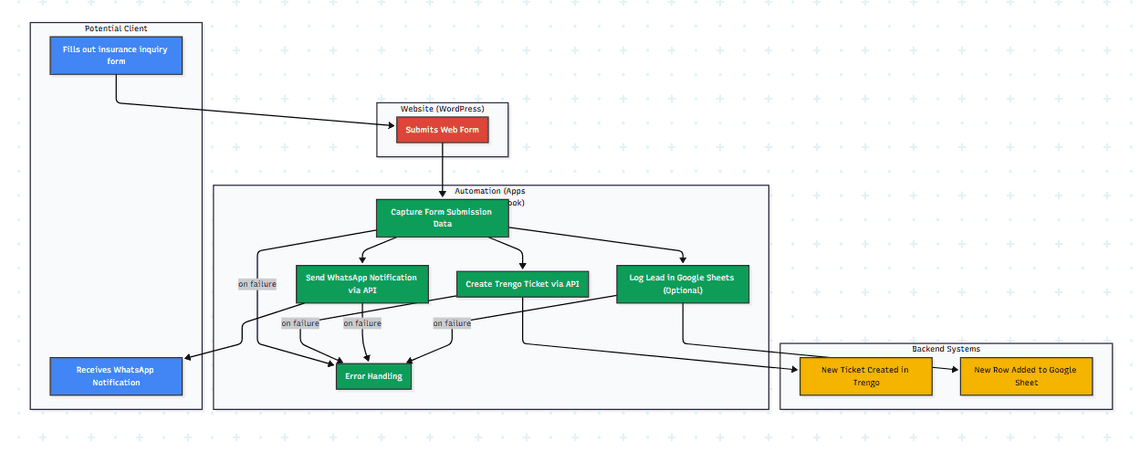
AI-Generated Diagram: Cross-Functional Flowchart for Planner Bee Lead Capture & Notification System
This project automated lead capture and client communication for Planner Bee, a Singapore-based insurance provider. It integrates a WordPress web form with Trengo (customer engagement platform) and WhatsApp, creating tickets in Trengo and sending instant notifications via WhatsApp for each new lead.
Planner Bee needed to streamline their lead management process. They were using a WordPress web form for lead capture but wanted to automate the creation of tickets in their Trengo CRM and send immediate notifications to potential clients via WhatsApp for faster follow-up and improved customer engagement.
Web Form Submission: A potential client fills out the insurance inquiry form on Planner Bee’s WordPress website.
Data Capture (Google Apps Script/Webhooks): A Google Apps Script (or a webhook setup on your server) captures the form submission data. Clarify the method you used.
Trengo Ticket Creation (Trengo API): The script uses the Trengo API to create a new ticket, populating it with the data from the web form.
WhatsApp Notification (WhatsApp API): Simultaneously, the script sends a personalized WhatsApp message to the potential client, acknowledging their inquiry and providing next steps or contact information. Specify which WhatsApp API you used (e.g., Twilio, WhatsApp Business API).
Google Sheets Logging (Optional): The script can also log the lead information in a Google Sheet for backup, reporting, or further processing. Mention if this was included.
Error Handling: The system includes error handling to manage potential issues with API connections or data transfer.
youtube: https://youtu.be/9RKM9EV8Sho
Google Apps Script (or other backend language if used for webhooks): Core automation logic and integration with APIs.
Trengo API: Creating and managing tickets in Trengo.
WhatsApp Business API (or other WhatsApp integration service): Sending WhatsApp messages.
WordPress Integration: Capturing data from web forms. (Clarify how you captured this data - plugin, webhooks, etc.)
API Integration and Management.
Workflow Automation and Process Improvement.
Quantifiable results:
Increased lead response time by >80%.
Improved lead conversion rates by 20%.
Client reported significant improvements in lead management efficiency.
WordPress-Trengo-WhatsApp Integration for Lead Management
Streamlined Lead Capture and Client Communication
Real-time Lead Notifications via WhatsApp and Trengo
Automated Workflow for Insurance Lead Management
Quick Links
Legal Stuff