

Automate Safety Audits Using Vision AI for Site Hazard Detection


Even the most diligent safety inspectors can’t be everywhere at once, leaving dangerous blind spots between periodic spot-checks. Discover the hidden risks of manual safety audits and why traditional compliance methods may be leaving your job site vulnerable to unseen hazards.

The Hidden Risks in Manual Safety Audits
Traditional safety audits have long been the backbone of site compliance, relying on safety officers walking the floor with clipboards, checklists, or digital tablets. However, as job sites grow in complexity and scale, this manual approach is increasingly showing its fractures. A human inspector, no matter how highly trained or diligent, can only be in one place at a time. This inherent limitation creates massive temporal and spatial blind spots across a facility. The hidden risks in manual safety audits do not stem from a lack of effort, but rather from the sheer impossibility of continuous, omnipresent monitoring. When site safety relies entirely on periodic spot-checks, dynamic hazards that emerge between inspection windows go completely unnoticed until an incident occurs.
Common Compliance Oversights on Job Sites
Job sites—whether sprawling construction zones, bustling distribution centers, or complex manufacturing plants—are highly dynamic environments. In these ever-shifting landscapes, transient compliance oversights are alarmingly common and notoriously difficult for human auditors to catch.
Some of the most frequent oversights include:
-
Personal Protective Equipment (PPE) Lapses: A worker might temporarily remove their safety goggles because they fog up, or take off a hard hat in a perceived “safe” zone that suddenly becomes active.
-
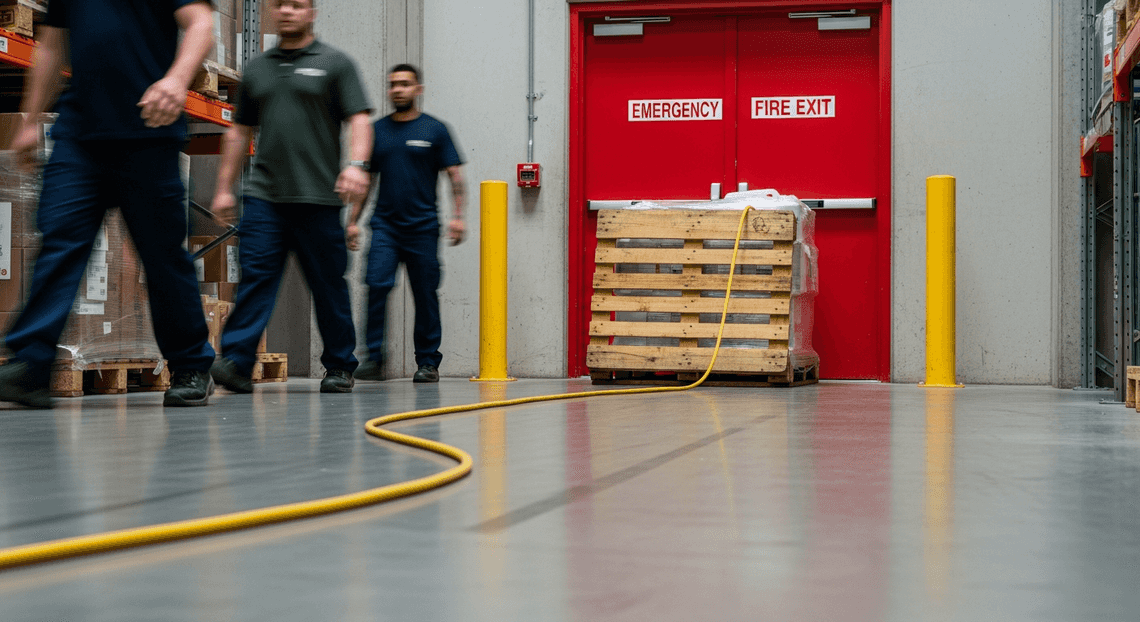
Housekeeping and Egress Violations: Pallets temporarily dropped in front of fire exits, or heavy-duty extension cords creating trip hazards in high-traffic corridors. These are often viewed by workers as “just for a minute” conveniences but pose severe risks.
-
Exclusion Zone Breaches: Personnel inadvertently stepping into the swing radius of heavy machinery, or entering restricted, high-voltage areas without a spotter noticing.
-
Improper Equipment Usage: Misuse of scaffolding, failure to tie off fall-protection harnesses, or operating forklifts at unsafe speeds.
Manual audits routinely miss these fleeting violations.
The True Cost of Missed Hazards and Human Error
The repercussions of these manual oversight gaps extend far beyond a simple warning or a failed checklist. The true cost of missed hazards and human error is multi-dimensional, severely impacting the bottom line, operational continuity, and human lives.
From a financial and regulatory perspective, the penalties are steep. Regulatory bodies like OSHA levy hefty fines for compliance failures, particularly if they are deemed willful or repeated. But fines are just the tip of the iceberg. Missed hazards lead to accidents, which in turn trigger soaring insurance premiums, expensive workers’ compensation claims, and potential litigation that can bleed a project’s budget dry.
Operationally, an incident caused by a missed hazard invariably leads to site shutdowns, exhaustive root-cause investigations, and severe project delays. In industries where margins are razor-thin and time is money, a halted production line or a delayed construction schedule can cost tens of thousands of dollars per hour.
Most importantly, there is the human toll. The most devastating cost of a missed hazard is, unequivocally, human injury or fatality. A momentary lapse in manual monitoring can result in life-altering consequences for workers and their families, while simultaneously destroying a company’s safety culture and public reputation.
Relying on a reactive, manual audit framework means an organization is perpetually one step behind the hazard. To truly mitigate these compounding costs, the safety paradigm must shift from periodic human observation to continuous, automated vigilance.
Introducing Vision AI for Forensic Hazard Detection
Traditional safety audits have long relied on manual walkthroughs, clipboards, and human observation. While foundational to workplace safety, this analog approach is inherently vulnerable to human error—fatigue, blind spots, and subjective assessments can easily allow critical hazards to slip through the cracks. Enter Vision AI. By leveraging advanced machine learning models to analyze visual data, organizations can fundamentally shift safety management from a reactive, periodic chore to a proactive, continuous forensic science.
Forensic hazard detection involves the deep, pixel-level analysis of site imagery to identify unsafe conditions, compliance violations, and potential risks before they culminate in an incident. Whether the goal is detecting a missing hard hat, identifying an unlabeled chemical spill, or recognizing unauthorized personnel in a restricted zone, Vision AI acts as an untiring, highly precise set of eyes. It doesn’t just capture a static image of a construction site or a manufacturing floor; it interprets a complex matrix of objects, spatial relationships, and safety protocols, instantly flagging anomalies that a human inspector might miss.
How Building Self Correcting Agentic Workflows with Vertex AI Transforms Site Photos into Actionable Data, Ensuring Secure and Meticulous Safety Checks
At the heart of this automated safety revolution is Google Cloud’s Vertex AI. For cloud engineers and safety officers alike, Vertex AI provides a unified, enterprise-ready platform to build, deploy, and scale computer vision models without the friction traditionally associated with machine learning infrastructure.
The transformation from raw site photos to actionable safety data follows a highly orchestrated cloud architecture. First, images captured from CCTV cameras, drones, or mobile devices are securely ingested into Google Cloud Storage. From there, Vertex AI takes over. Utilizing either highly optimized pre-trained Vision APIs or custom-trained AutoML models tailored to your specific site environment, the platform performs rapid object detection and image classification.
For instance, a custom Vertex AI model can be trained on thousands of historical images of your specific scaffolding setups to detect improper bracing, or it can be configured to recognize whether workers are wearing the correct high-visibility vests and safety harnesses. When an image is processed, the model outputs bounding boxes, classification labels, and confidence scores.
This output is where raw pixels become actionable data. Using event-driven architecture, a high-confidence hazard detection can trigger a Google Cloud Function to execute immediate workflows. This integrates seamlessly with Automatically create new folders in Google Drive, generate templates in new folders, fill out text automatically in new files, and save info in Google Sheets—instantly dispatching an urgent Google Chat notification to the on-duty site manager, or automatically logging a timestamped incident report into Google Sheets and Google Docs for compliance tracking and audit trails.
Crucially, this entire pipeline is underpinned by Google Cloud’s zero-trust security model. Site photos often contain sensitive proprietary layouts or personally identifiable information (PII). Vertex AI ensures that all visual data is encrypted at rest and in transit, adhering to strict enterprise compliance standards. Furthermore, the meticulous nature of these AI-driven checks guarantees that safety audits are consistent, unbiased, and capable of operating 24/7. By bridging the gap between advanced machine learning and daily operational workflows, Vertex AI empowers organizations to maintain uncompromising standards of workplace safety.
The Automated Safety Audit Workflow
Building a robust, automated safety audit system requires seamless orchestration between data storage, machine learning, and reporting tools. By bridging the collaborative power of AC2F Streamline Your Google Drive Workflow with the advanced machine learning capabilities of Google Cloud, we can create an end-to-end pipeline that operates entirely in the background. This workflow transforms a manual, time-consuming inspection process into a real-time, event-driven architecture.
Centralizing Site Photos with Google Drive
Every automated workflow begins with reliable data ingestion. In a dynamic construction or manufacturing environment, the barrier to data entry must be as low as possible. Google Drive serves as the perfect ubiquitous ingestion point for this architecture.
Site managers, safety officers, or even automated site cameras can simply upload raw images to a designated, shared Google Drive folder. Because Drive is inherently mobile-friendly and supports granular access controls, it easily integrates into the daily routines of on-site personnel without requiring them to learn a new application.
From a cloud engineering perspective, this folder acts as our event trigger. Using AI Powered Cover Letter Automation Engine or an Eventarc trigger connected to the Automated Client Onboarding with Google Forms and Google Drive. Events API, we can configure the system to listen for google.workspace.drive.file.v1.created events. The moment a new site photo is uploaded, the event payload—containing the file ID and metadata—is instantly dispatched to the next stage of our pipeline, ensuring zero latency between observation and analysis.
Analyzing Images for PPE Compliance with Vertex AI
Once the image is ingested, the orchestration layer securely retrieves the file and passes it to Google Cloud’s Vertex AI for inference. This is where the heavy lifting of the safety audit occurs.
Depending on your specific site requirements, this step utilizes either a pre-trained Vision API model or a custom-trained AutoML object detection model hosted on Vertex AI. The model is specifically calibrated to identify Personal Protective Equipment (PPE) such as hard hats, high-visibility vests, safety goggles, and steel-toed boots.
When the image is processed, Vertex AI scans the visual data and returns a highly structured JSON response. This payload contains critical data points, including:
-
Detected Objects: The specific classes of PPE identified (or missing) on the individuals in the frame.
-
Bounding Boxes: The exact pixel coordinates of where these objects are located, which is vital for auditing and visual verification.
-
Confidence Scores: A percentage indicating the model’s certainty regarding its detections, allowing you to set thresholds (e.g., only flag anomalies if confidence is > 85%).
By offloading this visual inspection to Vertex AI, the system can evaluate complex, crowded site photos in milliseconds, objectively identifying safety hazards that a human auditor might overlook due to fatigue or distraction.
Logging Results Automatically in Google Sheets
Data generated by machine learning is only as valuable as the actionable insights it provides to your team. To make the Vertex AI output accessible to safety officers and site managers, the final step of the workflow parses the JSON payload and logs the results directly into Google Sheets.
Using the Google Sheets API, the pipeline automatically appends a new row for every processed image. A well-architected audit log typically includes columns for the Timestamp, Image File Name, a direct URL to the photo in Google Drive, the Overall Compliance Status (Pass/Fail), Specific Hazards Detected (e.g., “Missing Hard Hat”), and the AI Confidence Score.
Leveraging Google Sheets as the database for this workflow offers immediate operational benefits. You can apply conditional formatting to instantly highlight non-compliant rows in red, triggering immediate on-site interventions. Furthermore, because the data is structured and centralized in Sheets, it can be effortlessly connected to Looker Studio to generate real-time safety dashboards, allowing stakeholders to track compliance trends across multiple sites over time.
Building Your Smart Safety Architecture
To transform a manual site inspection process into an automated, intelligent pipeline, we need to bridge the gap between everyday operational tools and advanced machine learning. As Cloud Engineers, we can achieve this by designing a serverless, event-driven architecture that leverages Automated Discount Code Management System as our operational frontend and Google Cloud Platform (GCP) as our analytical backend.
The beauty of this architecture lies in its simplicity for the end-user. Field workers simply snap photos of the construction site or warehouse floor and upload them to a shared folder. Behind the scenes, Genesis Engine AI Powered Content to Video Production Pipeline orchestrates the workflow, passing the data to Vertex AI for hazard analysis, and finally logging the actionable insights into a centralized dashboard.
Connecting DriveApp and SheetsApp for Seamless Data Flow
The foundation of our automation relies on Architecting Multi Tenant AI Workflows in Google Apps Script, the serverless execution environment that natively binds Automated Email Journey with Google Sheets and Google Analytics applications together. To create a seamless data flow, we utilize the DriveApp and SpreadsheetApp (often referred to as SheetsApp in advanced service contexts) classes to handle our input and output streams.
The workflow begins when a new image is uploaded to a designated Google Drive folder. Using DriveApp, we can programmatically monitor this folder, extract the image files, and prepare them for processing. Once the AI analysis is complete, we use SheetsApp to append the results—such as the timestamp, image URL, detected hazards, and confidence scores—directly into a Google Sheet. This Sheet acts as a live, easily digestible safety audit log for site managers.
Here is a foundational example of how we establish this pipeline using Apps Script:
function processSafetyImages() {

// Define the target Drive folder and the output Sheet

const folderId = 'YOUR_DRIVE_FOLDER_ID';

const folder = DriveApp.getFolderById(folderId);

const sheet = SpreadsheetApp.getActiveSpreadsheet().getSheetByName('Audit Dashboard');

// Iterate through unprocessed images

const files = folder.searchFiles('mimeType contains "image/"');

while (files.hasNext()) {

let file = files.next();

let fileId = file.getId();

let fileName = file.getName();

// Step 1: Send to Vertex AI (Logic covered in the next section)

let aiResults = analyzeImageWithVertexAI(fileId);

// Step 2: Log the results to SheetsApp for seamless data flow

sheet.appendRow([

new Date(),

fileName,

file.getUrl(),

aiResults.hazardDetected,

aiResults.confidenceScore

]);

// Optional: Move file to an "Archived/Processed" folder to prevent reprocessing

}

}
By attaching a Time-driven trigger to this script, the system can automatically poll the Drive folder every few minutes, ensuring that the safety dashboard is updated in near real-time without any human intervention.
Integrating the Vertex AI Vision API for High Accuracy
While Workspace handles the data flow, Google Cloud’s Vertex AI serves as the “brain” of our safety architecture. Whether you are using pre-trained vision models or a custom-trained AutoML model specifically designed to detect site-specific anomalies (like missing PPE, unbarricaded edges, or chemical spills), the Vertex AI Vision API delivers high-accuracy object detection and image classification.
To integrate Vertex AI with our Apps Script pipeline, we must securely invoke the Vertex AI REST API. This involves retrieving the image payload from DriveApp, converting it into a Base64-encoded string, and securely passing it to the Vertex AI endpoint using UrlFetchApp.
Authentication is seamlessly handled by leveraging Apps Script’s native OAuth2 capabilities (ScriptApp.getOAuthToken()), provided your GCP project and Workspace script are properly linked with the necessary IAM permissions (e.g., Vertex AI User).
Here is how you engineer the integration:
function analyzeImageWithVertexAI(fileId) {

// Retrieve the image and encode it for the API payload

const file = DriveApp.getFileById(fileId);

const imageBlob = file.getBlob();

const base64Image = Utilities.base64Encode(imageBlob.getBytes());

// Define your GCP Project and Vertex AI Endpoint details

const projectId = 'YOUR_GCP_PROJECT_ID';

const location = 'us-central1';

const endpointId = 'YOUR_VERTEX_ENDPOINT_ID';

const apiUrl = `https://${location}-aiplatform.googleapis.com/v1/projects/${projectId}/locations/${location}/endpoints/${endpointId}:predict`;

// Construct the payload expected by Vertex AI

const payload = {

"instances": [{

"content": base64Image

}],

"parameters": {

"confidenceThreshold": 0.75,

"maxPredictions": 5

}

};

// Configure the HTTP POST request with OAuth2 authorization

const options = {

"method": "post",

"contentType": "application/json",

"headers": {

"Authorization": "Bearer " + ScriptApp.getOAuthToken()

},

"payload": JSON.stringify(payload),

"muteHttpExceptions": true

};

// Execute the call and parse the high-accuracy predictions

const response = UrlFetchApp.fetch(apiUrl, options);

const jsonResponse = JSON.parse(response.getContentText());

// Parse the JSON response to extract hazard labels and scores

// (Implementation depends on your specific model's output schema)

if (jsonResponse.predictions && jsonResponse.predictions.length > 0) {

let topPrediction = jsonResponse.predictions[0];

return {

hazardDetected: topPrediction.displayNames[0],

confidenceScore: topPrediction.confidences[0]

};

} else {

return { hazardDetected: "Site Clear", confidenceScore: "N/A" };

}

}
By decoupling the storage/logging layer from the machine learning layer, this architecture remains highly scalable. As your safety requirements evolve, you can seamlessly retrain and deploy new models to your Vertex AI endpoint without having to rewrite the underlying Automated Google Slides Generation with Text Replacement integration.
Scaling Your Safety Compliance Strategy
Implementing Vision AI for a single camera stream or a localized proof-of-concept is an excellent first step, but the true ROI of automated safety audits is realized at scale. When you expand hazard detection across multiple construction sites, manufacturing floors, or warehouse facilities, your underlying architecture must handle massive ingests of video data without bottlenecking or incurring runaway costs.
Leveraging Google Cloud’s robust infrastructure allows you to scale your compliance strategy seamlessly. By utilizing Vertex AI for scalable model deployment, Cloud Storage for staging video frames, and Pub/Sub for asynchronous event messaging, you can build a highly decoupled and resilient architecture. Furthermore, centralizing your safety telemetry in BigQuery allows safety officers and site managers to build unified, enterprise-wide Looker dashboards. This ensures that safety standards are uniformly enforced and monitored, regardless of geographic location or facility size.
Moving from Reactive to Proactive Hazard Mitigation
Traditional safety audits rely heavily on periodic manual walkthroughs and post-incident video reviews. This inherently reactive approach means safety teams are often responding to a hazard only after a near-miss or an actual injury has occurred. Vision AI fundamentally flips this paradigm, transforming your safety operations from a system of record into a system of action.
By integrating Google Cloud’s streaming analytics tools, such as Dataflow, with your Vision AI pipelines, you can analyze video feeds in near real-time. When a custom model detects a compliance breach—such as a missing hardhat, an obstructed fire exit, or a forklift operating dangerously close to pedestrian zones—it triggers an immediate event.
Coupling this cloud infrastructure with Automated Order Processing Wordpress to Gmail to Google Sheets to Jobber APIs transforms a raw data point into an instant, actionable alert. For instance, a Pub/Sub trigger can invoke a Google Apps Script that instantly dispatches an automated Google Chat message or a high-priority Gmail notification directly to the on-site safety supervisor’s mobile device. Over time, aggregating these real-time alerts allows you to apply predictive machine learning models to your historical data, identifying high-risk zones, recurring violations, or specific times of day when fatigue sets in. Ultimately, you transition from merely logging incidents to actively preventing them.
Audit Your Business Needs with a Google Developer Expert
While the technological capabilities of Google Cloud and Vision AI are vast, there is no one-size-fits-all approach to safety compliance. A fast-paced logistics hub has vastly different hazard parameters and compliance requirements than a chemical processing plant or a high-rise construction site. To ensure your architecture is both cost-effective and precisely tuned to your operational realities, it is highly recommended to audit your business needs alongside a Google Developer Expert (GDE) in Cloud.
A GDE brings deep, vetted expertise in cloud engineering, machine learning, and enterprise architecture. Engaging with an expert can help you:
-
Assess Current Infrastructure: Evaluate your existing camera hardware, network bandwidth, and edge-computing capabilities to determine the most efficient video ingestion strategy.
-
Architect Custom Solutions: Design a tailored architecture that respects data privacy and strict compliance mandates (such as OSHA reporting standards or GDPR constraints regarding facial blurring).
-
Optimize Cloud Spend: Provide guidance on fine-tuning custom Vertex AI Vision models, managing data lifecycle policies in Cloud Storage, and optimizing cloud egress costs for continuous video streaming.
-
Streamline Workflows: Seamlessly integrate safety alerts into your existing Automated Payment Transaction Ledger with Google Sheets and PayPal environment to ensure high user adoption among your safety personnel.
By collaborating with a cloud expert, you ensure that your investment in Vision AI translates into a resilient, future-proof safety ecosystem that protects both your workforce and your bottom line.


Stop Doing Manual Work. Scale with AI.
Want to turn these blog concepts into production-ready reality for your team?
Table Of Contents
Portfolios
Related Posts
Quick Links
Legal Stuff