

Multilingual Text-to-Speech Tool with Google Workspace


This project automates text-to-speech conversion in multiple languages using Google Sheets for text input, Google Cloud Text-to-Speech for audio generation, and Gmail for delivery via Google Apps Script. It offers a user-friendly and efficient way to convert text into natural-sounding speech in over 10 languages.
The Problem/Need/Why:
Converting text to speech can be useful for various applications, such as creating audio versions of documents, generating voiceovers for presentations, or making content more accessible to visually impaired users. This project automates this process, supporting multiple languages and simplifying the workflow for users.
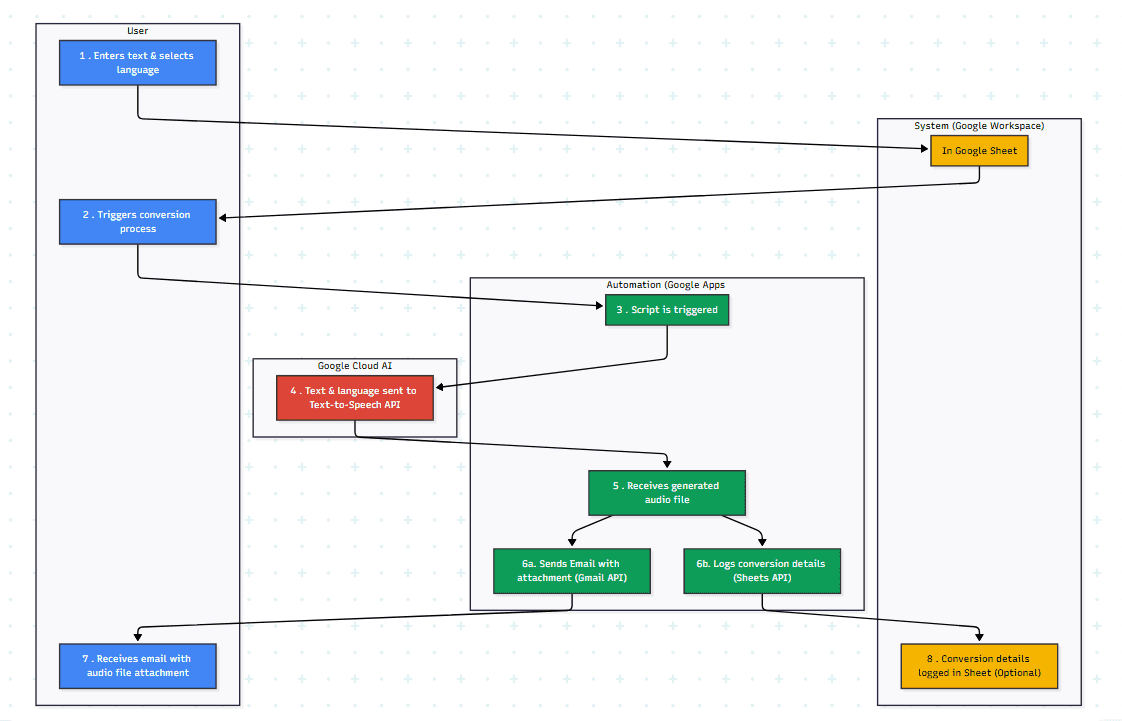
AI-Generated Diagram: Cross-Functional Flowchart for Multilingual Text-to-Speech Tool
Workflow/User Journey:
-
Text Input (Google Sheets): The user enters the text they want converted to speech in a Google Sheet. They also select the desired language from a list of supported languages (mention the specific languages or language families supported). Could you specify how the user provides input - by cell, column, form, etc.?
-
Conversion Triggered (Google Apps Script): The user triggers the conversion process (e.g., by clicking a button, running a custom menu function, or using a form submission).
-
Text-to-Speech Conversion (Google Cloud Text-to-Speech API): The Google Apps Script sends the text and selected language to the Google Cloud Text-to-Speech API.
-
**Audio File Generation: **The API generates an audio file of the text in the chosen language. What audio file format is generated (e.g., MP3, WAV)?
-
Email Delivery (Gmail API): The script attaches the generated audio file to an email and sends it to the user.
-
Google Sheet Logging (Optional): The script logs the conversion details (e.g., timestamp, input text, selected language, audio file link) in a Google Sheet for record-keeping and analysis. Specify what details are logged, if any.
The Client/Target Audience:
- it’s a personal project but it could be used as a reusable tool/solutions.
Technology Used:
-
Google Apps Script: Core automation, API integrations, and data handling.
-
Google Cloud Text-to-Speech API: Generating natural-sounding speech in multiple languages.
-
Gmail API: Sending emails with the generated audio files.
-
Google Sheets API: Retrieving input text and (optionally) logging data.
-
Google Cloud Project Setup and Management: Managing API credentials and billing.
-
OAuth 2.0 Authentication: Securely accessing Google Cloud APIs.
-
Multilingual Support: Handling text-to-speech conversion in multiple languages (specify the languages or language families).
-
Workflow Automation: Streamlining the text-to-speech process.
Key Metrics/Achievements:
-
Number of supported languages: 10+.
-
Average conversion time:
<6 minutes


Stop Doing Manual Work. Scale with AI.
Want to turn these blog concepts into production-ready reality for your team?
Table Of Contents
Portfolios
Related Posts
Quick Links
Legal Stuff