

Scaling Apps Script with Agentic Architecture and Gemini


While its low barrier to entry makes Google Apps Script incredibly popular, it can become a victim of its own success. Discover the hidden scaling limits that can bring your growing project to a grinding halt.

The Challenge: The Scaling Limits of Traditional Apps Script
[AI Powered Cover Letter [Automated Job Creation in Real Time Jobber and Google Sheets Integration from Gmail](https://votuduc.com/Automated-Job-Creation-in-Jobber-from-Gmail-p115606) Engine](https://votuduc.com/AI-Powered-Cover-Letter-Automated Quote Generation and Delivery System for Jobber-Engine-p111092) is a victim of its own success. Its low barrier to entry and seamless integration with the [Automatically create new folders in Google Drive, generate templates in new folders, fill out text automatically in new files, and save info in [Automated Web Scraping with [Multilingual Text-to-Speech Tool with SocialSheet Streamline Your Social Media Posting 123](https://votuduc.com/Multilingual-Text-to-Speech-Tool-with-Google-Workspace-p809282)](https://votuduc.com/Automated-Web-Scraping-with-Google-Sheets-p292968)](https://workspace.google.com/marketplace/app/auto_create_folder_and_files/430076014869) ecosystem make it the perfect tool for automating that one tedious report or building a quick workflow. It starts innocently. A simple onEdit() trigger here, a custom menu function there. But for any project that gains traction, this initial simplicity often becomes a technical debt time bomb. What begins as a helpful collection of scripts inevitably grows, and as it does, we start to run headfirst into the platform’s inherent architectural limitations.
From Simple Macros to Complex Monoliths
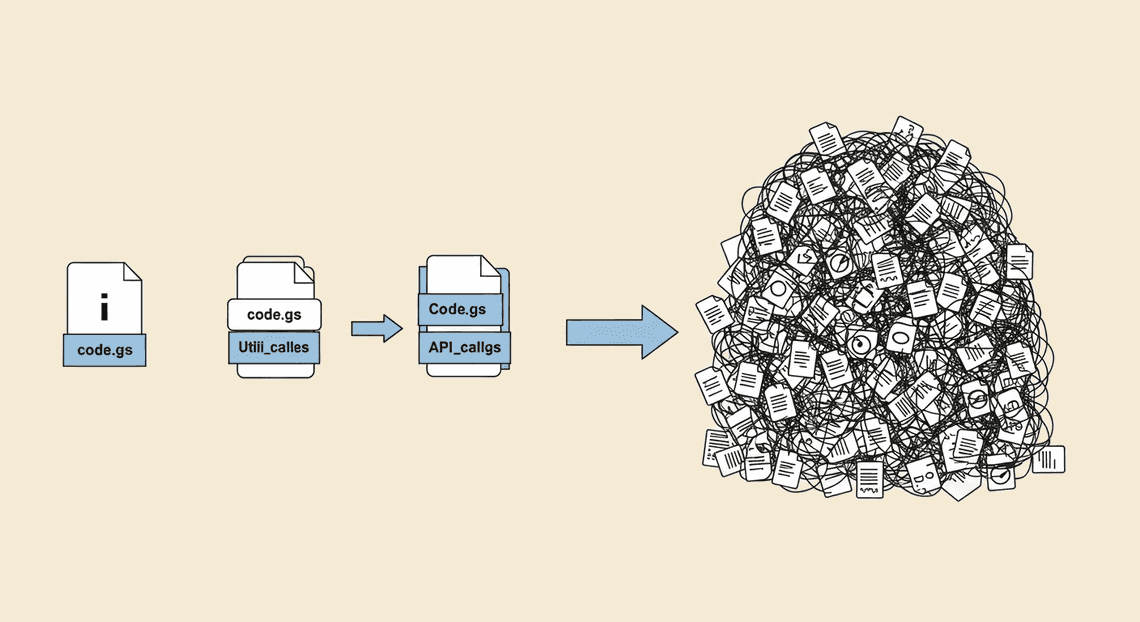
Every seasoned Apps Script developer knows this story. Your project starts as a single, elegant Code.gs file. It solves a real problem, and users love it. So they ask for more. You add a function to email a summary. Then another to generate a Google Doc from a template. You add a web app interface. To keep things “organized,” you create Utilities.gs and API_Calls.gs.
Before you know it, your once-simple script has ballooned into a sprawling monolith.
The Maintainability Trap of Interconnected Functions
The monolith problem isn’t just about the number of lines of code; it’s about the connections between them. In a typical large-scale Apps Script project, functions develop a complex and often invisible web of dependencies. functionA() calls a utility in another file, which in turn modifies a global variable that functionB() relies on. This is the “spaghetti code” nightmare.
This creates a maintainability trap:
-
High Cognitive Load: To fix a bug or add a feature, a developer has to load the entire system’s logic into their head. There are no clear boundaries or isolated modules.
-
Fear of Refactoring: Changing one function can have unforeseen cascading effects across the entire application. The risk of breaking something is so high that developers avoid making improvements, leading to code rot.
-
Difficult Onboarding: How do you explain this tangled web to a new team member? Without clear separation of concerns, the learning curve for a complex project is brutally steep.
-
Brittle Testing: Unit testing becomes a Sisyphean task. Because functions aren’t isolated, you end up having to mock half the project just to test a single piece of logic, if you can test it at all.
The path of least resistance is always to just add another function to the pile, deepening the trap and making the next change even harder.
Why AI Integration Demands a New Architectural Approach
Now, let’s introduce a modern AI model like Gemini into this environment. This isn’t just another API call; it’s a fundamental shift in how applications operate. Trying to bolt a sophisticated AI workflow onto a traditional Apps Script monolith is like trying to strap a jet engine onto a horse-drawn cart. It’s not just inefficient; it’s destined to fail.
Here’s why AI breaks the old model:
-
State and Context are King: AI-powered workflows are rarely simple, one-shot requests. They are conversations. An agent needs to remember previous interactions, maintain context, and execute multi-step plans. The stateless, ephemeral nature of a standard Apps Script execution is fundamentally at odds with this requirement. Where do you store the conversation history or the agent’s current plan between executions?
-
**Orchestration over Procedural Code: A traditional script follows a linear, predictable path:
if this, then that. An AI agent orchestrates a series of tools and actions. It mightunderstand user intent->decide to query a Sheet->analyze the data->decide to draft an email->wait for approval. This requires a control loop and a modular design where “tools” (likequerySheetorsendEmail) are discrete, reliable components that the agent can call upon. A monolithic tangle of functions simply cannot support this level of dynamic orchestration. -
Handling Non-Determinism: AI models are non-deterministic. You can’t guarantee the exact output every time. Your architecture must be resilient, capable of handling unexpected responses, parsing structured data from natural language, and retrying failed steps. This demands robust error handling, validation layers, and a level of abstraction that is nearly impossible to achieve when your business logic is tightly coupled in a single, massive script.
The traditional Apps Script architecture, built for simple, synchronous tasks, lacks the modularity, state management, and orchestration capabilities required for building robust, intelligent agents. To truly leverage the power of models like Gemini, we can’t just add more code; we need to fundamentally rethink our approach.
Introducing the Agentic Model: A Paradigm Shift for Automated Work Order Processing for UPS
For years, Genesis Engine AI Powered Content to Video Production Pipeline has been the go-to for procedural, task-based automation within the AC2F Streamline Your Google Drive Workflow ecosystem. We write scripts that follow a predefined, linear path: fetch data from a Sheet, process it, create a Doc, and send an email. This is a powerful model, but it’s inherently rigid. If a step changes or an unexpected condition arises, the script often breaks or requires a developer to manually rewrite the logic.
The agentic model, supercharged by Large Language Models (LLMs) like Gemini, flips this paradigm on its head. Instead of writing a script that dictates how to do something, you create a system that understands what you want to achieve and dynamically figures out the “how” on its own. It’s the difference between giving someone a fixed set of driving directions and giving them a destination address and a car with GPS. The agent can adapt to roadblocks, choose better routes, and handle complex, multi-step journeys without being explicitly programmed for every single turn.
What is an ‘Agentic’ Architecture in Apps Script?
In the context of Apps Script, an agentic architecture is a design pattern where a central AI model acts as a reasoning engine or “agent.” This agent is given a high-level goal and a toolbox of available functions. It then intelligently selects, sequences, and executes these functions to accomplish the goal.
This architecture consists of three core components:
-
The Goal: A user’s request, typically expressed in natural language. For example, “Find the latest quarterly sales report in Drive, summarize its key findings, and email the summary to the sales team.”
-
The Tools: A collection of well-defined, single-purpose Apps Script functions that can interact with Automated Client Onboarding with Google Forms and Google Drive. services (e.g.,
findFileInDrive(),getTextFromDoc(),summarizeWithGemini(),sendEmail()). These are the individual capabilities your agent can wield. -
The Orchestrator (The Agent): This is the Gemini model itself. It interprets the user’s goal, examines the available tools, and creates a plan of action. It decides which tool to call, with what arguments, and in what order. It can even process the output of one tool to use as the input for the next.
This model transforms your Apps Script project from a static set of instructions into a dynamic, problem-solving system. It moves the core logic from hardcoded if/else statements into the reasoning capabilities of the LLM.
Defining Your Functions as Modular ‘Tools’
The foundation of a robust agentic system is a well-designed set of tools. Your monolithic, do-everything functions of the past must be refactored into smaller, more granular, and independent units. Think of them less as a script and more as a library of commands for your AI agent.
A good “tool” function in an agentic architecture has several key characteristics:
-
Single Responsibility: It does one thing and does it well. For example, instead of a single
processNewLead()function that reads a form, updates a CRM Sheet, and sends a welcome email, you would create three separate tools:getNewLeadFromForm(),updateCrmRecord(), andsendWelcomeEmail(). -
Clear Inputs and Outputs: The function must have clearly defined parameters and a predictable return value. The agent needs to know exactly what information to provide (the arguments) and what to expect back (the return).
-
Statelessness: Whenever possible, tools should be stateless. They receive input, perform an action, and return output without relying on a persistent state from a previous run. This makes them reliable and reusable in any sequence the agent devises.
-
Descriptive Naming and Documentation: This is absolutely critical. The Gemini model doesn’t see your code; it sees the function’s name, its parameter names, and the description you provide for them. A function named
g_1()with a parameterp1is useless. A function namedgetCalendarEventsByDateRangewith parametersstartDateandendDateand a clear description is something the model can understand and use effectively.
By building your codebase this way, you’re not just writing code; you’re creating a versatile API for your AI agent to interact with the entire Automated Discount Code Management System.
The Role of Gemini Function Calling as the Central Orchestrator
This is where the magic happens. Gemini Function Calling is the mechanism that bridges the gap between the agent’s reasoning and the actual execution of your Apps Script code. It’s the central nervous system of your agentic architecture.
Here’s how the orchestration process works:
-
Declaration: In your code, you make a call to the Gemini API. Along with the user’s prompt, you provide a list of your available “tool” functions, described in a specific JSON schema. This schema includes the function name, a description of what it does, and details about its parameters.
-
Inference: Gemini analyzes the user’s prompt in the context of the tools you’ve declared. It determines that to fulfill the request, it needs to execute one or more of your functions.
-
Function Call Generation: Instead of returning a natural language answer, the Gemini API responds with a structured JSON object. This object contains a
functionCallwith the name of the function it wants to run and a dictionary of the arguments it has inferred from the user’s prompt. For example:{ "functionCall": { "name": "sendEmail", "args": { "recipient": "[email protected]", "subject": "Quarterly Sales Summary" } } }. -
**Execution: Your Apps Script code receives this JSON object. It’s your code’s responsibility to parse this response, identify the requested function name (
sendEmail), and execute your actualsendEmail()Apps Script function using the provided arguments. Gemini doesn’t run your code; it tells your code what to run. -
Response and Iteration: After your function executes, you send its return value (e.g., “Email sent successfully”) back to the Gemini API in a subsequent call. The model can then use this result to decide its next step—perhaps calling another tool or, if the task is complete, generating a final, user-facing confirmation message.
This loop of inference, execution, and response allows Gemini to chain together multiple tools, handle complex dependencies, and intelligently navigate a task from start to finish, all orchestrated through your well-defined Apps Script functions.
Architectural Blueprint: Migrating to an Agentic Framework
Transitioning a traditional, monolithic Apps Script project into a flexible, AI-driven agentic system is a process of strategic deconstruction and intelligent reconstruction. This isn’t just about rewriting code; it’s a paradigm shift from imperative commands to declarative, goal-oriented orchestration. The following blueprint outlines a four-step migration path, transforming your tightly-coupled script into a collection of modular, reusable “tools” that a Gemini-powered agent can understand and invoke.
Step 1: Deconstructing Your Monolith into Logical Domains
The first and most critical step is to analyze your existing Code.gs monolith. Most mature Apps Script projects become a tangled web of functions handling disparate tasks—reading sheets, managing calendars, sending emails, generating documents. The goal here is to untangle this web by identifying and grouping functions into logical, business-oriented domains.
Think of this as establishing “bounded contexts.” Instead of one script that does everything, you conceptualize distinct services.
For example, a monolithic script that automates project onboarding might contain functions for:
-
Reading new hire data from a Google Sheet.
-
Creating a project folder in Google Drive.
-
Scheduling a series of onboarding meetings in Google Calendar.
-
Sending a welcome email via Gmail.
In an agentic model, you would deconstruct this into four clear domains:
-
Sheet Service: All functions related to reading from or writing to Google Sheets.
-
Drive Service: Functions for file and folder management.
-
Calendar Service: Functions for event creation, modification, and lookup.
-
Notification Service: Functions for sending emails or chat messages.
This conceptual separation is paramount. It forces you to define clear boundaries and responsibilities for each piece of your application’s functionality. This domain-driven approach not only cleans up your codebase but also creates the perfect foundation for building the independent “tools” your Gemini agent will use.
Step 2: Structuring Tools with ES6 Modules for Reusability
With your logical domains defined, the next step is to implement them as physically separate, reusable components using modern JavaScript (ES6) modules. Apps Script’s support for ES6 modules is a game-changer, allowing us to escape the pitfalls of a shared global scope and build a truly modular architecture.
You will refactor the functions from each logical domain into their own .js file, exporting them as distinct tools. Each function should be self-contained, with a clear purpose and well-defined parameters. Crucially, you should use JSDoc comments to meticulously document what each function does, its parameters, and what it returns. This documentation isn’t just for human developers; it will serve as the primary source for generating the schema that Gemini uses to understand your tool’s capabilities.
Your project structure might evolve from a single Code.gs to something like this:
/appsscript.json

/Code.gs            // Main agent orchestrator

/tools/

- SheetsTool.js

- CalendarTool.js

- GmailTool.js

/utils/

- SchemaGenerator.js
Here’s an example of a well-defined tool in CalendarTool.js:
// tools/CalendarTool.js

/**

* Creates a new event on the user's primary Google Calendar.

* @param {string} title The title or summary of the event.

* @param {string} startTime The start time for the event in ISO 8601 format (e.g., "2024-09-27T10:00:00-07:00").

* @param {string} endTime The end time for the event in ISO 8601 format.

* @param {string[]} attendees An array of guest email addresses to invite.

* @param {string} location Optional. The physical location or video conference link for the event.

* @returns {{id: string, link: string}} An object containing the ID and HTML link for the newly created event.

*/

export function createCalendarEvent(title, startTime, endTime, attendees, location) {

try {

const calendar = CalendarApp.getDefaultCalendar();

const event = calendar.createEvent(title, new Date(startTime), new Date(endTime), {

guests: attendees.join(','),

location: location || ''

});

console.log(`Event created with ID: ${event.getId()}`);

return {

id: event.getId(),

link: event.getHtmlLink()

};

} catch (e) {

console.error(`Failed to create calendar event: ${e.toString()}`);

// It's crucial to return structured error information for the agent

return { error: `Failed to create event. Details: ${e.message}` };

}

}
By structuring your code this way, createCalendarEvent is no longer just a function; it’s a reusable, well-documented, and independently testable tool.
Step 3: Implementing the Gemini API Layer to Invoke Tools
This is where the agent comes to life. Your main Code.gs file transforms from a collection of business logic into a lean orchestrator. Its primary job is to mediate between the user’s natural language prompt and your library of tools, using Gemini as the reasoning engine.
The process follows a distinct loop:
-
Tool Declaration: First, you must describe your tools to Gemini in a format it understands: JSON Schema. You can write a utility function that parses the JSDoc comments from your tool modules to generate this schema automatically. This declaration tells Gemini the function name, its purpose, its parameters, and their types.
-
User Prompt: The orchestrator receives a prompt (e.g., “Schedule a 30-minute kickoff meeting with [email protected] for tomorrow at 2 PM”).
-
First API Call: The orchestrator sends the prompt, along with the JSON schemas of all available tools, to the Gemini API.
-
Function Call Response: Gemini analyzes the prompt and determines that the
createCalendarEventtool is required. Instead of a text response, it replies with afunctionCallobject, specifying the tool name and the arguments it has extracted from the prompt.
{

"functionCall": {

"name": "createCalendarEvent",

"args": {

"title": "Kickoff Meeting",

"startTime": "2024-09-26T14:00:00-07:00",

"endTime": "2024-09-26T14:30:00-07:00",

"attendees": ["[email protected]"]

}

}

}
-
Tool Execution: Your orchestrator code parses this response. It dynamically finds the
createCalendarEventfunction in its map of available tools and executes it with the provided arguments. -
**Second API Call: The orchestrator takes the return value from the tool execution (e.g.,
{id: 'xyz...', link: '...'}) and sends it back to the Gemini API in a follow-up request, indicating the result of the function call. -
Final Response: Gemini now has the full context. It processes the tool’s output and generates a final, human-readable response (e.g., “OK, I’ve scheduled the ‘Kickoff Meeting’ with [email protected] for tomorrow at 2 PM. You can view the event here: [link]”).
Your Code.gs effectively becomes a state machine, managing the conversation with Gemini and executing real-world actions via your toolset.
Step 4: Managing State and Context Across Multiple Function Calls
Simple requests may be resolved with a single tool call. However, the true power of an agentic architecture lies in its ability to handle complex, multi-step tasks. Consider the prompt: “Find an open 45-minute slot next week for me and the project-leads, then book a ‘Project Sync’ meeting.” This requires at least two steps: first, a tool to check calendars and find availability, and second, a tool to create the event.
To orchestrate this, the agent must maintain state and context across multiple turns of conversation with the Gemini API. Apps Script’s PropertiesService is an excellent, built-in solution for this.
Here’s the strategy:
-
Assign a Conversation ID: For each new, distinct task or conversation, generate a unique ID. This ID will be the key for storing the conversation’s history.
-
Store the Conversation History: After each full turn (User Prompt -> Gemini Tool Request -> Tool Execution -> Tool Result), append the entire exchange to a conversation log. Serialize this log (e.g., as a JSON array) and save it to
PropertiesServiceusing the conversation ID. -
Provide Context on Subsequent Calls: When the user provides a follow-up prompt or when the agent needs to perform another step, retrieve the full conversation history from
PropertiesService. Send this entire history, not just the latest prompt, to the Gemini API.
By providing the complete history, you give the model the context it needs to reason about multi-step processes. It can see the output of the findAvailableSlots tool and use that information to correctly populate the arguments for the createCalendarEvent tool in the next step. This turns PropertiesService into a simple yet powerful short-term memory for your agent, enabling it to execute sophisticated workflows that would be incredibly complex and brittle to code imperatively.
Practical Implementation: Building a Google Drive Management Agent
Theory is one thing, but the real power of an agentic architecture comes to life when you build something tangible. In this section, we’ll construct a practical agent designed to handle a common, yet complex, Automated Email Journey with Google Sheets and Google Analytics task: triaging and reporting on files in a shared Google Drive folder. This example will demonstrate how to separate concerns into modular “tools” and orchestrate them with a central Gemini-powered agent.
Scenario: Automating Complex File Triage and Reporting
Imagine a shared Google Drive folder named “Incoming Invoices” where various departments upload PDF invoices. The folder quickly becomes a chaotic mix of files. A manual process would involve a person periodically checking the folder, identifying new invoices, moving them to an “Archived Invoices” folder (perhaps organized by year and month), and updating a Google Sheet log with the details of each processed file.
This task is more than a simple loop. It requires:
-
Searching: Finding files based on criteria like date range and type.
-
Decision Making: Determining the correct destination folder (e.g., creating a “2024-07” subfolder if it doesn’t exist).
-
Action: Performing file system operations (moving files, creating folders).
-
Reporting: Logging the outcome of each action into a structured format (a Google Sheet).
This is a perfect use case for an agent. We can provide it with a high-level natural language command like, “Process all invoices from last month, archive them, and update the master log.” The agent will then use its available tools to figure out and execute the necessary steps.
Code Breakdown: Creating the FileTool and SheetTool Modules
A core principle of agentic design is creating a well-defined set of tools. These are self-contained, reliable functions that the agent can call upon. We’ll create two separate script files (.gs) to keep our code modular and maintainable.
1. FileTool.gs - For Google Drive Operations
This module will contain all the functions related to interacting with Google Drive. Each function is designed to perform one specific, atomic action.
/**

* @file FileTool.gs

* @description A collection of tools for Google Drive file and folder manipulation.

*/

/**

* Finds files within a specific Google Drive folder created within a given date range.

* @param {string} folderId The ID of the Google Drive folder to search in.

* @param {string} startDateISO The start date in ISO 8601 format (e.g., "2024-07-01T00:00:00Z").

* @param {string} endDateISO The end date in ISO 8601 format (e.g., "2024-07-31T23:59:59Z").

* @returns {Array<Object>} An array of objects, each containing the file's id, name, and mimeType.

*/

function findFilesByDateRange(folderId, startDateISO, endDateISO) {

try {

const folder = DriveApp.getFolderById(folderId);

const query = `createdDate >= '${startDateISO}' and createdDate <= '${endDateISO}' and trashed = false`;

const filesIterator = folder.searchFiles(query);

const files = [];

while (filesIterator.hasNext()) {

const file = filesIterator.next();

files.push({

id: file.getId(),

name: file.getName(),

mimeType: file.getMimeType(),

});

}

return files;

} catch (e) {

return { error: `Failed to find files: ${e.message}` };

}

}

/**

* Moves a file to a specified target folder in Google Drive.

* @param {string} fileId The ID of the file to move.

* @param {string} targetFolderId The ID of the destination folder.

* @returns {Object} An object indicating the success or failure of the operation.

*/

function moveFile(fileId, targetFolderId) {

try {

const file = DriveApp.getFileById(fileId);

const targetFolder = DriveApp.getFolderById(targetFolderId);

file.moveTo(targetFolder);

return { status: 'success', fileId: fileId, newFolderId: targetFolderId };

} catch (e) {

return { status: 'error', message: `Failed to move file ${fileId}: ${e.message}` };

}

}

/**

* Gets a folder by name within a parent folder, creating it if it doesn't exist.

* @param {string} parentFolderId The ID of the parent folder.

* @param {string} folderName The name of the folder to find or create.

* @returns {Object} An object containing the folderId.

*/

function getOrCreateFolder(parentFolderId, folderName) {

try {

const parentFolder = DriveApp.getFolderById(parentFolderId);

const folders = parentFolder.getFoldersByName(folderName);

if (folders.hasNext()) {

// Folder exists, return its ID

return { folderId: folders.next().getId() };

} else {

// Folder doesn't exist, create it

const newFolder = parentFolder.createFolder(folderName);

return { folderId: newFolder.getId() };

}

} catch (e) {

return { error: `Failed to get or create folder: ${e.message}` };

}

}
2. SheetTool.gs - For Google Sheets Operations
This module handles the reporting aspect of our task. It has one job: append data to a log sheet.
/**

* @file SheetTool.gs

* @description A tool for appending data to a Google Sheet.

*/

/**

* Appends a row of data to a specified Google Sheet.

* @param {string} spreadsheetId The ID of the Google Spreadsheet.

* @param {string} sheetName The name of the sheet (tab) to append the row to.

* @param {Array<string|number|Date>} rowData An array of values representing the row to append.

* @returns {Object} An object indicating the success or failure of the operation.

*/

function appendReportRow(spreadsheetId, sheetName, rowData) {

try {

const sheet = SpreadsheetApp.openById(spreadsheetId).getSheetByName(sheetName);

if (!sheet) {

throw new Error(`Sheet with name "${sheetName}" not found.`);

}

sheet.appendRow(rowData);

return { status: 'success', message: `Row appended to ${sheetName}.` };

} catch (e) {

return { status: 'error', message: `Failed to append row: ${e.message}` };

}

}
Code Breakdown: The Main Agent Script with Gemini Function Declarations
With our tools defined, we now create the central agent script. This script has two primary responsibilities:
-
Declare the tools to the Gemini model in a format it understands (
FunctionDeclaration). -
Orchestrate the conversation, handling
functionCallrequests from the model, executing the corresponding tool, and sending the results back.
Here is the Code.gs file that brings it all together.
// Assumes the Gemini for [Automated Google Slides Generation with Text Replacement](https://votuduc.com/Automated-Google-Slides-Generation-with-Text-Replacement-p850694) SDK is enabled.

// For details, see: https://developers.google.com/apps-script/guides/gemini-api

// --- TOOL DECLARATIONS FOR GEMINI ---

// Describe the functions from our modules so the LLM knows what they do.

const FILE_TOOLS = [

Gemini.createFunctionDeclaration({

name: "findFilesByDateRange",

description: "Finds files in a Google Drive folder created within a specific date range. Use this to get a list of files to process.",

parameters: {

type: "OBJECT",

properties: {

folderId: { type: "STRING", description: "The ID of the Google Drive folder to search." },

startDateISO: { type: "STRING", description: "The start date for the search in ISO 8601 format (YYYY-MM-DDTHH:mm:ssZ)." },

endDateISO: { type: "STRING", description: "The end date for the search in ISO 8601 format (YYYY-MM-DDTHH:mm:ssZ)." },

},

required: ["folderId", "startDateISO", "endDateISO"],

},

}),

Gemini.createFunctionDeclaration({

name: "getOrCreateFolder",

description: "Finds a subfolder by name within a parent folder. If the subfolder does not exist, it creates it. Returns the folder's ID.",

parameters: {

type: "OBJECT",

properties: {

parentFolderId: { type: "STRING", description: "The ID of the parent Google Drive folder." },

folderName: { type: "STRING", description: "The name of the subfolder to find or create (e.g., '2024-07')." },

},

required: ["parentFolderId", "folderName"],

},

}),

Gemini.createFunctionDeclaration({

name: "moveFile",

description: "Moves a specific file to a new folder in Google Drive.",

parameters: {

type: "OBJECT",

properties: {

fileId: { type: "STRING", description: "The ID of the file to be moved." },

targetFolderId: { type: "STRING", description: "The ID of the destination folder." },

},

required: ["fileId", "targetFolderId"],

},

}),

];

const SHEET_TOOLS = [

Gemini.createFunctionDeclaration({

name: "appendReportRow",

description: "Appends a single row of data to a specified Google Sheet. Use this to log actions.",

parameters: {

type: "OBJECT",

properties: {

spreadsheetId: { type: "STRING", description: "The ID of the Google Spreadsheet for logging." },

sheetName: { type: "STRING", description: "The name of the specific sheet (tab) to append the row to." },

rowData: {

type: "ARRAY",

description: "An array of values for the row. For example: [Timestamp, FileName, Status, Details].",

items: { type: "STRING" },

},

},

required: ["spreadsheetId", "sheetName", "rowData"],

},

}),

];

const ALL_TOOLS = [...FILE_TOOLS, ...SHEET_TOOLS];

// --- AGENT ORCHESTRATION ---

const model = Gemini.getGenerativeModel({

model: "gemini-1.0-pro",

tools: ALL_TOOLS,

});

/**

* Main entry point for the agent.

* @param {string} prompt The natural language instruction for the agent.

* @returns {string} The final text response from the agent after completing the task.

*/

function runDriveAgent(prompt) {

let chat = model.startChat();

console.log(`User Prompt: ${prompt}`);

let response = chat.sendMessage(prompt);

// The core conversational loop

while (response.getFunctionCalls() && response.getFunctionCalls().length > 0) {

const functionCalls = response.getFunctionCalls();

console.log(`Model wants to call: ${functionCalls.map(fc => fc.getName())}`);

const functionResponses = [];

for (const functionCall of functionCalls) {

const functionName = functionCall.getName();

const args = functionCall.getArgs();

let result;

try {

// Dynamically call the correct tool function based on the model's request

if (typeof this[functionName] === "function") {

result = this[functionName](...Object.values(args));

} else {

throw new Error(`Function ${functionName} is not defined.`);

}

console.log(`Executed ${functionName}, Result: ${JSON.stringify(result)}`);

functionResponses.push(Gemini.createFunctionResponse(functionName, result));

} catch (e) {

console.error(`Error executing ${functionName}: ${e.message}`);

// Inform the model that the function call failed

functionResponses.push(Gemini.createFunctionResponse(functionName, { error: e.message }));

}

}

// Send the results of the function calls back to the model

response = chat.sendMessage(Gemini.createPart(functionResponses));

}

const finalText = response.getText();

console.log(`Agent's Final Response: ${finalText}`);

return finalText;

}

// Example usage:

function testAgent() {

const prompt = "Find all files in folder 'INCOMING_FOLDER_ID' from July 1 to July 31 2024. For each file, move it to a folder named '2024-07' inside the 'ARCHIVE_FOLDER_ID'. Then, log each move to spreadsheet 'SPREADSHEET_ID' in the 'Triage Log' sheet, including the timestamp, file name, and new location.";

runDriveAgent(prompt);

}
Visualizing the Execution Flow: From Natural Language to Action
Understanding the back-and-forth conversation between your Apps Script code and the Gemini model is key. Let’s trace the execution for a simplified prompt: “Process the file ‘invoice-abc.pdf’ (ID: ‘FILE_ID’) and log it to the sheet ‘SHEET_ID’.”
-
User Prompt: The
runDriveAgentfunction is called with the prompt. It sends this initial message to the Gemini model, along with the list of all available tools (ALL_TOOLS). -
Model Plans (Step 1): Gemini analyzes the prompt. It sees the instruction “process the file” and recognizes that moving it is a logical first step. It consults its tools and finds
moveFileis the best fit. -
Model Responds with
functionCall: The model doesn’t execute anything. It sends a response back to Apps Script that contains afunctionCallobject.
Model -> Apps Script:
{

  "functionCall": {

    "name": "moveFile",

    "args": {

      "fileId": "FILE_ID",

      "targetFolderId": "ARCHIVE_FOLDER_ID" // It infers this from context or a previous step

    }

  }

}
-
**Apps Script Executes: The
whileloop inrunDriveAgentcatches thisfunctionCall. It identifies the function name (moveFile) and its arguments. It then calls the actualFileTool.moveFile('FILE_ID', 'ARCHIVE_FOLDER_ID')function. -
Apps Script Responds with
functionResponse: ThemoveFilefunction completes and returns{ status: 'success', ... }. The agent script wraps this result in afunctionResponseobject and sends it back to the model.
Apps Script -> Model:
{

  "functionResponse": {

    "name": "moveFile",

    "response": {

      "status": "success",

      "fileId": "FILE_ID",

      "newFolderId": "ARCHIVE_FOLDER_ID"

    }

  }

}
-
Model Plans (Step 2): The model receives the confirmation that the file was moved successfully. It looks at the original prompt again and sees the second part: “…and log it to the sheet”. It knows the next logical action is to use the
appendReportRowtool. -
Model Responds with
functionCall: It sends a newfunctionCallrequest.
Model -> Apps Script:
{

  "functionCall": {

    "name": "appendReportRow",

    "args": {

      "spreadsheetId": "SHEET_ID",

      "sheetName": "Triage Log",

      "rowData": ["2024-07-26T10:00:00Z", "invoice-abc.pdf", "Moved to Archive"]

    }

  }

}
-
Apps Script Executes & Responds: The loop runs again. It executes
SheetTool.appendReportRow(...)and sends the successful result back to the model as anotherfunctionResponse. -
Model Concludes: The model receives the confirmation that the logging was successful. It reviews the original prompt and determines all tasks are complete.
-
Final Text Response: Instead of another
functionCall, the model now generates a final, human-readable text response.
Model -> Apps Script:
{

  "text": "Processing complete. The file 'invoice-abc.pdf' has been successfully moved and the action has been logged in the 'Triage Log' sheet."

}
The while loop in our script sees that there are no more functionCalls and exits, returning this final text to the user. This conversational, tool-using loop is the essence of the agentic architecture.
The Strategic Advantage of an Agentic Approach
Moving from traditional, monolithic Apps Script projects to an agentic architecture isn’t just a refactoring exercise; it’s a fundamental paradigm shift. The old way—a single, sprawling .gs file with dozens of interconnected functions—is brittle and hits a hard ceiling on complexity. An agentic model, especially when supercharged with a powerful LLM like Gemini, dismantles that ceiling. It transforms your automations from rigid, procedural scripts into dynamic, intelligent systems that can reason, adapt, and scale in ways previously unimaginable within the Automated Order Processing Wordpress to Gmail to Google Sheets to Jobber ecosystem.
Unlocking True Scalability and Simplified Code Management
As any seasoned Apps Script developer knows, complexity is the enemy of scale. A script that starts as a simple on-edit trigger can quickly balloon into an unmanageable monolith of tangled dependencies. Adding a new feature becomes a high-risk operation, and debugging feels like untangling a knotted fishing line in the dark.
An agentic architecture directly confronts this problem by enforcing modularity and separation of concerns. Instead of one giant script, you build a team of specialists:
-
A
SheetAgentthat exclusively knows how to read, write, and format Google Sheets. -
A
CalendarAgentthat is an expert in creating and managing events. -
A
DriveAgentthat handles file creation, permissions, and organization.
These agents are self-contained and decoupled. The CalendarAgent doesn’t need to know how the SheetAgent gets its data; it only needs to receive a well-structured object with event details. This structure provides two immediate benefits:
-
Scalability of Complexity: Need to integrate with the Google Tasks API? You simply build a new
TaskAgentwith its own set of tools (functions) and introduce it to the system. You aren’t weaving new logic into an already complex web; you’re adding a new, independent specialist to the team. This is true scalability—not just handling more data, but gracefully handling more features and integrations. -
Simplified Maintenance: When calendar events are being created incorrectly, you know exactly where to look: the
CalendarAgent. Your cognitive load is drastically reduced because you can debug one domain at a time. This modularity makes your codebase more readable, testable, and far less intimidating for new developers to contribute to.
Enhancing Capabilities with AI-Driven Logic and Reasoning
Traditional scripts operate on rigid, deterministic logic. They are excellent at following a pre-defined set of if-then-else instructions. But they fail when faced with ambiguity, nuance, or tasks that require contextual understanding. A script can find an email with the word “invoice” in the subject, but it can’t comprehend the intent of an email that says, “Circling back on the payment for last month’s consultation.”
This is where integrating Gemini as the “brain” of your agentic system changes the game. Your Apps Script functions become a “toolbelt” that the AI can use to execute tasks. The agent is no longer just following instructions; it’s a reasoning engine.
Consider a request like, “Find the latest quarterly performance deck, summarize the key takeaways for the marketing team, and draft an email with the summary.”
-
A traditional script would require a complex, hard-coded workflow that would break if a file name changed or the email’s desired tone was different.
-
An AI-driven agent can reason through the steps:
-
Interpret Intent: Understands what “quarterly performance deck” means.
-
Select Tools: Chooses to use the
DriveAgent’ssearchFilestool with likely keywords. -
Process Information: Uses a
SlidesAgentorDriveAgentto extract text from the identified presentation. -
Synthesize & Reason: Passes the raw text to its core Gemini intelligence to perform a nuanced summary, specifically focusing on marketing-related points.
-
Execute Final Action: Uses the
GmailAgent’sdraftEmailtool, composing a professional message with the generated summary.
This allows your automations to handle unstructured data, understand natural language prompts, and dynamically chain actions together in a way that mimics human problem-solving.
Future-Proofing Your Automated Payment Transaction Ledger with Google Sheets and PayPal Automations
Technology evolves. APIs get updated, new Google services are launched, and business requirements shift. A monolithic script is inherently fragile in the face of this change; it’s a snapshot in time, optimized for yesterday’s APIs and processes. Reworking it is often as costly as starting over.
The agentic model, by separating the reasoning engine (the LLM) from the execution tools (the Apps Script functions), is built for adaptation.
-
Adaptable Tooling: When Google releases a new API for a service like Google Chat, you don’t need to overhaul your entire system. You simply develop a new
ChatAgentwith a set of tools that wrap the new API endpoints. The central orchestrator can immediately start leveraging this new capability without any changes to the existing agents. -
Upgradable Intelligence: The most powerful aspect of this architecture is the ability to upgrade its “brain.” As Google releases more powerful versions of Gemini, you can often upgrade your agent’s core intelligence by simply pointing to a new model version. The agent’s ability to reason, plan, and understand complex requests improves instantly, without you having to rewrite a single line of your tool functions in Apps Script.
This approach shifts you from writing imperative code (telling the script exactly how to do something) to a more declarative model (telling the agent what you want to achieve). You define the capabilities, and the AI figures out how to use them. As the underlying platforms and AI models evolve, your investment in building a robust toolset of agents remains valuable and ready for the future.
Conclusion: Evolve Your Scripts into Intelligent Agents
We’ve journeyed far beyond the familiar territory of single-file .gs scripts and simple onEdit() triggers. The path we’ve explored isn’t just about writing better code; it’s about fundamentally rethinking what’s possible within the Google Docs to Web ecosystem. By embracing an agentic architecture supercharged by Gemini, we elevate our Apps Script projects from simple automations into robust, intelligent systems.
Recap: From Linear Code to a Modular Agent Ecosystem
Let’s distill the core transformation. We began with the traditional model: a linear, often monolithic script where functions are tightly coupled, logic is intertwined, and scalability is an afterthought. A change in one area, like how we parse an email, could have cascading and unpredictable effects on how a spreadsheet is updated.
We dismantled that model and replaced it with a vibrant ecosystem of autonomous agents. In this new architecture:
-
The Orchestrator Agent acts as the central nervous system, receiving initial triggers and delegating tasks with purpose and context. It doesn’t perform the work itself; it understands the “what” and “why” and routes the request to the appropriate specialist.
-
Specialized Worker Agents (like a
SheetsAgent,CalendarAgent, orDriveAgent) encapsulate all the logic and capabilities related to a single domain. They are the experts, exposing a clean API (createEvent,findRowByKey,generateDocFromTemplate) and hiding the complex implementation details. This makes them reusable, testable, and independently maintainable. -
The Gemini-Powered Reasoning Agent serves as the cognitive core. It’s the agent that can interpret ambiguous natural language requests, formulate multi-step plans, summarize complex data, and generate human-like content. It transforms a rigid, programmatic workflow into a dynamic, adaptive process that can handle unforeseen variables.
The result is a system that is more than the sum of its parts. It’s a decoupled, resilient, and scalable architecture where complexity is managed, not feared. We’ve moved from writing functions that do things to designing agents that have responsibilities.
Take the Next Step in Your Architectural Journey
Adopting an agentic mindset is a paradigm shift. It may seem like overkill for automating a single weekly report, but its power becomes undeniable as your application’s ambition grows. When you need to build a workflow that listens to a Gmail inbox, interprets the user’s intent, finds relevant data in BigQuery, updates three different Google Sheets, generates a personalized Google Doc from a template, and then schedules a follow-up meeting in Calendar, the value of this modularity becomes crystal clear.
Your journey doesn’t have to be an all-or-nothing leap. Start small.
-
Identify a “God Script”: Look at your existing projects. Find that one monolithic script that has become difficult to maintain and understand.
-
Carve Out One Agent: Choose a single, well-defined responsibility within that script—perhaps all the functions related to interacting with a specific spreadsheet.
-
Refactor and Encapsulate: Move that logic into its own “agent” (a new
.gsfile organized as a class or a namespace object). Define a clear interface for your main script to call this new module.
By taking this first step, you’ll immediately feel the benefits of cleaner separation and improved clarity. From there, you can progressively refactor other responsibilities and begin to wire them together through an orchestrator.
The tools and concepts we’ve discussed are your building blocks for creating the next generation of workspace intelligence. Imagine agents that don’t just react to triggers but proactively analyze data to suggest optimizations, that manage entire projects by coordinating between Docs, Sheets, and Tasks, or that provide a natural language conversational layer over your entire company knowledge base stored in Drive.
The line between a simple script and a sophisticated application is blurring. With Apps Script as your execution environment, agentic design as your blueprint, and Gemini as your reasoning engine, you are no longer just a scripter. You are an architect of intelligent systems. Go build them.


Stop Doing Manual Work. Scale with AI.
Want to turn these blog concepts into production-ready reality for your team?
Table Of Contents
Portfolios
Related Posts
Quick Links
Legal Stuff