

Automated Web Scraping with Google Sheets


This project involved developing a Google Apps Script to automatically scrape data from a Yellow Pages website and store it in a structured Google Sheet. The script successfully extracted over 225,000 business records, demonstrating proficiency in web scraping, data processing, and Google Sheets integration.
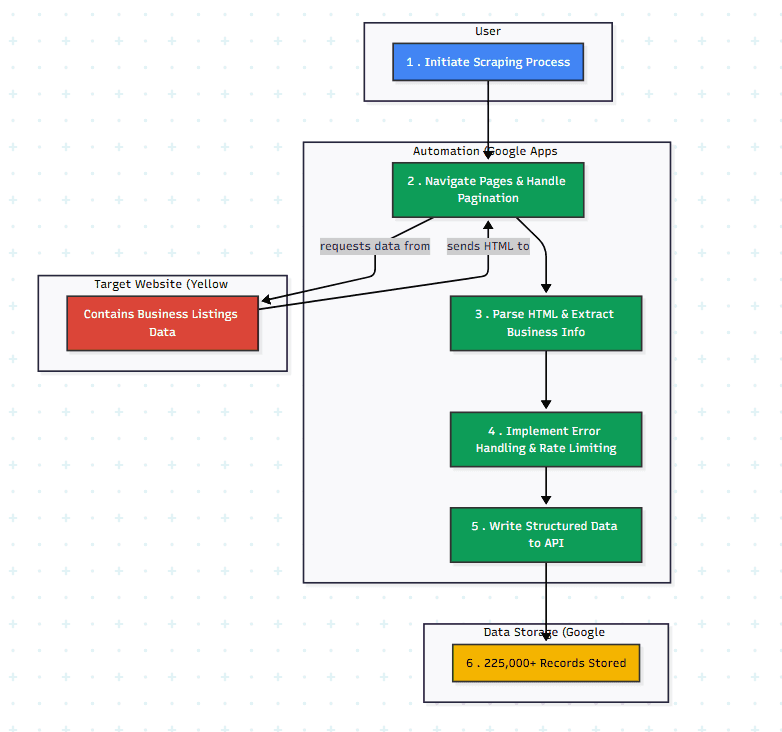
AI-Generated Diagram: Cross-Functional Flowchart for Automated Web Scraping to Google Sheets
The Problem/Need/Why:
The goal was to collect a large dataset of business information from a Yellow Pages website. Manual data entry was infeasible due to the volume of data (225K+ records). Web scraping provided an automated solution to efficiently gather this information, and Google Sheets offered a convenient way to store and organize the structured data.
Workflow/User Journey:
-
Target Website Identification: The Yellow Pages website was identified as the target data source. You might want to briefly describe the website’s structure and the challenges it presented for scraping (e.g., pagination, dynamic content, anti-scraping measures).
-
Web Scraping Script Development (Google Apps Script): A Google Apps Script was developed to automate the web scraping process. Mention specific techniques used (e.g.,
-
**Data Extraction and Parsing: **The script parsed the HTML of each web page, extracting relevant business information (name, tax ID, contact person, products/services, industry, etc.).
-
Data Storage (Google Sheets): The extracted data was structured and stored in a Google Sheet, with each row representing a business record and each column representing a specific data point.
-
**Pagination and Iteration: **The script handled pagination to navigate through multiple pages of the Yellow Pages website and extract data from all relevant listings.
-
**Error Handling and Rate Limiting: **The script included error handling to manage issues like network errors or changes in the website structure. Rate limiting was implemented to avoid overloading the target website and comply with its terms of service. (This is a crucial point to mention for ethical scraping practices.)
The Client/Target Audience:
- It is an personal purpose project. It helps me to generate new leads and to complete the automation workflow from data on internet to automation email marketing as pre-difine journey.
Technology Used:
-
Google Apps Script: Core development of the web scraping script.
-
Web Scraping Techniques (HTML Parsing, DOM Manipulation, Regular Expressions): Extracting data from web pages.
-
Data Processing and Cleaning: Handling and structuring the extracted data.
-
Google Sheets API: Writing data to a Google Sheet.
-
Pagination and Website Navigation: Handling website structure and pagination for large-scale data extraction.
-
Error Handling and Rate Limiting: Implementing robust and ethical scraping practices.
Key Metrics/Achievements:
-
225,000+ business records extracted.
-
Free cost.


Stop Doing Manual Work. Scale with AI.
Want to turn these blog concepts into production-ready reality for your team?
Table Of Contents
Portfolios
Related Posts
Quick Links
Legal Stuff