

Building a PII Redaction Agent for Google Chat with Vertex AI


While Large Language Models promise a leap in productivity, they also create a hidden compliance time bomb as employees inadvertently leak sensitive personal data into chat logs.

The Rising Threat of PII Exposure in Enterprise LLMs
The integration of Large Language Models (LLMs) into enterprise workflows represents a monumental leap in productivity. Teams can now summarize complex reports, draft communications, and query internal knowledge bases with conversational ease. However, this new paradigm introduces a subtle but significant security risk that many organizations are only now beginning to confront: the unintentional leakage of Personally Identifiable Information (PII) into LLM ecosystems. As employees treat these AI-powered tools as trusted digital assistants, they inadvertently feed them a steady stream of sensitive data, creating a compliance time bomb hidden within chat logs and prompt histories.
Why Standard Chat Platforms Are a New Frontier for Data Leaks
Enterprise chat platforms like Google Chat and Slack were built for speed and collaboration, not for rigorous data governance. When you connect an LLM to these platforms, you create a powerful but porous interface to your organization’s data. The fundamental problem lies in the unstructured, conversational nature of the interactions.
Unlike traditional applications with structured forms and validated fields, a chat interface accepts free-form text. An employee, focused on completing a task, won’t think twice before asking a question like:
"Can you generate a follow-up email for the support case filed by Jane Doe regarding account number 987-654-321?"
In this single, innocuous query, the user has injected a full name and a unique account number directly into the conversation. This data is now:
-
Logged: Stored indefinitely in the chat platform’s history.
-
Processed: Sent to the LLM provider’s API endpoint.
-
Recorded: Potentially captured in the LLM’s own prompt and inference logs for monitoring or fine-tuning purposes.
This conversational data flow bypasses many traditional Data Loss Prevention (DLP) tools that are designed to monitor structured data egress points like email or file transfers. Each conversation becomes a potential micro-breach, creating a vast, distributed, and difficult-to-audit surface area for PII exposure.
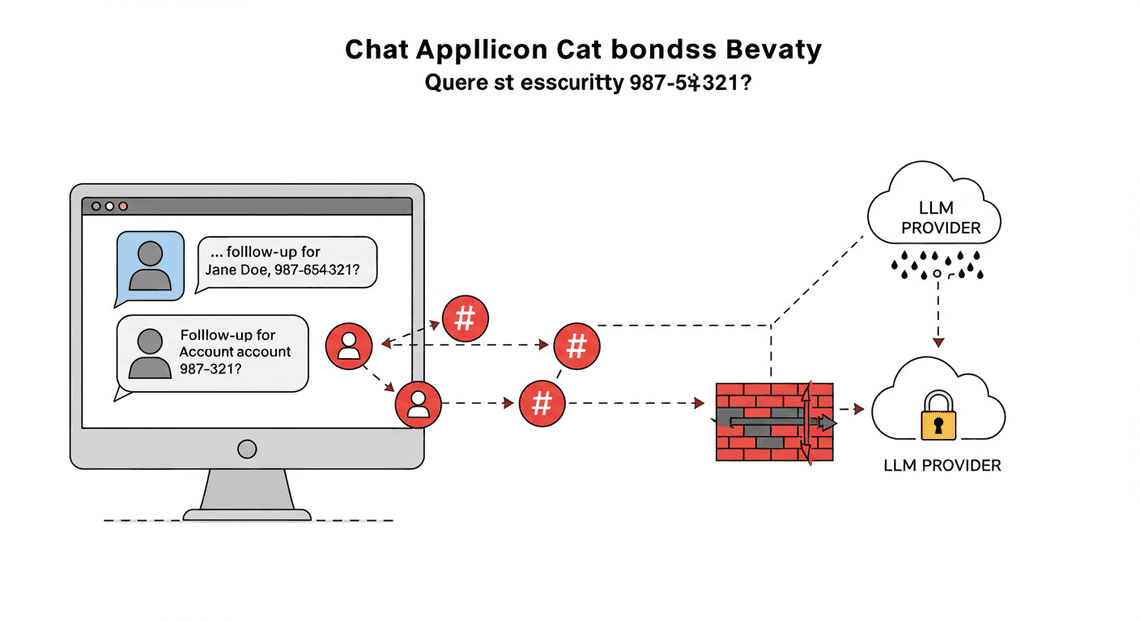
The Compliance Nightmare: SSNs and Account Numbers in Prompt Histories
The persistence of PII in prompt histories is more than a security risk; it’s a direct threat to regulatory compliance. Regulations like GDPR, CCPA, and HIPAA impose strict rules on the handling, storage, and processing of personal data. The discovery of sensitive information—such as Social Security Numbers, credit card details, patient IDs, or financial account numbers—in an LLM’s training data or logging systems can trigger severe consequences.
Consider the compliance implications:
-
Data Sovereignty & Residency: Was the PII sent to an LLM provider’s servers in a different legal jurisdiction, violating data residency laws?
-
Right to Erasure: How can you honor a customer’s “right to be forgotten” request under GDPR if their PII is immutably embedded in a model’s weights or scattered across thousands of log files?
-
Data Minimization: Are you collecting and storing sensitive data that is not strictly necessary for the LLM’s task? A prompt containing a customer’s entire case history just to ask for a summary violates this core principle.
A single instance of leaked PII can lead to crippling fines, mandatory public disclosures, and a devastating loss of customer trust. The challenge is that this data isn’t sitting in a neatly organized database table that can be easily queried and purged. It’s unstructured text, buried deep within systems that were never designed for this level of data sensitivity, creating a nightmare for audit and remediation teams.
Introducing the Proactive Solution: A PII Redaction Agent
Instead of reactively trying to clean up data spills after they occur, the modern approach is to prevent the sensitive data from ever reaching the LLM in the first place. This is the role of a PII Redaction Agent.
A PII Redaction Agent is a specialized service that acts as an intelligent intermediary, or a proxy, between the user’s input in the chat platform and the LLM. Its sole purpose is to inspect text in real-time, identify and remove PII, and then pass a sanitized, anonymous version of the prompt to the LLM.
Here’s how it transforms the interaction:
Before Redaction (User Input):
"Summarize the latest invoice for customer John Smith, email [email protected]."
After Redaction (Sent to LLM):
"Summarize the latest invoice for customer [PERSON_NAME], email [EMAIL_ADDRESS]."
The LLM still receives the full context and intent of the query—it understands the user wants an invoice summary for a specific person and email—but it never sees the actual sensitive values. This “compliance-by-design” architecture offers several key advantages:
-
Minimizes Risk: PII never enters the LLM’s processing pipeline or logs, drastically reducing the risk of a breach or compliance violation.
-
Preserves Functionality: The use of descriptive placeholders (e.g.,
[EMAIL_ADDRESS]) instead of generic redaction ensures the LLM can still reason effectively about the user’s request. -
Simplifies Auditing: It centralizes the point of PII handling, making it vastly easier to audit and prove that your organization is taking proactive steps to protect sensitive data.
By building and deploying a PII Redaction Agent, you shift from a reactive security posture to a proactive one, enabling your organization to leverage the power of enterprise LLMs safely and responsibly.
Solution Architecture: A Secure Gateway for LLM Prompts
Before we dive into the code, it’s crucial to understand the architectural blueprint of our solution. We aren’t just connecting Google Chat directly to an LLM. Instead, we’re building an intermediary service that acts as a security gateway. This gateway intercepts every message, inspects it for sensitive data, sanitizes it, and only then passes a “clean” version to the AI. This proxy pattern is fundamental to building secure, data-aware Architecting AI Agents for the Google Workspace Marketplace.
High-Level System Diagram of the Redaction Flow
At its core, our architecture is a classic serverless webhook pattern. A central Cloud Function orchestrates the entire flow, acting as the intelligent router and processor between the user interface (Google Chat) and the AI model ([Building Self Correcting Agentic Workflows with Building Self-Correcting Agentic Workflows with Vertex AI](https://votuduc.com/building-self-correcting-agentic-workflows-with-vertex-ai-p-20260321542526)).
Imagine the data flow like this:
-
User Interaction: A user sends a message containing a query to the Google Chat bot. This message might contain sensitive information like a customer’s name, email address, or project ID.
-
Webhook Trigger: Google Chat sends the message payload to a pre-configured webhook URL, which points to our central HTTP Cloud Function.
-
Inspection & Redaction: Instead of immediately forwarding the prompt, the Cloud Function first calls the Cloud Data Loss Prevention (DLP) API. It passes the raw message text to DLP for inspection.
-
Sanitization: The DLP API identifies and redacts sensitive data tokens, replacing them with generic placeholders (e.g.,
[EMAIL_ADDRESS]). It returns this sanitized version of the prompt back to the Cloud Function, along with the details of what was redacted. -
Secure LLM Prompting: The Cloud Function now sends only the clean, sanitized prompt to the Vertex AI PaLM API. The LLM never sees the original sensitive customer data.
-
AI Response Generation: Vertex AI processes the anonymized prompt and generates a helpful response, which may include the placeholders it received.
-
De-redaction: The Cloud Function receives the AI’s response. Using the information it received from the DLP API in step 4, it performs a “de-redaction” process, swapping the placeholders back with the original sensitive data.
-
Final Reply: The Cloud Function sends the final, fully-reconstituted, and contextually relevant message back to the Google Chat API, which then displays it to the user.
This entire round trip happens in seconds. The user experiences a seamless conversation, completely unaware of the sophisticated data protection happening in the background. This architecture ensures that we can leverage the power of generative AI without compromising on data privacy or regulatory compliance.
Step-by-Step Implementation Guide
With our architecture defined, it’s time to roll up our sleeves and build the solution. This section provides a detailed, hands-on walkthrough, from setting up your cloud environment to deploying the final, PII-aware Chat agent.
Setting Up Your Google Cloud Environment and Permissions
A secure and correctly configured foundation is non-negotiable. Before writing a single line of code, we need to prepare our Google Cloud project, enable the necessary APIs, and create a dedicated service account with the principle of least privilege in mind.
-
Select or Create a Google Cloud Project: Ensure you have a Google Cloud project with billing enabled. All resources will be created within this project.
-
Enable Required APIs: We need to activate the APIs for all the services our solution will touch. You can do this via the Cloud Console or by using the
gcloudCLI, which is often faster for experienced users.
# Set your project ID first

gcloud config set project <YOUR_PROJECT_ID>

# Enable the necessary APIs

gcloud services enable \

cloudfunctions.googleapis.com \

cloudbuild.googleapis.com \

run.googleapis.com \

iam.googleapis.com \

aiplatform.googleapis.com \

chat.googleapis.com
- Create a Dedicated Service Account: To ensure our Cloud Function operates securely with minimal permissions, we’ll create a specific service account for it.
gcloud iam service-accounts create pii-redaction-agent \

--display-name="PII Redaction Google Chat Agent"
- Grant IAM Permissions: Now, we grant the necessary roles to our new service account. This allows it to be invoked and to call the Vertex AI API.
# Allow the service account to call the Vertex AI API

gcloud projects add-iam-policy-binding <YOUR_PROJECT_ID> \

--member="serviceAccount:pii-redaction-agent@<YOUR_PROJECT_ID>.iam.gserviceaccount.com" \

--role="roles/aiplatform.user"

# Allow the service account to write logs (essential for debugging)

gcloud projects add-iam-policy-binding <YOUR_PROJECT_ID> \

--member="serviceAccount:pii-redaction-agent@<YOUR_PROJECT_ID>.iam.gserviceaccount.com" \

--role="roles/logging.logWriter"
The cloudfunctions.invoker role will be configured later during function deployment to allow public (but authenticated) access from Google Chat’s servers.
Configuring the Google Chat App and Webhook Trigger
Next, we’ll define the Google Chat App itself. This is the user-facing component that people will interact with in their Chat spaces.
-
Navigate to the Google Chat API Console: Go to the Google Cloud Console and search for “Google Chat API”. Select it and go to the “Configuration” tab.
-
Create the App:
-
App Name: Enter a descriptive name, like “Secure AI Assistant”.
-
Avatar URL: Provide a publicly accessible URL for an icon.
-
Description: Briefly explain what the app does.
- Enable Interactive Features:
-
Check the box to “Enable interactive features”.
-
Under “Functionality”, select “Receive 1:1 messages” and “Join spaces and group conversations”.
- Configure the Connection:
- Select “App URL” as the connection type. This is where Google Chat will send event data (like user messages) via an HTTP POST request.
For the* App URL**, we need the trigger URL of our Cloud Function. Since we haven’t deployed it yet, enter a temporary placeholder like https://example.com. Crucially, you must remember to come back and update this field with the actual Cloud Function URL after deployment.
- Under “Visibility”, make the app available to specific users/groups or your entire domain.
- Save and Install: Click “Save”. Once saved, navigate to the “Permissions” section and add yourself (or a test group) to make the app available for installation. You can then go to Google Chat and add the app to a test space.
Developing the PII Redaction Cloud Function with Regex
This is the core of our solution. We’ll write a JSON-to-Video Automated Rendering Engine Cloud Function that intercepts the message, sanitizes it using regular expressions, and prepares it for the LLM.
We’ll use a 2nd Gen HTTP-triggered Cloud Function with Python 3.11 or newer.
1. The main.py File:
Create a file named main.py. This code will parse the incoming Chat event, apply regex for PII, and prepare the sanitized text.
import functions_framework

import json

import re

# Define regex patterns for common PII

# Note: These are examples. Production systems may require more robust patterns

# or integration with services like the Cloud DLP API.

PII_PATTERNS = {

"EMAIL": re.compile(r'[a-zA-Z0-9._%+-]+@[a-zA-Z0-9.-]+\.[a-zA-Z]{2,}'),

"PHONE": re.compile(r'\(?\d{3}\)?[-.\s]?\d{3}[-.\s]?\d{4}'),

"SSN": re.compile(r'\b\d{3}-\d{2}-\d{4}\b'),

"CREDIT_CARD": re.compile(r'\b(?:\d[ -]*?){13,16}\b')

}

def sanitize_text(text: str) -> str:

"""

Scans text for PII patterns and replaces them with placeholders.

"""

sanitized_text = text

for pii_type, pattern in PII_PATTERNS.items():

sanitized_text = pattern.sub(f"[REDACTED_{pii_type}]", sanitized_text)

return sanitized_text

@functions_framework.http

def handle_chat_event(request):

"""

HTTP Cloud Function to process events from Google Chat.

"""

# 1. Parse the incoming event from Google Chat

event_data = request.get_json()

# Ignore events that are not messages or are from the app itself

if event_data['type'] != 'MESSAGE' or event_data['message']['sender']['type'] != 'HUMAN':

return '' # Return an empty 200 OK

# 2. Extract the user's message text

# The actual text is in 'text', but we strip out the app mention

user_text = event_data['message']['argumentText'].strip()

# 3. Sanitize the text for PII

sanitized_prompt = sanitize_text(user_text)

print(f"Original prompt: '{user_text}'")

print(f"Sanitized prompt: '{sanitized_prompt}'")

# --- Placeholder for Vertex AI Integration ---

# In the next step, we will send `sanitized_prompt` to Gemini

# For now, we'll just echo it back to confirm it works.

llm_response_text = f"Sanitized prompt received: {sanitized_prompt}"

# 4. Format and return the response to Google Chat

return json.dumps({'text': llm_response_text})
2. The requirements.txt File:
This file lists the Python dependencies for our function.
functions-framework==3.*

google-cloud-aiplatform>=1.25.0
This initial code sets up the webhook handler, parses the event, and implements the core redaction logic. The sanitize_text function iterates through our defined regex patterns and replaces any matches with a placeholder like [REDACTED_EMAIL]. For now, it simply echoes the sanitized prompt back to the user.
Integrating the Sanitized Prompt with the Vertex AI Gemini API
Now, let’s replace our placeholder response with a real call to the Vertex AI Gemini API. We will send the sanitized prompt to the model, ensuring no sensitive user data ever leaves our secure function environment to be processed by the LLM.
Update your main.py with the following changes:
import functions_framework

import json

import re

import os

# --- PII PATTERNS (from previous step, no changes) ---

PII_PATTERNS = {

"EMAIL": re.compile(r'[a-zA-Z0-9._%+-]+@[a-zA-Z0-9.-]+\.[a-zA-Z]{2,}'),

"PHONE": re.compile(r'\(?\d{3}\)?[-.\s]?\d{3}[-.\s]?\d{4}'),

"SSN": re.compile(r'\b\d{3}-\d{2}-\d{4}\b'),

"CREDIT_CARD": re.compile(r'\b(?:\d[ -]*?){13,16}\b')

}

# --- Import and initialize Vertex AI ---

import vertexai

from vertexai.generative_models import GenerativeModel

# Get project and location from environment variables

PROJECT_ID = os.environ.get('GCP_PROJECT')

LOCATION = os.environ.get('FUNCTION_REGION')

# Initialize Vertex AI client

vertexai.init(project=PROJECT_ID, location=LOCATION)

# Load the Gemini Pro model

gemini_model = GenerativeModel("gemini-1.0-pro")

def sanitize_text(text: str) -> str:

# --- (from previous step, no changes) ---

sanitized_text = text

for pii_type, pattern in PII_PATTERNS.items():

sanitized_text = pattern.sub(f"[REDACTED_{pii_type}]", sanitized_text)

return sanitized_text

def get_llm_response(prompt: str) -> str:

"""

Sends the sanitized prompt to the Vertex AI Gemini API.

"""

try:

response = gemini_model.generate_content(prompt)

return response.text

except Exception as e:

print(f"Error calling Vertex AI API: {e}")

return "I'm sorry, I encountered an error while processing your request."

@functions_framework.http

def handle_chat_event(request):

"""

HTTP Cloud Function to process events from Google Chat.

"""

event_data = request.get_json()

if event_data['type'] != 'MESSAGE' or event_data['message']['sender']['type'] != 'HUMAN':

return ''

user_text = event_data['message']['argumentText'].strip()

sanitized_prompt = sanitize_text(user_text)

print(f"Original prompt: '{user_text}'")

print(f"Sanitized prompt: '{sanitized_prompt}'")

# --- NEW: Call the Vertex AI Gemini API ---

llm_response_text = get_llm_response(sanitized_prompt)

return json.dumps({'text': llm_response_text})
Key changes in this step:
-
We import the
vertexailibrary. -
We initialize the Vertex AI client using the project ID and region, which are automatically available as environment variables in the Cloud Function runtime.
-
We create a
get_llm_responsefunction that encapsulates the API call togemini-1.0-pro. -
Crucially, this function includes a
try...exceptblock to gracefully handle potential API failures and return a user-friendly error message.
Securely Handling and Returning LLM Responses
The final piece of the puzzle is to take the response from Gemini and correctly format it to be displayed in the Google Chat space. Our current code already does this, but it’s worth examining the mechanism.
Google Chat expects a simple JSON object in response to a webhook event. The most basic valid response is one that contains a text key.
{

"text": "This is the response that will be posted in the chat."

}
Our Python function accomplishes this with the final line:
return json.dumps({'text': llm_response_text})
This line takes the text generated by Gemini (or our error message), wraps it in a Python dictionary that matches the required structure, and then serializes it into a JSON string to be sent back as the HTTP response body.
The security of this step lies in its simplicity and the architecture we’ve built:
-
No PII in the Loop: The
llm_response_textwas generated from a prompt that never contained the original PII. The model has no memory of the sensitive data. -
Secure Channel: The response is sent back over HTTPS directly to the Google Chat service that initiated the request.
-
Scoped Context: The response is posted only within the specific Chat space where the original message was sent, respecting the boundaries and privacy of that conversation.
With this final piece in place, your Cloud Function is complete. You are now ready to deploy it and wire it up to your Google Chat App.
Advanced Security and Compliance Considerations
Moving a PII redaction agent from a proof-of-concept to a production-grade enterprise tool requires a significant shift in focus towards robustness, security, and auditable compliance. A simple function that works for a small team will not suffice when faced with enterprise-scale traffic, sophisticated data types, and the stringent requirements of regulatory frameworks. This section explores the critical architectural and operational enhancements needed to build a resilient, secure, and compliant system.
Beyond Regex: Leveraging Google Cloud DLP for Robust Detection
While regular expressions are a great starting point for identifying well-defined patterns like email addresses, they are notoriously brittle and insufficient for comprehensive PII detection in a corporate environment. They struggle with international formats, lack contextual understanding (leading to high false positives), and become a maintenance nightmare as you try to cover more PII types.
For enterprise-grade accuracy and coverage, you must move beyond regex and leverage a dedicated service like Google Cloud Data Loss Prevention (DLP). Cloud DLP is a fully managed service that helps you discover, classify, and protect sensitive data.
Why Cloud DLP is the Superior Choice:
-
Pre-built InfoTypes: DLP comes with over 150 predefined detectors (InfoTypes) that can identify a vast range of sensitive data, from global credit card numbers and national identity numbers (like U.S. Social Security Numbers) to names and health information. This saves you from writing and maintaining hundreds of complex, error-prone regular expressions.
-
Contextual Awareness: Unlike a simple pattern match, DLP’s detectors use contextual clues, checksums, and machine learning models to validate findings. For example, it can differentiate a valid U.S. SSN from a random 9-digit number by looking for nearby keywords like “SSN” or “Social Security”. This dramatically reduces false positives.
-
Custom InfoTypes: You can extend DLP’s capabilities by defining your own custom InfoTypes. These can be based on dictionaries of terms (e.g., internal project codenames), regular expressions tailored to your specific data formats, or even exclusion rules to reduce noise.
-
Easy Integration: Integrating DLP into your Cloud Function is a straightforward API call. You send the text content to the DLP API and receive a structured response containing any PII findings, their locations, and a likelihood score.
Here is a conceptual Python snippet showing how you would call the DLP API from your Cloud Function:
import google.cloud.dlp_v2

def inspect_text_with_dlp(project_id: str, content: str) -> dlp_v2.InspectContentResponse:

"""

Uses the Cloud DLP API to inspect a string for sensitive information.

"""

dlp_client = google.cloud.dlp_v2.DlpServiceClient()

# Specify the project ID

parent = f"projects/{project_id}"

# Define the infoTypes to look for

inspect_config = {

"info_types": [

{"name": "CREDIT_CARD_NUMBER"},

{"name": "US_SOCIAL_SECURITY_NUMBER"},

{"name": "EMAIL_ADDRESS"},

{"name": "PHONE_NUMBER"},

],

"include_quote": True,

"min_likelihood": "LIKELY",

}

# Construct the item to inspect

item = {"value": content}

# Call the DLP API

response = dlp_client.inspect_content(

request={"parent": parent, "inspect_config": inspect_config, "item": item}

)

return response

# In your main function logic:

# findings = inspect_text_with_dlp(GOOGLE_CLOUD_PROJECT, message_text).result.findings

# if findings:

#     # Logic to redact the message based on finding locations
By offloading the detection logic to Cloud DLP, you gain a more accurate, maintainable, and powerful redaction engine that is built to handle the complexity and diversity of modern data.
Implementing Immutable Logging and Auditing for Compliance
When your system is responsible for handling and redacting sensitive data, you must be able to prove what it did and when. For compliance with regulations like GDPR, HIPAA, or SOC 2, a simple print() statement is not enough. You need a verifiable, tamper-proof audit trail.
This is achieved by implementing immutable logging. The goal is to create a log record that, once written, cannot be altered or deleted for a defined period.
Steps to Create an Immutable Audit Trail:
- Emit Structured Logs: From your Cloud Function, write logs as structured JSON payloads to Cloud Logging. This makes them easy to query, filter, and analyze. Each log entry should be a detailed record of an event. Crucially, never log the sensitive PII itself. Instead, log the metadata about the event.
{

"severity": "INFO",

"event_type": "PII_REDACTED",

"message": "PII was detected and redacted from the message.",

"chat_metadata": {

"space_id": "spaces/AAAA1234",

"message_id": "AbCdEf.123456",

"user_id": "users/123456789"

},

"dlp_findings": {

"count": 2,

"info_types": ["EMAIL_ADDRESS", "PHONE_NUMBER"]

},

"timestamp": "2023-10-27T10:00:00Z"

}
-
Create a Log Sink: In Google Cloud Logging, configure a log sink to export logs matching a specific filter (e.g., all logs from your redaction Cloud Function) to a designated destination.
-
Export to a Locked Cloud Storage Bucket: The destination for your sink should be a Google Cloud Storage bucket. To make the logs immutable, you must configure the bucket with a Retention Policy. This feature, also known as “Bucket Lock,” makes objects WORM (Write Once, Read Many). Once a log file is written to the bucket, it cannot be deleted or modified by anyone—including project administrators—until the retention period expires.
-
Enable Audit Logs: Ensure that Cloud Audit Logs are enabled for your project. This will capture all administrative actions, such as who modified the Cloud Function, changed IAM permissions, or attempted to alter the configuration of the locked storage bucket, providing a complete, multi-layered audit trail.
This setup provides a non-repudiable record of your agent’s actions, which is indispensable for security forensics and demonstrating compliance to auditors.
Scalability and Performance Tuning for Enterprise Workloads
As your redaction agent is rolled out to thousands of users, it will need to handle thousands of messages per minute. The initial design must evolve to handle this load efficiently without incurring runaway costs or introducing unacceptable latency.
Cloud Function Optimization:
-
Concurrency: Configure the
max_instancessetting on your Cloud Function. This limits the number of concurrent executions, preventing your function from overwhelming downstream APIs (like Cloud DLP) and helping control costs. -
Cold Starts: For applications sensitive to latency, set
min_instancesto a value greater than zero. This keeps a specified number of function instances warm and ready to handle requests, significantly reducing the “cold start” delay for the first request after a period of inactivity. -
Resource Allocation: Profile your function’s performance to right-size its memory and CPU allocation. Over-provisioning wastes money, while under-provisioning can lead to slow processing and timeouts.
Architectural Enhancements for Scale:
The most significant improvement for scalability is to shift from a synchronous to an asynchronous architecture using Pub/Sub.
-
Decouple with Pub/Sub: Instead of having the Google Chat API call your Cloud Function directly, have it publish the message event to a Pub/Sub topic.
-
Trigger from Pub/Sub: Reconfigure your Cloud Function to be triggered by messages on that Pub/Sub topic.
This asynchronous pattern provides immense benefits:
-
Load Leveling: Pub/Sub acts as a buffer, absorbing sudden spikes in traffic and feeding messages to your function at a manageable rate.
-
Resilience: If your function is down or experiencing errors, messages are retained in the Pub/Sub subscription and will be re-delivered once the function recovers.
-
Independent Scaling: The message ingestion (Chat API) and message processing (Cloud Function) can scale independently.
Finally, remember to monitor your Cloud DLP API quotas. For high-volume workloads, you may need to request a quota increase from Google Cloud to avoid being rate-limited.
Error Handling and Fallback Mechanisms for System Resilience
In a distributed system, failures are inevitable. APIs can become unavailable, networks can have transient issues, and malformed data can cause exceptions. A production-ready system must anticipate these failures and handle them gracefully.
Handling Downstream API Failures (e.g., Cloud DLP):
-
Retries with Exponential Backoff: For transient network errors or temporary API unavailability (e.g., HTTP 503 errors), your code should automatically retry the request. Implement an exponential backoff strategy (e.g., wait 1s, then 2s, then 4s) to avoid overwhelming the service when it’s trying to recover.
-
Define a Fallback Policy: What happens if the DLP API is down for an extended period? You must make a conscious business decision:
-
Fail-Open: Log the error and allow the original, un-scanned message to be posted. This prioritizes communication availability but introduces a temporary security risk.
-
Fail-Closed: Block the message from being posted and notify the user of the failure. This prioritizes security and compliance but can disrupt business communication. The choice depends entirely on your organization’s risk appetite and the sensitivity of the data being handled.
Building a Resilient Asynchronous System:
When using the recommended Pub/Sub architecture, you gain powerful, built-in resilience mechanisms:
-
Automatic Retries: Pub/Sub will automatically retry delivering a message if your function fails to process it successfully (i.e., returns an error or times out).
-
Dead-Letter Queues (DLQ): Configure a DLQ on your Pub/Sub subscription. If a message fails delivery a specified number of times (e.g., 5 retries), Pub/Sub will automatically move it to the DLQ topic. This prevents a single “poison pill” message from blocking the entire processing pipeline. You can then set up alerts on the DLQ for manual inspection and reprocessing of failed messages.
Clear User Communication:
In any failure scenario, especially a fail-closed one, provide clear feedback to the end-user. The agent should post an ephemeral message (visible only to that user) in the Chat space, explaining that the message could not be processed due to a temporary issue and advising them to try again later. This prevents user frustration and reduces unnecessary support tickets.
Conclusion: Scaling Secure AI with Confidence
We’ve successfully architected and deployed a functional, serverless PII redaction agent for Google Chat. This isn’t just a technical exercise; it’s a foundational pattern for integrating AI into your enterprise workflows responsibly. By placing a security and privacy layer directly at the data ingress point, you create a trusted pathway for information, enabling you to leverage the power of large language models without exposing sensitive data. This proactive approach to security is what separates experimental AI projects from scalable, production-ready enterprise solutions. You’re not just building a chatbot; you’re building a secure framework for future AI innovation.
Recap: The Value of an Automated PII Redaction Layer
The solution we’ve built delivers tangible value across several critical business domains:
-
Enhanced Security & Privacy: At its core, the agent acts as a diligent gatekeeper. It ensures that sensitive Personally Identifiable Information (PII) never reaches the core LLM, external APIs, or even long-term log storage. This dramatically reduces the data exposure surface area.
-
Streamlined Compliance: By automatically identifying and redacting data governed by regulations like GDPR, CCPA, and HIPAA, this architecture becomes a powerful tool for demonstrating compliance and avoiding costly penalties. [Automated Job Creation in Real Time Jobber and Google Sheets Integration from Gmail](https://votuduc.com/Automated-Job-Creation-in-Jobber-from-Gmail-p115606) removes the risk of human error inherent in manual review processes.
-
Unlocking AI Use Cases: Many potentially transformative AI applications are blocked due to data privacy concerns. With a reliable redaction layer in place, you can confidently explore use cases that were previously considered too risky, from internal knowledge base assistants to customer support bots.
-
Operational Scalability: The serverless architecture—leveraging Cloud Functions and Vertex AI—is built for the enterprise. It scales seamlessly from a few messages to millions without manual intervention, and you only pay for the resources you consume, making it incredibly cost-efficient.
Next Steps: Expanding the Agent’s Capabilities
This agent is a powerful starting point, but the architecture is designed for extension. Here are several ways you can evolve this solution to meet more advanced requirements:
-
Multi-Modal Redaction: Extend the agent to handle files and images shared in Google Chat. You could route image uploads to the Cloud Vision API to perform OCR and PII detection on text within images, or process documents with Document AI before they are stored or analyzed.
-
Sophisticated Data Masking: Move beyond simple
[REDACTED]placeholders. Implement data masking techniques that preserve the format but obscure the value (e.g.,(***) ***-1234) or pseudonymization to replace entities with consistent, non-identifiable tokens. -
Customizable Redaction Policies: Empower administrators to define organization-specific PII. Store custom regex patterns (e.g., for internal project codes or employee IDs) in a Firestore database that the Cloud Function can dynamically pull from, allowing for flexible and centralized policy management.
-
Audit & Security Integration: Forward redaction events to Google’s Security Command Center or your SIEM platform. This creates a comprehensive audit trail, allowing your security team to monitor for unusual patterns, track policy effectiveness, and respond to potential data leaks in real-time.
-
Cross-Platform Deployment: The core redaction logic within the Cloud Function is platform-agnostic. Adapt it to serve as a security gateway for other communication channels like Slack, Microsoft Teams, or even customer support platforms like Zendesk by simply building new webhook triggers.
Book Your Architecture Discovery Call
Moving from a proof-of-concept to a production-grade, enterprise-wide security solution presents unique challenges—from integrating with existing Identity and Access Management (IAM) policies to ensuring high availability and cost governance at scale.
If you’re ready to explore how this pattern can be tailored to your specific security and compliance needs, we invite you to schedule a complimentary Architecture Discovery Call with our team of cloud and AI experts. We’ll help you map your requirements to a robust, scalable, and secure production architecture.
>> Schedule Your Free Consultation Today


Stop Doing Manual Work. Scale with AI.
Want to turn these blog concepts into production-ready reality for your team?
Table Of Contents
Portfolios
Related Posts
Quick Links
Legal Stuff