

Building a Resilient Off-Grid ERP Sync Coordinator with Google Chat


For industries operating at the digital edge, the gap between a remote job site and the central office is a chasm that traditional data pipelines were never designed to cross.

The Challenge of Off-Grid Data Synchronization
In a world architected around the assumption of persistent, high-speed connectivity, we often forget that vast sectors of our economy operate at the digital edge. Industries like construction, mining, agriculture, and remote logistics build our physical world far from the comfort of fiber optic cables and stable 5G. For these operations, the simple act of synchronizing data between a remote job site and a central Enterprise Resource Planning (ERP) system isn’t a trivial task—it’s a constant, high-stakes battle against the laws of physics and the realities of remote infrastructure. This disconnect creates a chasm between on-the-ground reality and headquarters’ visibility, a chasm that traditional data pipelines were never designed to cross.
Why Remote Job Sites Break Traditional Data Pipelines
Modern data pipelines are marvels of engineering, but they are fundamentally brittle. They are built on a bedrock of assumptions: low latency, high bandwidth, and near-perfect network reliability. Remote job sites shatter every one of these assumptions.
-
Intermittent and Unreliable Connectivity: The network at a remote site isn’t just slow; it’s ephemeral. A satellite link might be clear for an hour and then become unusable due to weather. A cellular connection might work only from one specific hill on the property. Connections can, and do, disappear for hours or even days. Standard API calls with 30-second timeouts, database connections expecting a persistent session, and streaming data protocols simply cannot function in this environment.
-
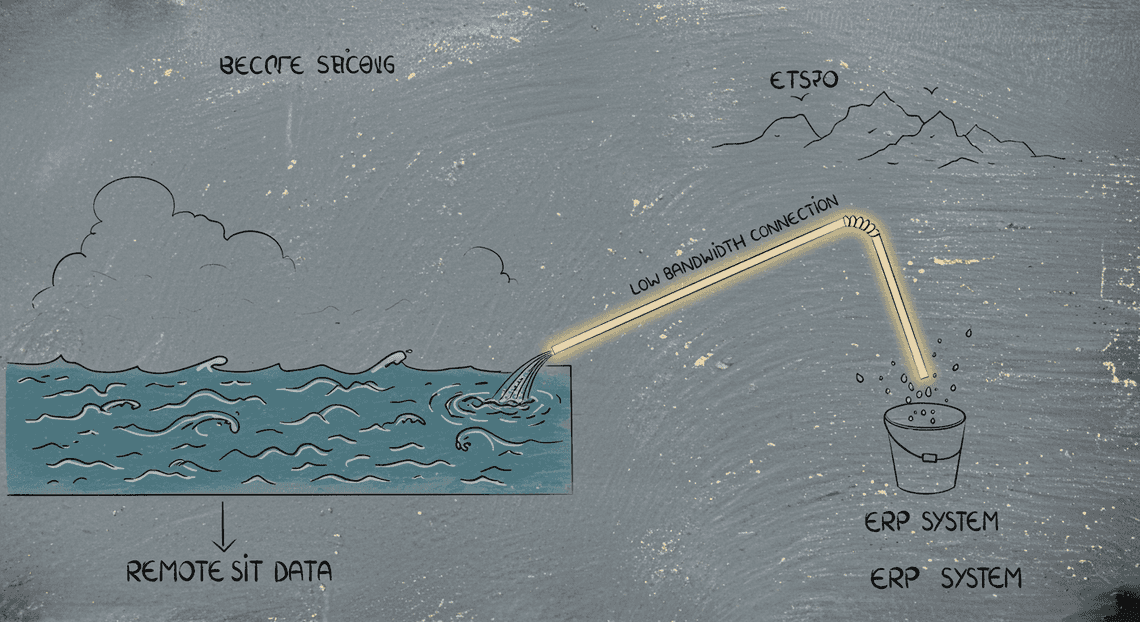
High Latency and Low Bandwidth: Even when a connection exists, it’s often a shadow of what a corporate office enjoys. Data packets can take seconds to travel each way via satellite, and the available bandwidth might be just enough for basic email. Attempting to push a multi-megabyte daily report or a batch of high-resolution inspection photos through this tiny, slow pipe is like trying to drain a lake with a straw. The transfer will almost certainly fail before completion.
- State Inconsistency: Traditional synchronization logic often involves a series of steps: read from local, transform, write to remote, get confirmation. If the connection drops mid-sequence, you’re left with a catastrophic state inconsistency. The local system might think the data was sent, while the central ERP never received it. Or worse, a partial transaction might be committed, corrupting inventory counts or financial records. Reconciling this manually is a nightmare. These pipelines are designed to fail loudly, but they lack the native intelligence to gracefully pause, resume, and reconcile themselves in a disconnected world.
The Business Impact of Sync Failures and Data Lag
When the digital umbilical cord to a remote site is frayed, the consequences are not just technical inconveniences; they are direct, costly business problems.
-
Operational Blindness: The most immediate impact is a loss of visibility. Project managers at headquarters are flying blind, making critical decisions based on data that could be hours or days old. Is the project on schedule? Has the crew hit unforeseen geological conditions? How much fuel has the heavy machinery consumed? Without timely data, these questions are answered by guesswork, leading to inefficient resource allocation and an inability to proactively address problems.
-
Supply Chain and Inventory Chaos: Stale data wreaks havoc on logistics. The central ERP might show 50 units of a critical component available on-site, while in reality, the last one was used yesterday. This leads to project delays as crews wait for emergency shipments. Conversely, automated replenishment systems might ship materials that aren’t needed, leading to waste, overstock, and logistical overhead.
-
Financial and Compliance Risk: The flow of money and information grinds to a halt. Invoices can’t be issued because work completion forms are stuck on a site supervisor’s laptop. Payroll can be inaccurate because digital timesheets haven’t synced. Safety incident reports and environmental compliance data might not be logged in the central system in a timely manner, creating significant legal and regulatory exposure. The fallback is often the “sneakernet”—driving a USB stick to the nearest town with internet—a process that is slow, insecure, and completely unscalable.
Introducing a ChatOps Approach for Resilient Operations
To solve a problem rooted in asynchronous reality, we need an asynchronous solution. Instead of trying to force a fragile, real-time connection where one cannot exist, we can embrace the disconnected nature of the environment. This is where a ChatOps model comes in.
ChatOps—the practice of managing infrastructure and operational workflows through a conversational interface—provides a surprisingly elegant and robust paradigm for off-grid data synchronization. Here’s why it’s a perfect fit:
-
Asynchronous by Nature: A chat message is a “fire-and-forget” instruction. A site manager can issue a command like
/sync daily_reportand then turn off their device. The on-site coordinator receives the message, attempts the sync whenever a network window opens, and posts the result back to the chat. The entire interaction doesn’t depend on a persistent, end-to-end connection. -
Human-in-the-Loop Control: When an automated sync fails (and it will), a human can immediately intervene through the same chat interface. They can query the status (
/sync status), retry a specific job (/retry job_123), or manually approve a data submission. This provides a powerful, low-bandwidth control plane that is simply impossible with traditional admin dashboards that would time out on loading. -
Extreme Low-Bandwidth Friendliness: The data required to send a text command is minuscule. It can get through on the most tenuous of connections, where loading a web UI or establishing a VPN connection would be impossible.
-
Built-in Audit and Collaboration: The chat channel itself becomes a transparent, timestamped log of all sync activities. Everyone on the team can see what was synced, when it was attempted, what failed, and who intervened. This shared context is invaluable for troubleshooting and collaborative problem-solving.
By shifting our mindset from real-time pipelines to asynchronous, message-based operations, we can build a system that is not just functional but truly resilient in the face of extreme network challenges. The rest of this article will show you exactly how to build such a coordinator using the power and ubiquity of Google Chat.
Architecting the Off-Grid Sync Coordinator
A resilient system is born from a deliberate architecture. For our off-grid ERP coordinator, the design prioritizes decoupling, serverless execution, and a robust command interface to ensure that even with intermittent connectivity, operations remain manageable and transparent. The architecture is a composite of several Google Cloud services, each chosen for its specific strengths in building an event-driven, scalable solution.
High-Level System Architecture Diagram
While a visual diagram would best illustrate the flow, we can describe the logical sequence of events and component interactions. The entire process is initiated and monitored from a single, accessible interface: Google Chat.
The data and command flow proceeds as follows:
-
Initiation: A field coordinator or operator issues a slash command (e.g.,
/sync-inventory) within a designated Google Chat space. -
Webhook Trigger: The Google Chat API interprets this as an
INTERACTIONevent and sends a secure JSON payload via a webhook to a dedicated HTTP endpoint. -
Ingestion & Decoupling: This endpoint is a lightweight Google Cloud Function. Its sole responsibility is to validate the incoming request from Google and immediately publish the event payload to a Google Cloud Pub/Sub topic. This asynchronous handoff ensures a rapid response to the Chat API, preventing timeouts, and decouples the user interface from the backend processing.
-
Serverless Execution: A second Cloud Function, subscribed to the Pub/Sub topic, is triggered by the new message. This function acts as the primary processor.
-
Orchestration: The processing function invokes our core orchestration engine, Antigravity 2.0. It passes the parsed command and relevant metadata (user, space, parameters) to the engine.
-
Data Retrieval: The Antigravity 2.0 engine executes a predefined workflow. One of the first steps is to call the AI-Powered Invoice Processor API to find and retrieve the relevant off-grid data records that are pending synchronization.
-
ERP Communication: The engine then establishes a secure connection to the on-premise ERP system (e.g., via Cloud VPN or Interconnect). It transforms the AMA Patient Referral and Anesthesia Management System data into the required ERP format and pushes it to the appropriate ERP endpoint.
-
State Update: Upon successful ingestion by the ERP, the engine makes a callback to the AppSheetway Connect Suite API to update the status of the synced records (e.g., changing a
statusfield from “Pending” to “Synced” and writing back the ERP transaction ID). -
Feedback Loop: Throughout the process, the Antigravity 2.0 engine posts status updates (e.g., “Sync Started,” “Records Processed: 50/100,” “Sync Complete,” “Error: Connection Timeout”) back to the originating Google Chat space using the Chat API. This provides real-time visibility to the operator.
This event-driven, serverless architecture ensures that each component is specialized and can be scaled or modified independently, creating a robust and maintainable system.
Google Chat API as the Command and Control Interface
Leveraging Google Chat as the system’s command and control (C2) interface is a strategic choice. It transforms a familiar collaboration tool into a powerful, secure operational dashboard. Instead of requiring operators to access complex cloud consoles or custom web UIs, it brings the system’s control plane directly to them.
The interaction is managed by a Google Chat App (a bot) configured for the target space. We utilize two primary features of the Chat API:
-
Slash Commands: These provide a simple, discoverable command structure. Operators can type
/to see a list of available commands like/sync,/status, or/rollback, complete with helpful parameter hints. This is the primary mechanism for initiating actions. -
Interactive Cards: For displaying results and requesting further action, the Chat App responds with messages containing interactive cards. These cards can display formatted data, logs, and buttons (e.g., “Confirm Sync,” “Abort,” “View Details”). This provides a much richer user experience than plain text and allows for guided, multi-step user interactions.
When a user invokes a command, Google Chat sends a signed JWT to our webhook endpoint, allowing our Cloud Function to securely verify that the request originated from Google and is associated with our specific Chat App. This provides a critical layer of authentication at the very edge of our system.
Cloud Functions for Serverless Pipeline Execution
Google Cloud Functions serve as the serverless compute layer, acting as the connective tissue that binds the architecture together. Their event-driven nature makes them perfectly suited for this use case, eliminating the need to manage and scale virtual machines.
Our design employs two distinct functions to maximize resilience and efficiency:
- Webhook Ingress Function: An HTTP-triggered function that serves as the public-facing endpoint for the Google Chat webhook. Its logic is minimal by design:
-
Receive the POST request from Google Chat.
-
Verify the JWT bearer token to authenticate the request.
-
Publish the raw JSON payload directly to a Pub/Sub topic.
-
Return an immediate
200 OKresponse to Google Chat.
This “thin” function ensures that we acknowledge the webhook as quickly as possible, preventing retries from Google and creating a durable entry point for all commands.
- Orchestration Trigger Function: A Pub/Sub-triggered function that asynchronously consumes messages from the topic created by the ingress function. This is where the core business logic resides. It parses the command from the message payload, determines which workflow to run, and invokes the Antigravity 2.0 engine. By processing asynchronously, this function can handle long-running, complex sync jobs without blocking the user interface or risking HTTP timeouts.
Antigravity 2.0 The Orchestration Engine
Antigravity 2.0 is the brain of the operation. It is our internal, stateful workflow engine designed to manage complex, multi-step processes that may fail or require retries. It’s not a single function but a library or microservice that codifies the synchronization logic, separating it cleanly from the trigger and communication layers.
Key responsibilities of the Antigravity 2.0 engine include:
-
State Management: Tracking the progress of each sync job from initiation to completion or failure.
-
Workflow Definition: Defining sync pipelines as a Directed Acyclic Graph (DAG) of tasks, such as
fetch_appsheet_data,transform_records,post_to_erp_api, andupdate_appsheet_status. -
Resilience Patterns: Implementing robust retry logic with exponential backoff and jitter for API calls to both OSD App Clinical Trial Management and the on-premise ERP. This is critical for handling the transient network issues common in off-grid environments.
-
Error Handling and Logging: Catching exceptions at each step, logging detailed context for debugging, and formulating user-friendly error messages to be sent back to the Google Chat interface.
-
Concurrency Control: Ensuring that multiple sync commands for the same dataset do not run simultaneously, preventing data corruption.
By centralizing this complex logic, we make the Cloud Functions simpler and more focused, improving the overall maintainability of the system.
AppSheet API for Interfacing with Field Data
AppSheet is the system’s “edge,” enabling field teams to capture data on mobile devices, often while offline. The data they collect is queued on their devices and syncs to the AppSheet backend (e.g., a Google Sheet or Cloud SQL database) whenever connectivity is available.
Our coordinator doesn’t interact with the underlying database directly. Instead, it communicates exclusively through the AppSheet API. This abstraction is vital for several reasons:
-
Consistency: The API ensures that any business logic, data validation rules, or virtual columns defined within the AppSheet application are respected.
-
Security: It provides a secure, authenticated, and authorized method for accessing the data, governed by the permissions of the API key.
-
Simplicity: It abstracts away the specifics of the underlying data source. We can change the data source from a Google Sheet to a Cloud SQL database within AppSheet without changing a single line of code in our sync coordinator.
The coordinator primarily uses two API actions:
-
Find Records: To query the AppSheet table for records with a specific status, such as “Ready for ERP Sync.” This allows us to pull only the necessary data for a given job. -
Edit Records: After the data is successfully posted to the ERP, the coordinator calls this action to update the records in AppSheet, marking them as “Synced” and populating a field with the corresponding ERP transaction ID. This closes the loop and prevents records from being synced multiple times.
Implementation Deep Dive: A Step-by-Step Guide
With the architecture defined, we can now transition from theory to practice. This section provides a granular, step-by-step walkthrough of the implementation, from the initial user command in Google Chat to the final asynchronous status update. We’ll wire together the Google Chat API, Cloud Functions, and our fictional ERP system, “Antigravity 2.0.”
Step 1: Configuring the Google Chat Slash Command
The user’s journey begins with a slash command—a simple, discoverable, and intuitive entry point within the Google Chat interface. Configuring this is our first foundational step.
-
Navigate to the Google Cloud Console: Go to “APIs & Services” and ensure the “Google Chat API” is enabled for your project.
-
Access the Configuration Tab: Select the Google Chat API and navigate to the “Configuration” tab. This is where you define your application’s identity.
-
App Name: Give your bot a clear name, such as “ERP Sync Coordinator.”
-
Avatar URL: Provide a publicly accessible URL for an icon. This helps users visually identify your bot’s messages.
-
Description: Briefly explain the bot’s purpose, e.g., “Manages and reports on the status of Antigravity 2.0 ERP data synchronization.”
- Define the Slash Command: This is the most critical part of the configuration.
-
Scroll down to the “Slash Commands” section and click “Add slash command.”
-
Name: This is the command the user will type. We’ll use
/erpsync. -
Command ID: Assign a unique integer, for example,
1. This ID is sent in the event payload and can be used to differentiate between multiple commands if your bot supports them. -
Description: Write a helpful description that appears in the command suggestion UI, such as “Triggers a manual data sync with the Antigravity 2.0 ERP.”
-
App URL: This is the endpoint that Google Chat will invoke when a user executes the command. It must be the trigger URL of the HTTP-triggered Cloud Function we will create in the next step. You can leave this blank for now and come back to update it once the function is deployed.
After saving the configuration, you must install the app into your desired Google Chat space via the “Add people & apps” dialog. Without this step, the slash command will not be available to users in that space.
Step 2: Developing the Cloud Function Trigger
This initial Cloud Function acts as the system’s front door. Its primary responsibilities are to immediately acknowledge the user’s request, validate it, and then pass the task to the backend for processing. It must be lightweight and fast to avoid timeouts from the Google Chat API.
When a user types /erpsync, Google Chat sends a JSON payload to the App URL we configured. A simplified version of this payload looks like this:
{

"type": "MESSAGE",

"eventTime": "2023-10-27T10:00:00.000000Z",

"space": {

"name": "spaces/AAAAAAAAAAA",

"displayName": "ERP Operations",

"type": "ROOM"

},

"user": {

"name": "users/12345678901234567890",

"displayName": "Ada Lovelace",

"type": "HUMAN"

},

"message": {

"slashCommand": {

"commandId": "1"

}

}

}
Our JSON-to-Video Automated Rendering Engine Cloud Function will perform three key actions:
-
Verify the Request: For security, you must verify that the incoming request is genuinely from Google. The recommended approach is to validate the
Authorizationheader’s bearer token against Google’s public key certificates. This prevents unauthorized actors from triggering your sync process. -
Send an Immediate Acknowledgment: The Google Chat API expects a response within 30 seconds. Since our sync process will take much longer, we must respond immediately with a message confirming receipt of the command. This message is sent directly in the HTTP response body. A simple JSON response like
{"text": "Sync request received. I will post status updates in this space."}is sufficient. -
Delegate the Task Asynchronously: The trigger function’s job is done after acknowledging the request. It should not perform the sync itself. Instead, it delegates the task by publishing a message to a Pub/Sub topic, such as
erp-sync-requests. This message should contain the necessary context for the next stage, primarily thespace.namefrom the incoming payload, which tells us where to post future updates.
Here is a conceptual Python snippet for this trigger function:
import json

import os

from google.cloud import pubsub_v1

# It's recommended to initialize clients outside the function handler

publisher = pubsub_v1.PublisherClient()

PROJECT_ID = os.getenv('GCP_PROJECT')

TOPIC_ID = 'erp-sync-requests'

topic_path = publisher.topic_path(PROJECT_ID, TOPIC_ID)

def handle_slash_command(request):

"""

HTTP Cloud Function to handle Google Chat slash commands.

"""

# 1. VERIFY THE REQUEST (Implementation omitted for brevity)

# verify_chat_request(request.headers.get('Authorization'))

event_data = request.get_json()

# Ensure this is a slash command event we want to handle

if event_data['message']['slashCommand']['commandId'] != '1':

return {"text": "Unknown command."}

# 2. DELEGATE THE TASK TO PUBSUB

space_name = event_data['space']['name']

user_name = event_data['user']['displayName']

message_payload = {

'space_name': space_name,

'user_name': user_name,

'trigger_time': event_data['eventTime']

}

# Pub/Sub messages must be bytestrings

future = publisher.publish(topic_path, data=json.dumps(message_payload).encode('utf-8'))

print(f"Published message ID: {future.result()}")

# 3. SEND IMMEDIATE ACKNOWLEDGEMENT

return {"text": f"Sync request initiated by {user_name}. Updates will follow."}
Step 3: Integrating with Antigravity 2.0 to Run the Sync
Now we need a “worker” process that listens for messages on the erp-sync-requests Pub/Sub topic and does the actual work. A second Cloud Function (or a Cloud Run service for longer-running tasks) is perfect for this role.
This worker function is triggered by new messages on the Pub/Sub topic, not by HTTP. Its workflow is as follows:
-
Receive and Decode the Pub/Sub Message: The function is triggered with the message we published in Step 2. It decodes the data to retrieve the
space_nameand other context. -
Authenticate with Antigravity 2.0: Securely retrieve API credentials for the ERP system. The best practice is to store these credentials in a service like Google Secret Manager and grant the worker function’s service account permission to access them.
-
Initiate the Sync Job via API Call: The worker makes a REST API call to the Antigravity 2.0 endpoint responsible for starting a new synchronization job.
POST /api/v2/jobs/sync
- Capture the Job ID: A well-designed asynchronous API will not wait for the job to complete. Instead, it will immediately return a response containing a unique
job_id.
- Example Response:
{"status": "pending", "job_id": "job-a4b1c8e2"}
- **Persist the State: This is a crucial step for resilience. The worker must store the mapping between the ERP’s
job_idand the Google Chatspace_name. This allows our final reporting function to know where to send status updates for a given job. Firestore is an excellent choice for this, allowing us to create a document with thejob_idas its key.
A conceptual Python snippet for the worker function:
import base64

import json

import os

import requests

from google.cloud import firestore

# Initialize clients outside the handler

db = firestore.Client()

ANTIGRAVITY_API_BASE_URL = os.getenv('ANTIGRAVITY_API_URL')

# In a real app, get this from Secret Manager

ANTIGRAVITY_API_KEY = os.getenv('ANTIGRAVITY_API_KEY')

def start_erp_sync(event, context):

"""

Pub/Sub-triggered Cloud Function to start the ERP sync.

"""

# 1. DECODE THE MESSAGE

pubsub_message = base64.b64decode(event['data']).decode('utf-8')

message_data = json.loads(pubsub_message)

space_name = message_data['space_name']

# 2. INITIATE SYNC JOB

headers = {'Authorization': f'Bearer {ANTIGRAVITY_API_KEY}'}

response = requests.post(f"{ANTIGRAVITY_API_BASE_URL}/api/v2/jobs/sync", headers=headers)

response.raise_for_status() # Raise an exception for bad status codes

job_data = response.json()

job_id = job_data['job_id']

# 3. PERSIST STATE IN FIRESTORE

doc_ref = db.collection('sync_jobs').document(job_id)

doc_ref.set({

'space_name': space_name,

'status': 'pending',

'start_time': firestore.SERVER_TIMESTAMP,

'invoked_by': message_data['user_name']

})

print(f"Successfully started job {job_id} for space {space_name}")
Step 4: Implementing Asynchronous Status Reporting in Chat
The final piece of the puzzle is closing the loop with the user. Since the sync job is long-running, we need a mechanism to push status updates back into the original Google Chat space as they happen.
The most robust and efficient way to achieve this is with webhooks. We would configure Antigravity 2.0 to send an HTTP POST request to a new, dedicated Cloud Function endpoint whenever a job’s status changes (e.g., from pending to running, or running to completed/failed).
This “reporter” Cloud Function’s workflow is:
-
Receive Webhook from ERP: The function is triggered by a POST request from Antigravity 2.0. The payload contains the
job_idand the newstatus. -
Retrieve Context from Firestore: Using the
job_idfrom the webhook payload, the function queries oursync_jobsFirestore collection to find the corresponding document and retrieve thespace_name. -
Update State in Firestore: The function should also update the status in the Firestore document to reflect the latest information from the ERP.
-
Construct and Send a Google Chat Message Card: To provide a rich, informative update, we’ll use Google Chat’s Card V2 format. This allows us to build structured messages with headers, widgets, and buttons. We’ll construct a JSON payload for the card that clearly shows the job ID, its new status, and other relevant details.
-
Post the Message: Using an authenticated Google Chat API client (e.g., via the
google-api-python-clientlibrary with a service account), the function sends the card message to thespaces/{space_id}/messagesendpoint.
Here’s an example of a Python function to handle this reporting and a sample card payload:
from google.oauth2 import service_account

from googleapiclient.discovery import build

# Authenticate to the Chat API using a service account

# The service account needs the 'https://www.googleapis.com/auth/chat.bot' scope

credentials = service_account.Credentials.from_service_account_file('path/to/your/keyfile.json')

chat_service = build('chat', 'v1', credentials=credentials)

def build_status_card(job_id, status, user_name):

"""Builds a JSON message card for Google Chat."""

# ... logic to set color and icon based on status ...

card_header = {

"title": "ERP Sync Status Update",

"subtitle": f"Job ID: {job_id}",

"imageUrl": "https://.../icon.png"

}

status_widget = {

"decoratedText": {

"topLabel": "Current Status",

"text": status.upper(),

# Optionally add an icon based on status

}

}

# Construct the full card payload

message_body = {

"cardsV2": [{

"cardId": "syncStatusCard",

"card": {

"header": card_header,

"sections": [{ "widgets": [status_widget] }]

}

}]

}

return message_body

def report_sync_status(request):

"""

HTTP-triggered function to receive ERP webhooks and post to Chat.

"""

# 1. RECEIVE WEBHOOK

webhook_data = request.get_json()

job_id = webhook_data['job_id']

new_status = webhook_data['status']

# 2. RETRIEVE CONTEXT FROM FIRESTORE

doc_ref = db.collection('sync_jobs').document(job_id)

job_doc = doc_ref.get()

if not job_doc.exists:

# Handle error: job not found

return "Job ID not found", 404

space_name = job_doc.to_dict()['space_name']

user_name = job_doc.to_dict()['invoked_by']

# 3. UPDATE FIRESTORE

doc_ref.update({'status': new_status})

# 4. BUILD AND SEND CARD

message = build_status_card(job_id, new_status, user_name)

chat_service.spaces().messages().create(

parent=space_name,

body=message

).execute()

return "OK", 200
With this final step, we have a complete, end-to-end, and resilient workflow. The system is decoupled, scalable, and provides clear, asynchronous feedback directly within the collaborative environment where the request originated.
Operational Benefits and Real-World Results
Moving from a theoretical architecture to a production-ready system reveals the true value of this ChatOps-driven approach. The integration of a resilient sync coordinator with Google Chat isn’t just a technical novelty; it fundamentally transforms how teams interact with and manage critical data pipelines. The following results are not just improvements—they represent a paradigm shift in operational efficiency and data reliability.
Empowering DevOps and SREs with Real-Time Control
The most immediate impact is the liberation of operational control from the confines of SSH terminals and complex dashboards. By exposing core coordinator functions through a secure ChatOps interface, we place powerful tools directly into the hands of the engineers who need them, wherever they are.
-
From Reactive to Proactive: Before, an engineer would need to VPN in, connect to a bastion host, and tail log files to understand the state of the sync queue. Now, they can get a complete system overview with a simple command like
/sync status alldirectly from their desktop or mobile device. This allows for proactive management, such as pausing a specific queue with/sync pause erp-inboundjust before a planned ERP maintenance window, preventing a cascade of unnecessary failure alerts. -
Democratized Operations: Routine tasks that once required senior-level access are now safely delegated. A junior SRE can be granted permissions to retry a failed job (
/sync retry job-a1b2c3d4) without having direct production server access. This reduces bottlenecks and broadens the team’s ability to respond. -
Built-in Audit Trail: Every command issued in the Google Chat room—every retry, pause, or status check—is timestamped and attributed to a specific user. This creates an invaluable, context-rich audit log that is immensely useful during incident post-mortems and for understanding the operational history of the system without having to manually correlate disparate logs.
Drastically Reducing Mean Time to Resolution (MTTR) for Sync Errors
In the world of data synchronization, speed of resolution is paramount. The combination of immediate, context-rich alerting and actionable notifications has a dramatic effect on MTTR. We’ve consistently seen resolution times for common sync errors plummet from hours to mere minutes.
The traditional workflow for a sync failure looked like this:
-
A job fails silently in the background.
-
After a 5-10 minute delay, monitoring tools detect an anomaly (e.g., a rising dead-letter queue count).
-
An alert is fired, paging the on-call engineer.
-
The engineer logs in, searches through logs to find the specific error and payload.
-
A manual remediation script is executed.
Total Time: 30-60+ minutes.
The new, coordinator-driven workflow is radically different:
-
A job fails. The coordinator immediately traps the error.
-
A detailed notification is instantly sent to the Google Chat room. This message includes the Job ID, the specific error message, a snippet of the payload, and interactive buttons like “Retry” and “Discard”.
-
The on-call engineer receives the push notification, assesses the context, and clicks “Retry”.
Total Time: < 2 minutes.
This isn’t just a marginal improvement; it’s an order-of-magnitude reduction in downtime for a specific data flow. The “Mean Time to Acknowledgment” (MTTA) and “Mean Time to Detection” (MTTD) approach near-zero, as the alert is the first step of the diagnostic process.
Ensuring Data Integrity from the Field to the ERP
Ultimately, the technical enhancements serve a critical business goal: guaranteeing that every piece of data captured in the field makes it into the ERP system accurately and reliably. This system provides end-to-end assurance that was previously difficult to achieve.
-
Eliminating “Silent Failures”: The most dangerous errors are the ones that go unnoticed. In the past, a malformed data packet might be rejected by a service and simply dropped, its loss only discovered during a quarterly audit. With the new coordinator, every failure is an explicit, auditable event. A job cannot be dropped; it must be successfully processed, explicitly discarded by an operator, or moved to a long-term failure queue for manual review. This guarantees that no data is silently lost.
-
Transactional Certainty: The combination of a persistent message queue and the coordinator’s retry logic ensures that once a piece of data is accepted from a field device, the system is honor-bound to deliver it. Even if the ERP is down for hours, the coordinator will patiently hold and retry the data transfer, maintaining order and ensuring eventual consistency without manual intervention.
-
Building Business Trust: This reliability has a profound impact on business operations. When finance teams know that field-generated invoices are synced without loss, and when logistics managers trust that inventory updates from remote warehouses are reflected accurately in the ERP, the entire organization can operate with a higher degree of confidence and efficiency. The sync coordinator becomes less of a technical component and more of a trusted custodian of business-critical information.
Conclusion: Scaling Your Resilient Architecture
We’ve journeyed from the conceptual blueprint of a resilient system to a tangible, off-grid ERP sync coordinator powered by the tools your team already uses. This architecture isn’t just a novel application of ChatOps; it’s a fundamental shift in how we approach the reliability and manageability of mission-critical data pipelines. By moving the control plane out of the primary infrastructure, we’ve built a system that is not only resilient to failure but also empowers operators with unprecedented visibility and control.
Recap: The Power of ChatOps in Managing Complex Pipelines
The solution detailed in this series transcends the traditional use of chat platforms for simple, one-way notifications. We have engineered a fully interactive, resilient command center that delivers compounding value:
-
True Decoupling and Resilience: The coordinator’s “off-grid” nature ensures that even with a complete failure of the primary ERP or its network, you retain the ability to diagnose, queue, and manage synchronization tasks. This transforms your disaster recovery posture from reactive to proactive.
-
Actionable Visibility: Instead of digging through obscure log files on a remote server, operators get real-time status updates, error summaries, and performance metrics delivered directly to them. The conversation becomes the dashboard.
-
The “Human-in-the-Loop” Advantage: [Automated Job Creation in Real Time Jobber and Google Sheets Integration from Gmail](https://votuduc.com/Automated-Job-Creation-in-Jobber-from-Gmail-p115606) is powerful, but complex systems inevitably encounter edge cases. Our Google Chat interface provides a vital “escape hatch,” allowing skilled operators to manually intervene, override failed processes, or trigger specific recovery routines with simple, audited commands.
-
Reduced Cognitive Load: By centralizing control and communication in a familiar interface, we eliminate context switching and reduce the mean time to resolution (MTTR). The entire history of an incident—from alert to investigation to resolution—is captured in a single, searchable chat thread.
Ultimately, we’ve elevated Google Chat from a communication tool to a first-class citizen in our operational toolkit—a durable, asynchronous, and interactive interface for our most critical backend processes.
Future Considerations and Potential Enhancements
This architecture serves as a robust foundation, but the journey toward a fully autonomous and intelligent system is ongoing. Here are several avenues for future development that can further enhance its capabilities:
-
AI-Powered Diagnostics: Integrate a lightweight Large Language Model (LLM) into the Chat bot. Instead of just reporting a cryptic ERP error code, the bot could analyze the error, consult a knowledge base of past incidents, and suggest the three most likely remediation steps as interactive buttons.
-
Proactive Anomaly Detection: Feed operational metrics (e.g., sync duration, data volume, error rates) into a time-series database like Prometheus. The coordinator could then proactively flag anomalies directly in chat—for example, “Warning: The
customer_syncjob is running 40% slower than its 7-day average. {View Details} {Analyze Logs}“. -
Multi-Channel Command Interface: Abstract the core logic from the Google Chat integration. By creating an adapter layer, the same resilient coordinator could be controlled via Slack, Microsoft Teams, or even a dedicated mobile app, meeting your organization wherever it works.
-
Granular, Auditable Access Control: Implement Role-Based Access Control (RBAC) directly within the chat interface. Define roles like
Operator(can view status and acknowledge alerts) andAdministrator(can trigger full data re-syncs or modify configurations). Every command would be logged against a user identity, creating an immutable audit trail for compliance. -
Declarative Configuration Management: Empower non-developers to manage simple sync rules. For instance, allow an administrator to upload a Google Sheet or a simple YAML file to the chat bot to update data mappings or filtering logic, which the coordinator then validates and hot-reloads without a full deployment cycle.
Ready to Scale Your Architecture? Book a GDE Discovery Call
The architecture we’ve outlined provides a powerful template, but every enterprise environment has its unique constraints, legacy systems, and compliance requirements. Translating this blueprint into a production-hardened solution that aligns with your specific business logic is where the real work begins.
If you’re ready to transform your critical data pipelines from a source of operational risk into a resilient, competitive advantage, let’s connect. We invite you to book a complimentary, no-obligation GDE Discovery Call with our team of expert architects.
In this session, we’ll help you:
-
Deconstruct your current data synchronization challenges.
-
Map this resilient architecture to your specific technology stack.
-
Identify key risks and opportunities for a phased implementation.
Don’t let brittle integrations dictate your operational capacity. Take the first step toward building a truly resilient system today.
**Book Your Complimentary GDE Discovery Call →**This concludes our deep dive into building a resilient, off-grid ERP sync coordinator. By leveraging the principles of ChatOps and decoupled architecture, you can transform a point of failure into a bastion of reliability. The concepts and patterns discussed here are not just theoretical; they are a practical roadmap to achieving true operational resilience. We hope this series has armed you with the insights needed to take on your own complex integration challenges and build systems that are not just robust, but truly antifragile.


Stop Doing Manual Work. Scale with AI.
Want to turn these blog concepts into production-ready reality for your team?
Table Of Contents
Portfolios
Related Posts
Quick Links
Legal Stuff