

Secure and Searchable HR Archives with Vertex AI Automation


That forgotten archive of past employee data has become a digital graveyard. For compliance and HR leaders, it’s a ticking time bomb of security risks and regulatory nightmares.

The Compliance Officer’s Dilemma: The Digital Graveyard of HR Records
Every organization has one. It might be a forgotten network drive, a series of poorly labeled cloud storage buckets, or an archive from a long-decommissioned HRIS. This is the digital graveyard of HR records—a vast and growing necropolis of past employee data. It’s a place where information goes to die, becoming inert, unsearchable, and, most dangerously, a massive liability. For the modern compliance officer or HR leader, this isn’t just a storage problem; it’s a ticking time bomb of operational inefficiency, security risks, and regulatory nightmares. Navigating this graveyard is the central dilemma of modern data governance.
Defining the high cost of unsearchable legacy data
The cost of maintaining this digital graveyard is far greater than the monthly storage bill. It’s a silent tax on your organization, paid in wasted hours, missed opportunities, and operational friction. The true expense is multifaceted:
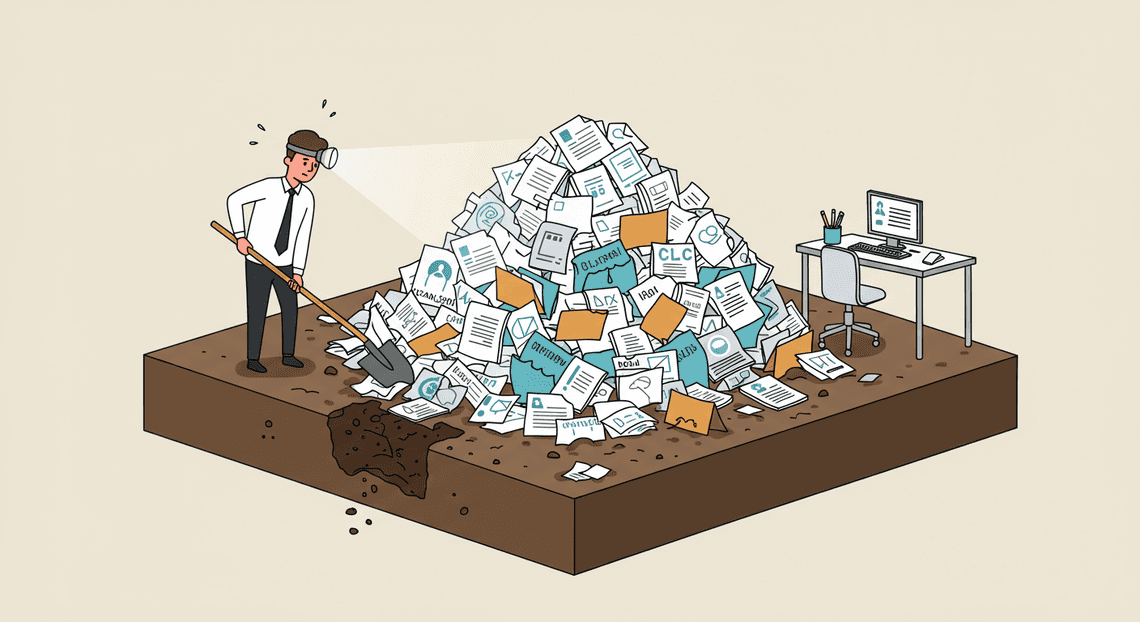
- The Productivity Sinkhole: Consider a routine legal discovery request or an internal audit. You need to find all performance reviews and compensation letters for a specific employee who left the company eight years ago. Your team now faces a grim archaeological dig.
-
The Asset That Isn’t: Buried within these archives is a potential goldmine of institutional knowledge. Imagine being able to analyze decades of hiring trends, track long-term performance indicators against initial candidate profiles, or understand historical attrition patterns. This data could inform future strategy, but because it’s unstructured and inaccessible, it remains dark data—a costly, inert liability rather than a valuable asset.
-
The Storage Fallacy: While cloud storage is cheap, storing terabytes of redundant, trivial, and unknown data indefinitely is not. Without a clear understanding of what’s inside these files, organizations default to the “keep everything forever” strategy. This not only inflates storage costs but compounds the compliance and security risks exponentially.
The risks of non-compliance and data breach in disorganized systems
If the cost of unsearchable data is a slow burn, the risks are an explosion waiting to happen. A disorganized archive is a direct threat to your organization’s legal and security posture.
-
Compliance Paralysis: Regulations like GDPR, CCPA, and HIPAA grant individuals specific rights over their data, including the right of access and the right to be forgotten (erasure). How can you honor a Data Subject Access Request (DSAR) when you can’t find all the relevant data? How can you confidently delete a former employee’s records when they might be scattered across ten different systems in five different formats? Furthermore, strict data retention policies become impossible to enforce. You’re caught in a compliance trap: deleting too little violates data minimization principles, while deleting too much could violate legal hold or record-keeping requirements. The potential for crippling fines and reputational damage is immense.
-
A Playground for Attackers: This digital graveyard is the perfect hiding place for sensitive Personally Identifiable Information (PII)—social security numbers, bank details, medical histories, and salary information. Because the data is unclassified, it’s also unprotected. A sensitive termination agreement containing health information is likely sitting with the same low-level security permissions as a company picnic flyer. This dramatically expands your attack surface. A breach of a single, forgotten file server could expose decades of employee data, leading to a catastrophic security incident that erodes trust and triggers regulatory investigations.
Introducing AI-powered semantic categorization as the solution
The answer isn’t to hire an army of paralegals for a multi-year manual sorting project. The solution lies in fundamentally changing how we interact with this data, moving from manual inspection to automated intelligence. This is where AI-powered semantic categorization comes in.
Unlike simple keyword searching (Ctrl+F), which can’t read a scanned PDF or understand context, semantic categorization uses advanced AI models to comprehend the meaning of a document. It works by:
-
Ingesting and Understanding: The AI system processes every file in your archive, using Optical Character Recognition (OCR) to digitize scanned documents and images.
-
Contextual Analysis: It then reads the content, understanding not just the words but the context. It recognizes that a document is a “performance review,” an “employment contract,” or a “benefits enrollment form.”
-
Extraction and Labeling: The model automatically identifies and extracts critical entities like employee names, dates, manager names, salary figures, and PII. It then applies a rich set of metadata tags to each file (e.g.,
document_type: offer_letter,employee_id: 54321,date: 2014-03-12,contains_pii: true).
This automated process transforms the digital graveyard into a living, intelligent, and searchable archive. Suddenly, the impossible becomes trivial. A query like, “Find all compensation-related documents for employees in the engineering department who left before 2015,” can be executed in seconds, not weeks. This is the foundational step in reclaiming control, mitigating risk, and finally turning your legacy data from a liability into an asset.
Architecting the Solution: A Forensic Blueprint
Every robust system is built on a solid architectural foundation. For our HR archival solution, we’re not just connecting services; we’re creating a synergistic workflow where each component plays a precise, critical role. This blueprint dissects the architecture into three core pillars, leveraging the native strengths of [Automatically create new folders in Google Drive, generate templates in new folders, fill out text automatically in new files, and save info in [Automated Web Scraping with [Multilingual Text-to-Speech Tool with SocialSheet Streamline Your Social Media Posting 123](https://votuduc.com/Multilingual-Text-to-Speech-Tool-with-Google-Workspace-p809282)](https://votuduc.com/Automated-Web-Scraping-with-Google-Sheets-p292968)](https://workspace.google.com/marketplace/app/auto_create_folder_and_files/430076014869) and Google Cloud Platform to create a seamless, intelligent, and secure [Automated Job Creation in Real Time Jobber and Google Sheets Integration from Gmail](https://votuduc.com/Automated-Job-Creation-in-Jobber-from-Gmail-p115606) pipeline. Think of it as a digital forensics lab, where each document is carefully received, analyzed, and filed with unerring accuracy.
Core Component 1: Google Drive and DriveApp for secure data access
At the base of our architecture lies Google Drive, serving as the secure vault for all HR documents. Its selection is deliberate. Beyond being a familiar interface for HR teams, Drive provides the enterprise-grade security controls essential for handling sensitive Personally Identifiable Information (PII). Features like granular, identity-based permissions, comprehensive audit logs, and integration with Google Vault for retention and eDiscovery make it a fortress for our data.
However, the real power for our Automated Quote Generation and Delivery System for Jobber comes from DriveApp, a native service within [AI Powered Cover Letter Automated Work Order Processing for UPS Engine](https://votuduc.com/AI-Powered-Cover-Letter-Automation-Engine-p111092). DriveApp is our programmatic key to the vault. Instead of relying on broad, user-scoped API permissions, it allows our script to interact with files and folders in a highly controlled, specific manner.
In our solution, DriveApp is responsible for:
-
Ingestion: Programmatically scanning a designated “intake” folder for new, unprocessed documents.
-
Content Extraction: Opening files (Google Docs, and through conversion, PDFs and Microsoft Word files) to access their raw text content for analysis.
-
Filing: Moving the processed document from the intake folder to a structured archive location (e.g.,
/Archive/Contracts/2023/) based on the classification received from our AI model. -
Metadata Management: Potentially updating file descriptions or custom properties with classification details for enhanced searchability.
By using DriveApp, we ensure that our automation operates within a strictly defined security context, accessing only what it needs, when it needs it.
Core Component 2: Genesis Engine AI Powered Content to Video Production Pipeline as the orchestration engine
If Google Drive is the vault, [Architecting Multi Tenant AI Workflows in Building Modular Agentic Apps Script with Gemini Function Calling](https://votuduc.com/architecting-multi-tenant-ai-workflows-in-google-apps-script-p-20260321290501) is the master roboticist operating within it. This serverless JavaScript platform is the central nervous system of our solution, the “glue” that binds our secure storage to our intelligent analysis engine. Its serverless nature means there’s no infrastructure to provision or manage, making it an incredibly efficient and cost-effective choice for this task-based workload.
Apps Script shines because of its native integration with the AC2F Streamline Your Google Drive Workflow ecosystem. It communicates with DriveApp fluently and can make authenticated calls to external services—in our case, the [Building Self Correcting Agentic Workflows with Building Self-Correcting Agentic Workflows with Vertex AI](https://votuduc.com/building-self-correcting-agentic-workflows-with-vertex-ai-p-20260321542526) API—with minimal boilerplate.
The script’s orchestration workflow is as follows:
-
Trigger: A time-based trigger (e.g., running every hour or nightly) initiates the script.
-
Fetch: It calls
DriveAppto retrieve the list of new documents in the intake folder. -
Process Loop: For each document, it extracts the text content.
-
API Call: It formats the text into a JSON payload and sends it via a
UrlFetchAppcall to our secure Vertex AI API endpoint. -
Decision: It parses the JSON response from Vertex AI, which contains the predicted document category and a confidence score.
-
Action: Armed with this intelligence, it uses
DriveAppagain to move the file to the appropriate, pre-defined archive subfolder. -
Logging: It records the action (e.g., “Moved ‘John_Doe_Offer_Letter.pdf’ to /Contracts/Signed/”) in a Google Sheet for a clear and simple audit trail.
This script is the engine that drives the entire process, executing the logic that transforms a chaotic intake folder into a perfectly organized, intelligent archive.
Core Component 3: Vertex AI Classification for intelligent analysis
This is the brain of the operation. While the other components manage storage and workflow, Vertex AI provides the critical intelligence. We leverage a custom Text Classification model trained on Google Cloud’s Vertex AI platform. This is fundamentally superior to simple keyword searching, which is brittle and often inaccurate. A keyword search might misclassify a contract discussion email as a formal contract, but a trained ML model understands context, structure, and nuance.
Why Vertex AI is the right tool for the job:
-
Customization: We don’t use a generic, one-size-fits-all model. We train our model specifically on our own corpus of HR documents (e.g., 50 examples of offer letters, 50 examples of performance reviews, 50 examples of non-disclosure agreements). This results in extremely high accuracy for our specific business context.
-
Scalable & Secure Endpoint: Once trained, the model is deployed to a private, scalable endpoint. This provides a simple REST API that our Apps Script can call for real-time predictions. All communication is secured via IAM (Identity and Access Management) and standard HTTPS encryption.
-
Confidence Scores: The model doesn’t just return a label; it returns a confidence score (e.g.,
{"document_type": "Offer Letter", "confidence": 0.991}). This is invaluable. We can build logic into our Apps Script to only auto-file documents with a confidence score above a certain threshold (e.g., 95%), flagging lower-confidence items for manual human review.
This component elevates the solution from a simple filing script to a truly intelligent archival system, ensuring that each document is understood and categorized with a level of precision that manual processes can rarely achieve.
Implementation: A Step-by-Step Meticulous Process
Transitioning from a conceptual architecture to a functioning, production-grade system requires a methodical approach. This process is broken down into four distinct phases, each building upon the last, to ensure a secure, robust, and auditable implementation. We move from establishing the secure foundation to orchestrating the intelligent, automated workflow.
Phase 1: Setting up the secure Google Cloud environment
Before a single byte of sensitive HR data is processed, we must construct a digital fortress. This phase is non-negotiable and prioritizes security and compliance through the principle of least privilege and data isolation.
- Project and Network Isolation:
-
Google Cloud Project: Create a new, dedicated project for this HR archival system. This isolates billing, permissions, and resources from other workloads, providing a clear boundary for security and auditing.
-
VPC Service Controls: For enterprise-grade security, establish a VPC Service Controls perimeter around your project. This acts as a virtual fence, preventing data exfiltration by restricting data movement to only authorized networks and services, effectively mitigating risks from compromised credentials or insider threats.
- Identity and Access Management (IAM):
-
Dedicated Service Account: Create a specific service account for the automation scripts and Cloud Functions. This account will be the non-human identity that performs the processing.
-
Granular Roles: Assign fine-grained IAM roles. Avoid primitive roles like
OwnerorEditor. The service account will need roles such as: -
Storage Object Admin(for the specific buckets) -
Vertex AI User(to invoke model predictions) -
Document AI User(to process documents) -
Logs Writer(for robust audit trails) -
Human access should be similarly restricted, granting specific individuals roles like
Storage Object Vieweron an as-needed basis.
- Secure Cloud Storage Buckets:
-
Create two distinct Cloud Storage buckets:
-
hr-legacy-archive-raw: A landing zone for the initial, unsorted bulk upload of legacy files. -
hr-secure-archive-prod: The final, organized, and secure destination for categorized documents. -
Security Configuration:
-
Uniform Bucket-Level Access: Enable this on both buckets to ensure consistent permissions managed solely by IAM.
-
Customer-Managed Encryption Keys (CMEK): Use Cloud KMS to create and manage your own encryption keys, giving you ultimate control over data-at-rest encryption.
-
Object Versioning & Retention Policies: Enable versioning to protect against accidental deletion or modification. Implement a retention policy on the
prodbucket to meet legal and compliance requirements for HR document storage.
- Enable APIs:
- In your project, enable the necessary APIs: Cloud Storage API, Vertex AI API, Document AI API, Cloud Functions API, and Cloud Logging API.
Phase 2: Scripting the batch process to iterate through legacy folders
With the secure environment in place, the next step is to ingest the legacy data. This involves a one-time or ongoing script to transfer files from their current location (e.g., an on-premises file server) into our GCS landing zone.
-
Tool Selection: For a straightforward, one-time transfer, the
gcloud storage rsynccommand is highly effective. It efficiently synchronizes a source directory with a GCS bucket. -
Custom Scripting for Control: For more complex scenarios requiring detailed logging, error handling, and metadata preservation, a custom JSON-to-Video Automated Rendering Engine script using the
google-cloud-storageclient library is recommended. -
Core Script Logic:
-
Authentication: The script authenticates using the dedicated service account credentials created in Phase 1.
-
Recursive Scan: It recursively traverses the source directory structure of the legacy file share.
-
Metadata Preservation: For each file, it captures the original file path. This is a critical piece of metadata for auditing. Before uploading, it attaches this path as custom metadata to the GCS object (e.g., with a key like
x-goog-meta-original-source-path). -
Upload: The script uploads the file to the
hr-legacy-archive-rawbucket. -
Logging and Error Handling: Every action—success or failure—is logged to Cloud Logging. The script should include retry logic for transient network errors and a clear process for handling files that consistently fail to upload, perhaps by writing them to an error log for manual review.
Phase 3: Training the Vertex AI model on your specific HR document types
This is where we build the intelligence of our system. We will train a custom classification model that understands the unique structure and language of your organization’s HR documents.
- Data Curation and Labeling: This is the most critical step for model accuracy.
-
Define Labels: First, define a clear, unambiguous set of categories. Examples:
OfferLetter,PerformanceReview,I9Form,Resume,TerminationNotice,PayrollStub. -
Gather a Representative Sample: Collect a balanced set of example documents for each label (ideally 100-1000+ examples per label). The quality and quantity of this data will directly determine model performance.
-
Extract Text Content: Since most HR documents are PDFs or DOCX files (many of which may be scans), you must extract their raw text content. The Document AI API is the superior choice here for its powerful Optical Character Recognition (OCR) capabilities, which can handle scanned documents, forms, and complex layouts far better than simple library-based text extraction.
-
Create the Training Dataset: Structure the extracted data into a CSV file with two columns: one for the GCS URI of the document (
gs://...) and one for its corresponding label. Upload this CSV to a folder in your Cloud Storage bucket.
- Vertex AI AutoML Training:
-
Create a Dataset: In the Vertex AI console, create a new
TextorDocumentdataset, pointing it to the CSV file you just created. -
Train the Model: Initiate a new training job using AutoML. Vertex AI handles the complex tasks of feature engineering, architecture selection, and hyperparameter tuning automatically. This process can take several hours.
-
Evaluate Model Performance: Once training is complete, meticulously review the evaluation metrics provided in the console. Pay close attention to the confusion matrix, which shows where your model is making mistakes (e.g., confusing
OfferLetterwithEmploymentContract). Also, review the precision and recall scores for each label. If the accuracy does not meet your standards (e.g., >95%), you may need to provide more training examples, refine your labels, or clean your data.
- Deploy the Model:
Once you are satisfied with the model’s performance, deploy it to a* Vertex AI Endpoint**. This makes the model available as a simple REST API that can be called by other services, like our Cloud Function.
Phase 4: Executing the automated categorization and file migration
This final phase connects all the pieces into a seamless, event-driven workflow that automatically processes each file as it arrives.
-
Architecture: Event-Driven Cloud Function:
-
We will use a Cloud Function triggered by the
google.storage.object.finalizeevent. This means the function will execute automatically every time a new file is successfully uploaded to thehr-legacy-archive-rawbucket. -
Cloud Function Logic Breakdown:
-
Trigger and Ingestion: The function is triggered by a new file upload. The event metadata provides the file name and bucket.
-
Text Extraction: The function calls the Document AI API to perform OCR on the newly uploaded document, reliably extracting its text content, regardless of whether it’s a native or scanned PDF.
-
Prediction: It then sends this extracted text to the deployed Vertex AI model endpoint from Phase 3.
-
Decision Making: The model returns a prediction (e.g.,
PerformanceReview) and a confidence score. Your function’s code should implement a business rule based on this score.
-
High-Confidence: If the score is above a set threshold (e.g., 0.95), the classification is trusted.
-
Low-Confidence: If the score is below the threshold, the file is flagged for human review.
- Intelligent File Migration:
-
For high-confidence predictions: The function constructs a new, structured file path. For example,
original_filename.pdfclassified asPerformanceReviewis moved tohr-secure-archive-prod/PerformanceReviews/original_filename.pdf. -
For low-confidence predictions: The file is moved to a dedicated quarantine location, such as
hr-secure-archive-prod/ManualReview/original_filename.pdf.
The function uses the Cloud Storage client library to perform a* move** operation (copy to the new location, then delete the original from the raw bucket).
- Comprehensive Auditing: Every step of the function’s execution—file received, prediction result, confidence score, and final move action—is logged to Cloud Logging. This creates an immutable, detailed audit trail for every single document processed by the system.
With this function deployed, the entire pipeline is live. As the Phase 2 script populates the raw bucket, this Phase 4 function works in the background, intelligently sorting, securing, and creating a fully searchable HR archive in real-time.
Ensuring Security and Integrity Throughout the Process
Automating the handling of sensitive HR documents is a powerful force multiplier, but it’s not a “set it and forget it” solution. Without a robust framework for security, auditing, and validation, you risk trading manual chaos for automated catastrophe. The integrity of your HR archive depends on a multi-layered approach that combines transparent logging, strict access control, and intelligent exception handling. This isn’t just about making the process faster; it’s about making it more secure, compliant, and trustworthy than its manual predecessor.
Maintaining a detailed audit trail with Apps Script logging
In any system that handles sensitive data, the ability to answer “Who did what, and when?” is non-negotiable. An audit trail is your system’s black box—essential for compliance audits, security investigations, and troubleshooting. While Apps Script’s built-in Logger.log() is useful for real-time debugging, its logs are ephemeral and not suitable for a permanent record. For a production-grade audit trail, we need a more persistent and structured solution.
There are two primary approaches:
- Logging to a Google Sheet: This is a straightforward and highly accessible method. You create a dedicated Google Sheet to act as an immutable logbook. Each time the script performs a significant action, it appends a new row with critical details.
What to log:
-
Timestamp: The exact date and time of the event. -
ExecutingUser: The email of the user or service account running the script. -
Action: A clear, standardized description (e.g.,PROCESS_START,FILE_CLASSIFIED,FILE_MOVED,ERROR_LOW_CONFIDENCE). -
SourceFileID: The unique ID of the document being processed. -
SourceFileName: The original name of the file. -
DestinationPath: The folder path where the file was moved. -
AssignedLabel: The document type determined by Vertex AI (e.g.,Offer_Letter). -
ConfidenceScore: The confidence level returned by the model. -
Details: Any relevant metadata or error messages.
Your Apps Script code would simply open the logging Sheet by its ID and use sheet.appendRow([...]) to add the entry. This creates a simple, human-readable log that is sufficient for many organizations.
- Logging to Google Cloud Logging: For enterprise-grade requirements, sending logs directly to Google Cloud’s Operations Suite (formerly Stackdriver) is the superior choice. This provides a centralized, searchable, and scalable logging platform with features like configurable retention policies, advanced query capabilities, and automated alerting.
From Apps Script, you can use the UrlFetchApp service to make a POST request to the Cloud Logging API, sending a structured JSON payload for each log entry. This decouples your logging from Google Sheets and integrates it directly into your broader cloud infrastructure, allowing you to correlate events from your HR automation with other cloud services.
Whichever method you choose, the principle remains the same: every significant action taken by your automation must be recorded in an immutable, timestamped log.
Structuring the new secure archive with granular permissions
The core principle guiding access to sensitive data is the Principle of Least Privilege (PoLP). Users should only have the minimum level of access required to perform their job functions. Applying this to our automated archive is critical to preventing unauthorized access and data leakage.
The foundation of this model is a combination of a logical folder structure and group-based permissions within Google Drive.
- Design a Logical Folder Hierarchy: Don’t just dump files into a single folder. Structure your archive based on the document classifications from Vertex AI. A clean structure might look like this:
HR Archive (Top-level, very restricted access)

├── Offer Letters

│   ├── 2023

│   └── 2024

├── Performance Reviews

│   ├── 2023

│   └── 2024

├── Payroll Records

│   ├── 2023

│   └── 2024

└── ... (other document types)
-
Use Google Groups for Access Control: Never assign permissions to individual users. This is a management nightmare. Instead, create Google Groups that correspond to roles within your HR department (e.g.,
hr-recruiters,hr-payroll-admins,hr-leadership,hr-auditors-readonly). -
**Apply Permissions at the Folder Level: Grant access to the groups at the appropriate folder level.
-
The
hr-recruitersgroup gets editor access to theHR Archive/Offer Lettersfolder. -
The
hr-payroll-adminsgroup gets editor access to theHR Archive/Payroll Recordsfolder. -
The
hr-leadershipgroup might get viewer access to the parentHR Archivefolder, allowing them to see everything without modification rights.
Your Apps Script automation is responsible for placing the file in the correct folder. The file then automatically inherits the meticulously configured permissions of its parent folder. The script itself should run as a service account or an administrator with sufficient privileges to move files into these restricted locations, but the end-users’ access is governed entirely by the folder structure you’ve defined.
Validating classification accuracy and handling exceptions
No AI model is perfect. Even with high-performing Vertex AI models, there will be ambiguous documents or incorrect classifications. Blindly trusting every prediction is a recipe for disaster. A crucial part of your automation is a workflow for handling uncertainty—a “human-in-the-loop” (HITL) process.
This workflow is driven by the confidence score that the Vertex AI classification API returns with each prediction.
-
Establish a Confidence Threshold: First, decide on an acceptable confidence threshold. This is a business decision, but a good starting point is often around 90% (or
0.90). This threshold separates high-confidence predictions that can be processed automatically from low-confidence ones that require human review. -
Implement Conditional Logic in Your Script:
-
If
confidence >= 0.90: The classification is considered reliable. The script proceeds as planned: it moves the file to the appropriate secure folder (e.g.,/Performance Reviews/2024), logs the action, and the process is complete. -
If
confidence < 0.90: The classification is uncertain. The script flags this as an exception.
- Create a Quarantine and Notification Workflow for Exceptions:
-
Move to a “Needs Review” Folder: The script moves the low-confidence file to a specially designated, highly restricted quarantine folder (e.g.,
HR Archive/--NEEDS MANUAL REVIEW--). -
Trigger a Notification: The script then sends an alert to a designated group of HR personnel (e.g., via an email to
[email protected]or a message in a dedicated Google Chat space). The notification must include: -
A direct link to the quarantined file.
-
The document’s original name.
The label Vertex AI predicted* (e.g., “Performance Review”).
- The low confidence score (e.g., “Confidence: 72%”).
An HR team member can then click the link, examine the document, and manually move it to its correct final destination. This HITL process ensures that the integrity of the archive is maintained, preventing misfiled documents while still automating the vast majority of the workload. Over time, you can even use these manually corrected exceptions as training data to fine-tune your model, further improving its accuracy.
Conclusion: From Reactive Archiving to Proactive Compliance
We’ve journeyed through the architecture of an intelligent, automated HR archiving system built on Vertex AI. The transformation this enables is not merely an upgrade in storage technology; it’s a fundamental paradigm shift. You move from a reactive state—scrambling to find documents for audits or legal requests—to a proactive one, where compliance is embedded, data is an asset, and insights are readily available. This isn’t just about storing files; it’s about activating the intelligence within them.
The tangible benefits of a fully searchable and compliant archive
Moving beyond the theoretical, the practical impact on your organization is immediate and substantial.
-
Drastically Reduced Discovery Time: The days of manual searches through disparate systems or physical file cabinets are over. What once took HR and legal teams days or weeks to fulfill—locating a specific clause in an employee contract from five years ago—can now be accomplished in seconds. This accelerates response times for audits, litigation, and internal reviews, significantly reducing operational friction and cost.
-
Enhanced Data Security and Governance: This architecture provides a fortified digital vault. With automated PII redaction, granular access controls via IAM, and an immutable audit trail for every document interaction, you can demonstrate compliance with confidence. You’re not just hoping you’re secure; you have a verifiable, automated system enforcing your governance policies at scale.
-
Proactive Risk Mitigation: A searchable archive allows you to hunt for risks before they become liabilities. You can run queries to identify all employment agreements missing a specific compliance clause, find records that are due for deletion under GDPR or CCPA retention policies, or analyze patterns in employee relations documents. The system becomes a tool for active risk management rather than a passive repository of potential problems.
-
Unlocking Strategic HR Insights: By treating your archive as a structured dataset, you empower your HR team to move from administrative tasks to strategic analysis. They can now analyze historical performance data, track trends in exit interview feedback, and identify patterns that inform talent management and organizational health initiatives, all while respecting data privacy and security.
Future possibilities for scaling this architecture
The framework we’ve outlined is not a final destination but a powerful foundation. Once established, the potential for expansion is immense.
-
Expanding Beyond HR: The core pattern—ingest, process, secure, and search—is universally applicable. You can extend this architecture to other document-intensive departments like Legal for Build A Contract Lifecycle Agent Using Google Workspace And Vertex AI, Finance for intelligent invoice processing, or Sales for centralizing and analyzing client agreements. It can become your organization’s central nervous system for unstructured data.
-
Advanced AI-Powered Analytics: With your data indexed and accessible, you can layer more sophisticated AI models on top. Imagine using Vertex AI to perform [How to build a Custom Sentiment Analysis System for Operations Feedback Using Google Forms OSD App Clinical Trial Management and Vertex AI](https://votuduc.com/How-to-build-a-Custom-Sentiment-Analysis-System-for-Operations-Feedback-Using-Google-Forms-AppSheet-and-Vertex-AI-p428528) on decades of employee feedback, identify emerging trends in workplace incident reports, or even build predictive models to forecast attrition risks based on communication patterns found within the archive.
-
Generative AI Integration for Conversational Insights: The next frontier is to integrate large language models (LLMs) for a truly conversational experience. Instead of keyword searches, stakeholders could ask complex questions in natural language: “Summarize the key performance themes for the engineering department in H1 2023” or “Generate a report of all severance agreements executed in the last quarter that included a non-standard clause.” This transforms the archive from a database to be queried into a knowledgeable expert to be consulted.
Your next step towards building a robust compliance framework
Embarking on this journey may seem daunting, but it can be approached methodically for a successful outcome.
-
Start with a High-Value PoC: Don’t try to boil the ocean. Identify a single, high-pain, high-value document type—such as separation agreements or employee contracts—and build a proof of concept. A successful PoC will secure executive buy-in and provide invaluable lessons for a full-scale rollout.
-
Assemble a Cross-Functional Team: This is not purely an IT project. Success requires a partnership between HR, Legal, Compliance, and IT. This team will be responsible for defining data retention policies, access control rules, PII redaction requirements, and the key questions the business needs to answer.
-
Explore and Experiment: The tools are at your fingertips. Dive into the Vertex AI Search documentation, experiment with Cloud Functions for your processing logic, and model your security posture with IAM. By starting to build, you will rapidly turn the architectural diagrams of this article into a tangible, value-generating reality for your organization.
By taking these steps, you are not just building an archive; you are investing in a future where your organization’s data is secure, your compliance is automated, and your most valuable information is always within reach.


Stop Doing Manual Work. Scale with AI.
Want to turn these blog concepts into production-ready reality for your team?
Table Of Contents
Portfolios
Related Posts
Quick Links
Legal Stuff