

Stateful AI Agents Building Long-Term Memory for Gemini with Firestore


AI models have no memory by design, which is why you constantly have to repeat yourself. We break down the reason for this “stateless” problem and show you how to finally fix it.
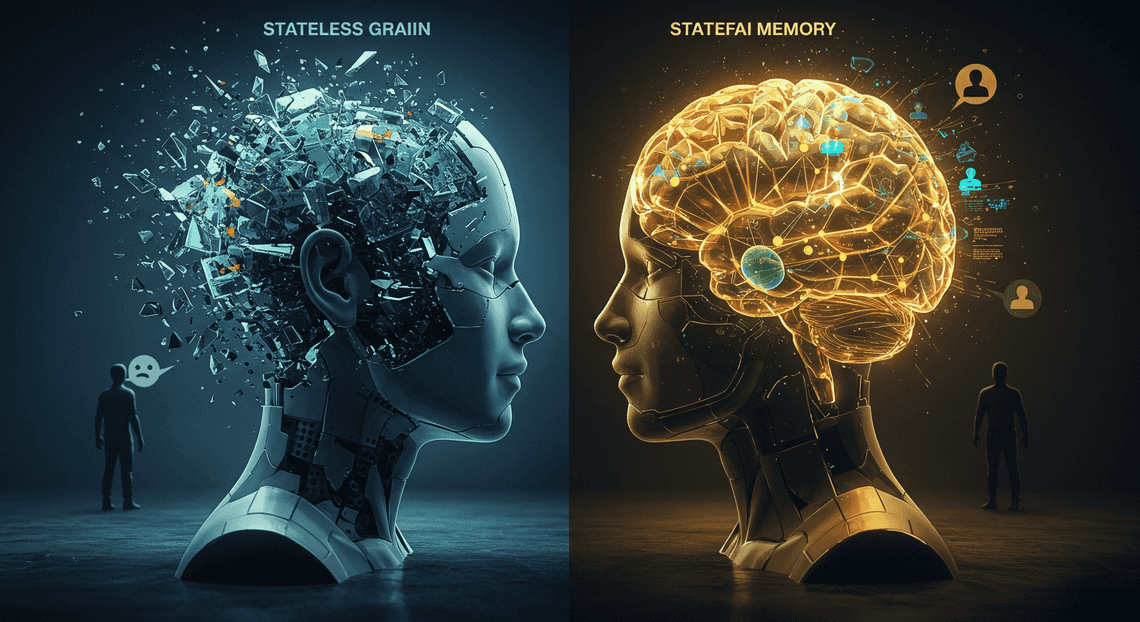
The Stateless Dilemma in AI Conversations
Ever feel like you’re having the same conversation with an AI over and over again? You explain your project, your preferences, your goals… and ten minutes later, you have to start from scratch. It’s like talking to someone with severe short-term memory loss. This frustrating experience isn’t a bug; it’s a fundamental characteristic of how most AI interactions are designed. They are, by nature, stateless. Each query is a new, isolated event, a conversation with a stranger who has no recollection of ever meeting you. Let’s break down why this happens and how we’re going to fix it.
Why Traditional Chatbots Forget You
The core of the issue lies in the stateless nature of API calls. When your application sends a prompt to a large language model (LLM) like Gemini, the model processes that single request, generates a response, and then… it’s done. The entire transaction is self-contained. The model doesn’t retain any information about you, your previous questions, or the context of your project once the API call is complete. It has no persistent memory of your interaction.
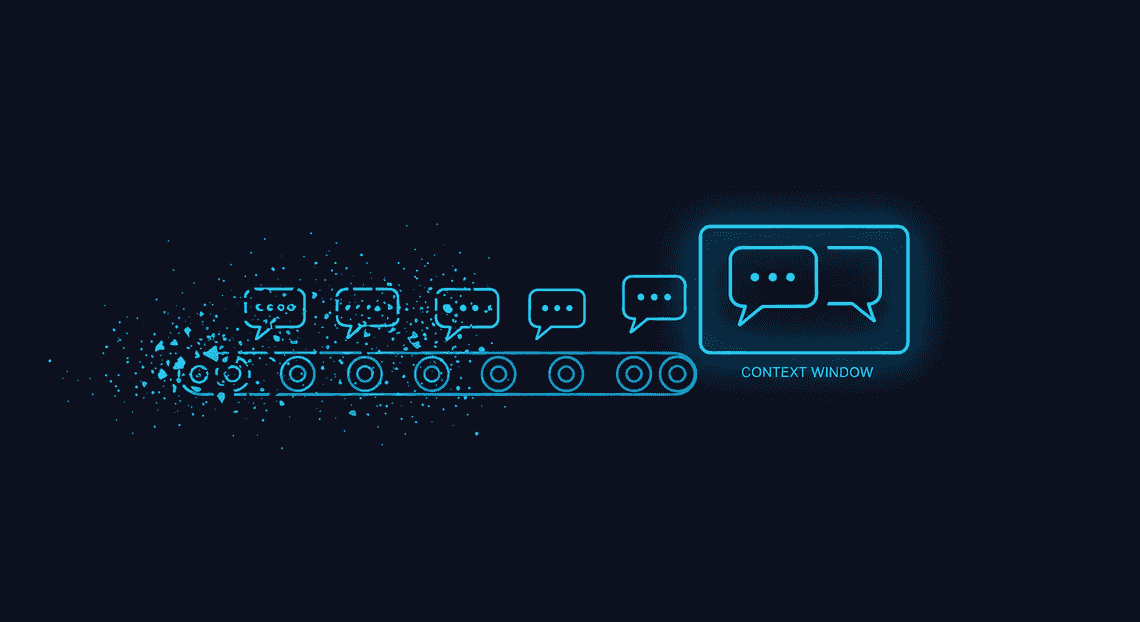
“But wait,” you might say, “ChatGPT remembers what I said a few turns ago!” You’re right, but that’s a clever illusion maintained through a “context window.” The application stuffs the recent conversation history back into the prompt for every new message. This works for short-term recall but has critical limitations:
-
Finite Size: The context window has a hard limit. Once your conversation exceeds that limit (e.g., a few thousand words), the oldest parts are dropped, and the AI begins to forget the beginning of your discussion.
-
Cost and Latency: Sending a massive history with every single prompt is inefficient. It consumes more processing tokens, which increases the cost of the API call and adds latency to the response.
-
No Long-Term Persistence: As soon as you close that chat window or start a new session, that context is gone forever. It’s temporary, session-based memory, not a true, persistent long-term memory.
This statelessness is the single biggest barrier to creating truly helpful, personalized Architecting AI Agents for the Google Workspace Marketplace. Without memory, an AI can’t learn, it can’t adapt, and it can’t evolve with you.
Introducing Stateful Agents for Persistent Personalized Experiences
A stateful agent is the antithesis of this problem. It’s an AI system designed with a dedicated, external memory, allowing it to maintain state and context across conversations and over long periods. Instead of treating every interaction as the first, a stateful agent can recall past details, build upon previous knowledge, and develop a genuine understanding of the user’s world.
Imagine the possibilities:
-
A project assistant that remembers your coding style, the specific goals of your repository, and the feedback from your last code review.
-
A research partner that keeps track of the papers you’ve read, the hypotheses you’ve explored, and the key insights you’ve discovered over weeks or months.
-
A personal tutor that recalls which concepts you struggle with and proactively suggests new exercises tailored to your learning curve.
This isn’t just about convenience; it’s about transforming the AI from a simple tool into a true collaborator. By giving our agent a memory, we enable continuity, deep personalization, and the ability to offer proactive, context-aware assistance. The agent stops being a generic oracle and starts becoming your agent.
Our Architectural Blueprint: Gemini, Firestore, and Apps Script
To build our stateful agent, we need a simple yet powerful architecture. We’ve chosen a trifecta of Google technologies that work together seamlessly to create a robust system for intelligence, memory, and orchestration.
Here’s our blueprint:
-
The Brain (Gemini): Google’s Gemini Pro will serve as the core intelligence of our agent. Its advanced reasoning, multi-modal capabilities, and large context window provide the raw processing power we need to understand user requests and generate insightful responses. We’ll send it carefully constructed prompts that include not just the user’s latest query, but also relevant memories retrieved from our database.
-
The Memory (Firestore): This is the key to overcoming statelessness. We’ll use Firestore, a highly scalable, serverless NoSQL database, as our agent’s long-term memory. Every significant interaction, key fact, user preference, or summary of a conversation will be structured and stored as a document in Firestore. When a new query comes in, our system will first query Firestore to retrieve relevant “memories” before ever calling the LLM.
-
The Nervous System ([AI Powered Cover Letter [Automated Job Creation in Real Time Jobber and Google Sheets Integration from Gmail](https://votuduc.com/Automated-Job-Creation-in-Jobber-from-Gmail-p115606) Engine](https://votuduc.com/AI-Powered-Cover-Letter-Automated Quote Generation and Delivery System for Jobber-Engine-p111092)): This is the serverless glue that connects the brain and the memory. Apps Script is a surprisingly powerful and incredibly simple way to orchestrate the entire process. It will host our application logic, acting as the backend that:
-
Receives the user’s input (e.g., from a Google Sheet or a web app).
-
Queries Firestore to find relevant memories based on the input.
-
Constructs a rich, context-filled prompt for the Gemini API.
-
Receives the response from Gemini.
-
Processes the response, extracts new information to be remembered, and saves it back to Firestore.
-
Delivers the final answer to the user.
This architecture—Gemini for reasoning, Firestore for memory, and Apps Script for orchestration—gives us a powerful, scalable, and cost-effective foundation for building a truly stateful AI agent that remembers.
Architecting the Agent’s Memory Core
A stateful agent is more than just a model; it’s a system. The architecture that underpins its memory is as critical as the reasoning capabilities of the LLM itself. For our agent, we’re building a robust yet agile stack by combining three powerful Google Cloud and Workspace services. Each component is chosen for a specific purpose: Firestore for persistent, flexible memory storage; Gemini 1.5 Pro for its vast context and reasoning power; and Genesis Engine AI Powered Content to Video Production Pipeline as the lightweight, serverless middleware that orchestrates the entire process. Let’s dissect each piece of this architectural puzzle.
Why Firestore is the Ideal Database for AI Memory
An AI agent’s memory is not a static, neatly structured table of data. It’s a complex, evolving collection of conversation logs, user preferences, learned facts, and semantic relationships. This requires a database that prioritizes flexibility, speed, and scalability over rigid schemas. This is precisely where Firestore excels.
As a NoSQL, document-oriented database, Firestore allows us to store memory in a JSON-like format. Each conversation, user profile, or discrete memory can be a “document,” and related documents can be organized into “collections.” This model perfectly mirrors the unstructured nature of an agent’s knowledge base.
Consider the key advantages for our use case:
-
Flexible Schema: We can add new fields and data structures to our memory documents on the fly without database migrations. If our agent learns a user’s communication style or a new technical concept, we can simply add a
communication_styleattribute or alearned_conceptsarray to the user’s profile document. This agility is paramount for an evolving AI. -
Scalability and Performance: Firestore is a serverless, globally distributed database that scales automatically with usage. Whether our agent is handling ten memories or ten million, Firestore manages the underlying infrastructure to ensure low-latency reads and writes. This is non-negotiable for maintaining a fluid, real-time conversational experience.
-
Powerful Querying: Despite its schema flexibility, Firestore provides a rich query API. We can efficiently retrieve memories based on time, user ID, semantic similarity (when combined with vector embeddings), or any custom metadata we store. This allows the agent to precisely recall relevant context instead of just fetching a raw data dump.
-
Seamless Integration: As a core part of the Google Cloud ecosystem, Firestore offers native integration and straightforward authentication with other services like Cloud Functions, [Building Self Correcting Agentic Workflows with Building Self-Correcting Agentic Workflows with Vertex AI](https://votuduc.com/building-self-correcting-agentic-workflows-with-vertex-ai-p-20260321542526), and, crucially for our architecture, [Architecting Multi Tenant AI Workflows in Building Modular Agentic Apps Script with Gemini Function Calling](https://votuduc.com/architecting-multi-tenant-ai-workflows-in-google-apps-script-p-20260321290501).
The Role of Gemini 1.5 Pro as the Reasoning Engine
If Firestore is the agent’s long-term memory, Gemini 1.5 Pro is its cerebrum—the engine responsible for comprehension, reasoning, and synthesis. The choice of model is critical, and Gemini 1.5 Pro’s capabilities, particularly its massive context window, fundamentally change how we can design the agent’s cognitive loop.
The standout feature is its 1 million token context window. This is a game-changer for stateful agents. Traditionally, developers have been forced to implement complex and often lossy techniques like sliding window context, recursive summarization, or vector-based retrieval (RAG) for every turn to manage limited context. While these methods still have their place, Gemini’s large context window allows for a more direct approach. We can “hydrate” the model by loading extensive conversation histories, relevant user documents, and key facts directly into the prompt. This provides the model with a high-fidelity, comprehensive view of the past, enabling it to:
-
Maintain Long-Term Coherence: The agent can reference details from conversations that happened days or weeks ago with perfect recall, simply because that information is present in its current context.
-
Perform Complex Synthesis: It can analyze larger blocks of information to identify trends, summarize key takeaways from the entire memory, and reason about the user’s evolving intent over time.
-
Reduce Architectural Complexity: We can rely more on the model’s native ability to find and use information within its context, simplifying the external memory retrieval logic.
Beyond the context window, Gemini 1.5 Pro’s advanced function calling capabilities are the mechanism by which it interacts with its own memory. We can define functions like save_memory(fact: str) or retrieve_memory(query: str). The model can then decide, based on the conversation, to output a request to call one of these functions. This transforms the LLM from a passive text generator into an active agent that can proactively manage its own knowledge base.
Using Google Apps Script as the Agentic Middleware
With a database for memory and a model for reasoning, we need a layer to connect them. This middleware orchestrates the flow of data: retrieving memories from Firestore, formatting them for Gemini, processing the model’s response, and writing new information back to the database. While a Cloud Function or a dedicated server could fill this role, Google Apps Script offers a uniquely compelling blend of simplicity, integration, and serverless convenience.
Think of Apps Script as the “serverless glue” for the Google ecosystem. It’s a JavaScript-based platform that runs on Google’s infrastructure and provides first-class, simplified access to services like Firestore, Vertex AI (via URL Fetch), [Automated Web Scraping with [Multilingual Text-to-Speech Tool with SocialSheet Streamline Your Social Media Posting 123](https://votuduc.com/Multilingual-Text-to-Speech-Tool-with-Google-Workspace-p809282)](https://votuduc.com/Automated-Web-Scraping-with-Google-Sheets-p292968), and more.
Here’s how it functions as our agentic middleware:
-
Triggering the Agent: We can deploy an Apps Script project as a Web App, which provides a unique URL. A
doPost(e)function in our script acts as an API endpoint, receiving new user messages via an HTTP POST request. -
Memory Retrieval: The script uses the built-in
FirestoreApplibrary to connect to our database. It authenticates seamlessly using the script owner’s permissions. It then queries the relevant collections to pull the user’s recent conversation history and any other pertinent memories. -
Prompt Orchestration: It takes the retrieved memories and the new user message, formats them into a structured prompt, and prepares the payload for the Gemini API.
-
Calling the LLM: Using the
UrlFetchAppservice, the script makes a secure API call to the Vertex AI endpoint for Gemini 1.5 Pro, passing the prompt and authentication token. -
Response Processing & Tool Use: It parses the JSON response from Gemini. If the response contains a function call, the script interprets it. A request to
save_memorytriggers afirestore.createDocument()call. A request toretrieve_memorytriggers another query. -
State Persistence: Finally, the script writes the new user message and the final AI response back to the conversation log in Firestore, ensuring the agent’s memory is always up-to-date before sending the response back to the user.
By using Apps Script, we create a robust, serverless orchestration layer without the overhead of managing virtual machines, containers, or complex authentication schemes. This allows us to focus entirely on the agent’s logic and the structure of its memory.
Designing the Firestore Data Model for Long-Term Memory
The foundation of any stateful system is its data model. A well-designed schema in Firestore not only ensures that our agent can recall information accurately but also that it can do so efficiently and scalably. For our Gemini agent, we’ll adopt a dual-memory strategy, separating fleeting conversational context from enduring user knowledge. This approach mirrors human memory, where we have short-term working memory for the task at hand and long-term memory for facts and experiences.
Our two primary collections will be sessions and users. Let’s break down the purpose and structure of each.
Structuring the ‘Session State’ Collection for Short-Term Context
Think of the sessions collection as the agent’s working RAM. It holds all the necessary context for the current, ongoing conversation. Its primary job is to ensure the agent doesn’t forget what was said two minutes ago. This data is vital but can often be ephemeral; a session from three months ago is rarely relevant to a new conversation today.
A document in this collection represents a single conversational session.
Collection: sessions
Document ID: A unique session identifier (e.g., session_xyz_789). This could be a UUID generated on the client or server when a new chat begins.
Key Fields:
-
userId(string): The identifier for the user involved in the session. This is our foreign key to link back to theuserscollection. -
createdAt(timestamp): When the session was initiated. Useful for analytics and potential cleanup jobs. -
lastUpdatedAt(timestamp): The timestamp of the last message exchange. This helps in identifying and archiving stale sessions. -
conversationHistory(array of maps): This is the heart of the session state. It’s an ordered list of every user message and agent response. Each map in the array should conform to the structure Gemini expects: -
role(string): Either “user” or “model”. -
parts(array of objects): The content of the message. For simple text, it would be[{ "text": "Your message here." }]. -
activeSummary(string): A running summary of the current conversation. Instead of feeding a potentially massiveconversationHistoryback to Gemini every time, we can use another LLM call to periodically summarize the chat. This keeps the token count manageable for very long sessions.
By isolating session data, we gain a significant advantage: we can apply Firestore’s Time-to-Live (TTL) policies to this collection. This allows us to automatically purge old, inactive session documents, keeping our database clean and our costs down without accidentally deleting core user information.
Modeling the ‘User Profile’ Collection for Enduring Preferences
If sessions is the agent’s RAM, the users collection is its long-term hard drive. This is where we store distilled knowledge about a user that persists across countless sessions. This collection is the key to creating an agent that truly knows its user, remembering their name, preferences, past projects, and core interests.
A document here represents a unique user who has interacted with the agent.
Collection: users
Document ID: The user’s unique identifier (e.g., user_abc_123).
Key Fields:
-
createdAt(timestamp): The timestamp of the user’s very first interaction. -
lastSeenAt(timestamp): The timestamp of the user’s most recent session, updated at the end of each conversation. -
preferences(map): A flexible key-value store for explicit user preferences. This could include things like: -
"preferredLanguage": "[JSON-to-Video Automated Rendering Engine](https://votuduc.com/JSON-to-Video-Automated-Rendering-Engine-p618510)" -
"communicationStyle": "formal" -
"timezone": "UTC-5" -
coreFacts(array of strings): A list of essential, verified facts about the user. These are atomic pieces of information extracted from conversations over time, such as: -
"User's name is Sarah." -
"User is a lead data scientist at Acme Corp." -
"User is building a recommendation engine." -
relationshipSummary(string): This is the most powerful field. It’s a narrative summary of the agent’s overall relationship and understanding of the user. This summary is periodically updated (e.g., after a significant conversation) by feeding key facts and recent conversation summaries into Gemini and asking it to “update your understanding of this user.” This synthesized knowledge is pure gold for personalizing future interactions.
This structure ensures that the most valuable, long-term information is stored efficiently and is easily retrievable using a simple userId. When a new session begins, we fetch this user document and inject its contents into the initial prompt, giving Gemini a rich, personalized context from the very first message.
Sample Schema for a Scalable and Efficient Memory Store
Let’s visualize how these two collections would look in Firestore. The separation of concerns is clear: one collection manages the “now,” and the other manages the “forever.”
Here is a sample representation of the data structure:
{

"sessions": {

"session_xyz_789": {

"userId": "user_abc_123",

"createdAt": "2023-10-27T10:00:00Z",

"lastUpdatedAt": "2023-10-27T10:05:12Z",

"conversationHistory": [

{ "role": "user", "parts": [{ "text": "Hey, can you help me debug some Python code?" }] },

{ "role": "model", "parts": [{ "text": "Of course! I remember you prefer Python. What seems to be the issue with your recommendation engine code?" }] }

],

"activeSummary": "User asked for help debugging Python code related to their recommendation engine project."

}

},

"users": {

"user_abc_123": {

"createdAt": "2023-09-01T14:30:00Z",

"lastSeenAt": "2023-10-27T10:05:12Z",

"preferences": {

"preferredLanguage": "Python",

"codeTheme": "dark"

},

"coreFacts": [

"User's name is Sarah.",

"User is a lead data scientist.",

"User is building a recommendation engine."

],

"relationshipSummary": "Sarah is a lead data scientist who primarily uses Python. She is currently focused on building a recommendation engine and often seeks help with debugging and conceptual brainstorming for this project. The tone of interaction is collaborative and technical."

}

}

}
This dual-collection model provides a robust and scalable architecture. Queries for active sessions are fast and isolated, while the rich user profile can be fetched once at the start of a conversation to provide deep personalization. The real magic happens in the application logic that reads from both collections to construct the perfect, context-aware prompt for Gemini.
Implementation Walkthrough: Connecting the Components
With our architecture defined, it’s time to translate theory into practice. This is where we wire everything together: setting up the database, writing the data access logic, engineering the prompts that give Gemini its memory, and finally, persisting the new state. We’ll be using Google Apps Script as the orchestration layer due to its seamless integration with the Google ecosystem, but the principles here are portable to any backend environment like Node.js, Python, or Go.
Step 1: Setting Up Your Firestore Database
Your agent’s memory needs a home. Firestore, a NoSQL document database, is an excellent choice for this. Its flexible schema is perfect for storing conversational data, and its scalability ensures your agent can handle countless interactions without breaking a sweat.
First, navigate to your Google Cloud Project and create a new Firestore database. When prompted, choose Native mode and select a location close to your users.
Next, we need to define our data structure. A well-designed structure is critical for efficient data retrieval and updates. We’ll use a top-level collection called sessions. Each document in this collection will represent a unique conversation thread, identified by a unique sessionId.
Here’s the data model we’ll implement for each session document:
-
sessions/{sessionId} -
createdAt(Timestamp): When the session was initiated. -
lastUpdatedAt(Timestamp): The timestamp of the last interaction, useful for session management and cleanup. -
summary(String): A running, AI-generated summary of the conversation. This is the cornerstone of our long-term memory, preventing us from having to feed the entire history back to the model every time. -
metadata(Map): An object for storing arbitrary data, like user IDs, preferences, or other contextual information. -
Sub-collection:
history -
Each document in this sub-collection represents a single turn in the conversation.
-
history/{messageId} -
role(String): Who sent the message. This will be eitheruserormodel. -
content(String): The actual text of the message. -
timestamp(Timestamp): When the message was recorded.
This structure elegantly separates the condensed long-term memory (summary) from the granular, short-term conversational history (history sub-collection).
Here’s what a sample session document might look like in JSON format:
// Document: /sessions/session_abc123

{

"createdAt": "2023-10-27T10:00:00Z",

"lastUpdatedAt": "2023-10-27T10:25:15Z",

"summary": "The user, a web developer named Alex, is troubleshooting a CSS flexbox issue where a child element is overflowing its container. We've identified that the issue might be related to min-width.",

"metadata": {

"userId": "user_xyz789"

},

// Sub-collection: /sessions/session_abc123/history

"history": [

// {messageId_1} -> { role: "user", content: "...", timestamp: ... }

// {messageId_2} -> { role: "model", content: "...", timestamp: ... }

]

}
Step 2: Writing Apps Script to Fetch Context and History
Now that our database is structured, we need to write the code to retrieve a session’s “memory.” In Google Apps Script, the easiest way to interact with Firestore is by using the community-built FirestoreApp library.
-
Add the FirestoreApp Library: In your Apps Script project, click on “Libraries” and add the library using its script ID:
1VUSl4b1r1NsGHso52__b2l2N9sI_6Y73LgOQvCIi_lAeo_dpDZ6_9y2d. -
Write the Fetch Function: This function will take a
sessionIdand pull the relevant summary and recent history from the database.
Here is the Apps Script code to accomplish this. This function forms the “read” part of our memory system.
// Ensure you've added the FirestoreApp library and initialized it

const firestore = FirestoreApp.getFirestore(FIREBASE_API_KEY, FIREBASE_PROJECT_ID, {

email: SERVICE_ACCOUNT_EMAIL,

key: SERVICE_ACCOUNT_PRIVATE_KEY,

});

/**

* Fetches the conversational context for a given session from Firestore.

* @param {string} sessionId The unique identifier for the conversation session.

* @param {number} historyLimit The number of recent messages to retrieve.

* @returns {object|null} An object containing the summary and recent history, or null if not found.

*/

function getConversationContext(sessionId, historyLimit = 10) {

try {

const sessionPath = `sessions/${sessionId}`;

// 1. Fetch the main session document to get the summary

const sessionDoc = firestore.getDocument(sessionPath);

if (!sessionDoc.exists) {

console.log(`No session found for ID: ${sessionId}`);

return null;

}

const summary = sessionDoc.fields.summary || ""; // Default to empty string if no summary yet

// 2. Fetch the most recent messages from the 'history' sub-collection

const historyDocs = firestore.getDocuments(`${sessionPath}/history?orderBy=timestamp desc&pageSize=${historyLimit}`);

// The documents are fetched in descending order, so we reverse to get chronological order

const recentHistory = historyDocs.reverse().map(doc => {

return {

role: doc.fields.role,

content: doc.fields.content

};

});

return {

summary: summary,

history: recentHistory

};

} catch (e) {

console.error(`Error fetching context for session ${sessionId}: ${e.toString()}`);

return null;

}

}
This function efficiently grabs the two key pieces of memory we need: the high-level summary and the turn-by-turn recentHistory. Limiting the history prevents our prompt from becoming excessively long and costly.
Step 3: Engineering Context-Aware Prompts for Gemini
This is where the magic happens. A standard, stateless prompt only includes the user’s latest query. A stateful prompt, however, is a carefully constructed document that provides the AI with a persona, long-term memory, and short-term context.
We’ll create a helper function that takes the context object from Step 2 and the user’s new input, and assembles them into a single, powerful prompt for the Gemini API.
/**

* Constructs a complete, context-aware prompt for the Gemini model.

* @param {object} context The context object from getConversationContext.

* @param {string} newUserInput The user's latest message.

* @returns {string} The fully-formed prompt ready to be sent to the Gemini API.

*/

function buildGeminiPrompt(context, newUserInput) {

// 1. Define the agent's core persona and instructions

const systemInstruction = `You are a helpful and stateful AI assistant. Your goal is to provide accurate and relevant information while remembering the context of our ongoing conversation. Use the provided memory summary and recent history to inform your responses.`;

// 2. Format the long-term memory summary

let memorySection = "";

if (context && context.summary) {

memorySection = `## LONG-TERM MEMORY SUMMARY\nThis is a summary of your past conversations with the user. Use it to recall key facts, preferences, and context:\n---\n${context.summary}\n---`;

}

// 3. Format the recent conversation history

let historySection = "## RECENT CONVERSATION HISTORY\n";

if (context && context.history && context.history.length > 0) {

const formattedHistory = context.history.map(turn => `${turn.role}: ${turn.content}`).join('\n');

historySection += formattedHistory;

} else {

historySection += "No recent history available. This is the start of the conversation.";

}

// 4. Assemble the final prompt

const finalPrompt = `

${systemInstruction}

${memorySection}

${historySection}

user: ${newUserInput}

model:`; // The 'model:' suffix primes the model to generate its response

return finalPrompt.trim();

}
This function methodically builds the prompt in layers. It tells Gemini how to behave (System Instruction), what it should remember long-term (Memory Summary), what was just said (Recent History), and finally, what it needs to respond to (New User Input). This structured approach dramatically improves the quality and coherence of the agent’s responses.
Step 4: Persisting New Information and Updating Session State
The conversation loop isn’t complete until the agent’s memory is updated with the latest interaction. After Gemini generates a response, we need to write both the user’s prompt and the model’s response back to Firestore.
This “write” operation ensures that the next turn of the conversation will have access to this new information.
/**

* Persists the new user input and model response to the Firestore history

* and updates the session's 'lastUpdatedAt' timestamp.

* @param {string} sessionId The unique identifier for the conversation session.

* @param {string} userInput The content of the user's message.

* @param {string} modelResponse The content of the model's response.

*/

function updateConversationState(sessionId, userInput, modelResponse) {

try {

const sessionPath = `sessions/${sessionId}`;

const historyPath = `${sessionPath}/history`;

const now = new Date().toISOString();

// 1. Persist the user's message

firestore.createDocument(`${historyPath}/`, {

role: 'user',

content: userInput,

timestamp: now

});

// 2. Persist the model's response

firestore.createDocument(`${historyPath}/`, {

role: 'model',

content: modelResponse,

timestamp: now

});

// 3. Update the session's lastUpdatedAt timestamp

firestore.updateDocument(sessionPath, { lastUpdatedAt: now }, true); // 'true' to merge fields

console.log(`Successfully updated state for session: ${sessionId}`);

} catch (e) {

console.error(`Error updating state for session ${sessionId}: ${e.toString()}`);

}

}

// **Conceptual: The Memory Consolidation Step**

// While not shown in the function above, a crucial next step is to periodically

// update the `summary` field. This is a "memory consolidation" process.

// You could trigger a separate Gemini call after every 5-10 interactions with a prompt like:

/*

"Given the previous summary and the latest conversation turns, generate a new, concise summary.

PREVIOUS SUMMARY:

[... a long summary of the conversation so far ...]

LATEST CONVERSATION:

user: How do I deploy a container to Cloud Run?

model: You can deploy it using the 'gcloud run deploy' command...

...

NEW SUMMARY:"

*/

// This meta-task keeps the summary fresh and relevant without it growing indefinitely.
With this final function, we’ve closed the loop. We can now read from memory, use that memory to generate a context-aware response, and write the new interaction back to memory. This read-process-write cycle is the fundamental heartbeat of our stateful AI agent.
Use Case in Action: A Smarter Workspace Assistant
Theory is great, but seeing statefulness transform a real-world application is where the magic truly happens. Let’s consider a common use case: a corporate workspace assistant. Its job is to help employees navigate internal documents, track project statuses, and understand team responsibilities. Without memory, this assistant is barely more useful than a search bar. With memory, it becomes an indispensable partner.
Before: Stateless Interaction vs. After: Stateful Conversation
The difference between a stateless and a stateful agent isn’t just an academic distinction; it’s a chasm in user experience.
The “Before” Scenario: A Frustrating Loop
Imagine interacting with a standard, stateless assistant. Each query is a blank slate, devoid of context from the previous turn.
User: “Hey, can you give me the latest update on ‘Project Chimera’?”
Stateless Agent: “Project Chimera’s status is ‘On Track’. The development team completed sprint 7-B yesterday. The next milestone is user acceptance testing, scheduled for next Monday.”
User: “Great. Who is the product manager for that project?”
Stateless Agent: “I can help with that. Which project are you referring to?”
This is the classic amnesiac agent problem. The user is forced to repeat the context (“Project Chimera”) because the agent has no memory of the conversation’s subject. It’s inefficient, unnatural, and frankly, annoying.
The “After” Scenario: A Coherent Dialogue
Now, let’s see the same interaction with our stateful, Firestore-backed Gemini agent.
User: “Hey, can you give me the latest update on ‘Project Chimera’?”
Stateful Agent: “Of course. Project Chimera’s status is ‘On Track’. The development team completed sprint 7-B yesterday. The next milestone is user acceptance testing, scheduled for next Monday. I’ve noted our conversation is about Project Chimera.”
User: “Great. Who is the product manager for that project?”
Stateful Agent: “The Product Manager for Project Chimera is Anya Sharma. Would you like me to show you her contact details or schedule a meeting?”
The difference is night and day. The agent not only remembers the context (“Project Chimera”) but also uses that memory to offer proactive, relevant next steps. The conversation flows naturally, mirroring a human-to-human interaction.
Analyzing the Code that Enables Memory Recall
This seamless experience is powered by a simple, elegant loop of fetching, prepending, and saving conversation state with Firestore. Let’s break down the core logic, which would typically live in the backend service that handles requests to the Gemini API.
Here’s a conceptual Python snippet illustrating the three key steps:
# Assume firestore_client is an initialized Firestore client

# and gemini_model is an initialized Gemini model instance.

def handle_user_query(session_id: str, user_prompt: str):

"""

Processes a user query by fetching history, querying Gemini,

and saving the new state.

"""

conversation_ref = firestore_client.collection("conversations").document(session_id)

# 1. FETCH HISTORY: Retrieve past messages from Firestore.

try:

conversation_doc = conversation_ref.get()

if conversation_doc.exists:

history = conversation_doc.to_dict().get("messages", [])

else:

history = []

except Exception as e:

print(f"Error fetching history: {e}")

history = []

# 2. PREPEND CONTEXT: Build a prompt that includes the history.

# We format the history to give Gemini the full conversational context.

full_prompt = []

for message in history:

# message is a dict like {'role': 'user', 'parts': ['text']}

full_prompt.append(message)

# Add the user's new message

full_prompt.append({'role': 'user', 'parts': [user_prompt]})

# Send the complete context to the model

gemini_response = gemini_model.generate_content(full_prompt)

response_text = gemini_response.text

# 3. SAVE NEW TURN: Update Firestore with the latest interaction.

new_history_additions = [

{'role': 'user', 'parts': [user_prompt]},

{'role': 'model', 'parts': [response_text]}

]

if not history:

# If it's a new conversation, create the document

conversation_ref.set({"messages": new_history_additions})

else:

# Otherwise, append to the existing message array

conversation_ref.update({

"messages": firestore.ArrayUnion(new_history_additions)

})

return response_text

# Example usage:

# session_id = "user123_session_abc"

# response = handle_user_query(session_id, "Who is the product manager for that project?")
Dissecting the Logic:
-
Fetch History: Before we do anything, we query the
conversationscollection in Firestore using a uniquesession_id. This retrieves the array of past messages associated with this specific conversation. If none exists, we start with an empty history. -
Prepend Context: This is the critical step. We don’t just send the user’s latest prompt to Gemini. Instead, we construct a new prompt that includes the entire relevant conversation history. This effectively “loads” the short-term memory into the model’s context window for the current turn.
-
**Save New Turn: After Gemini generates a response, we immediately write the user’s prompt and the model’s response back to our Firestore document. We use
firestore.ArrayUnionto atomically append the new messages to the history array. This closes the loop, ensuring that this turn’s context is available for the next one.
This fetch-prepend-save cycle is the engine that drives stateful conversation.
The Tangible Impact on User Experience and Productivity
Implementing this memory layer isn’t just a technical exercise; it delivers substantial, tangible benefits that redefine the agent’s value.
On User Experience (UX):
-
Reduced Conversational Friction: Users no longer need to constantly re-establish context. This makes interactions smoother, faster, and far less frustrating. The cognitive load on the user is significantly reduced.
-
Increased Trust and Rapport: An assistant that remembers past interactions feels more like a reliable partner than a simplistic tool. This builds user trust and encourages more complex and meaningful engagement.
-
Hyper-Personalization: Over time, the agent can learn a user’s preferences, common projects, and communication style from the stored history, allowing for truly personalized and predictive responses. For example: “I see you’re asking about Q4 projections. Last time, you wanted this data visualized as a bar chart. Should I do that again?”
On Productivity:
-
Complex, Multi-Step Task Execution: Stateful memory unlocks the ability to chain commands and perform sophisticated tasks. A user can now say: “Find the latest marketing brief for Project Chimera.” followed by “Summarize the key takeaways in three bullet points.” and then “Draft an email to Anya Sharma with that summary.” This entire workflow happens in one continuous, logical conversation.
-
Proactive and Context-Aware Assistance: A stateful agent can anticipate user needs. If a user frequently asks about a specific project’s status on Monday mornings, the agent could learn to proactively offer the update.
-
Corporate Knowledge Retention: The conversation history itself becomes a valuable asset. It can be used to understand user pain points, identify knowledge gaps in documentation, and analyze how teams are interacting with project data.
By connecting Gemini’s powerful reasoning capabilities with Firestore’s persistent, scalable storage, we elevate our assistant from a simple Q&A bot to a true productivity-enhancing collaborator.
Conclusion and Future-Proofing Your AI Agent
We’ve journeyed from the ephemeral nature of a stateless API call to the persistent, context-aware dialogue of a stateful AI agent. By architecting a solution that pairs the formidable reasoning power of Gemini with the scalable, real-time memory of Firestore, we’ve unlocked a new tier of intelligent applications. This isn’t just an academic exercise; it’s the blueprint for building AI that remembers, learns, and collaborates with users over the long term.
Key Architectural Takeaways for Building Stateful AI
As you move from this guide to your own projects, keep these core architectural principles in mind. They are the bedrock of any robust, stateful AI system.
-
Decouple the Brain from the Memory: This is the most critical takeaway. The LLM (Gemini) is the “brain”—a powerful, stateless processing unit. The database (Firestore) is the “memory”—the persistent, long-term storage layer. Your application’s core logic acts as the bridge, the nervous system that fetches context from memory, presents it to the brain for processing, and then stores the resulting new memories. This separation of concerns makes your system modular, scalable, and easier to maintain.
-
The Orchestrator is King: The magic doesn’t happen in the LLM or the database alone; it happens in the orchestration layer (e.g., your Cloud Function or backend service). This component is responsible for the entire state management lifecycle: identifying the user/session, retrieving the relevant history from Firestore, intelligently constructing the prompt for Gemini, parsing the model’s response, and persisting the new turn in the conversation back to Firestore. Mastering this flow is mastering stateful AI.
-
Your Data Model Dictates Your Agent’s Capabilities: How you structure your data in Firestore is not an afterthought—it’s a design decision that directly impacts performance and functionality. A simple chronological log of messages is a great start, but a well-designed schema with user IDs, session IDs, timestamps, and message roles (
user,model) provides the hooks you need for efficient retrieval and more complex memory operations down the line.
Scaling Your Solution: Considerations for Production
A proof-of-concept that works for a single user is one thing; a production system serving thousands is another. As you prepare to scale, your focus must shift from basic functionality to performance, cost-efficiency, and advanced context management.
-
Database Performance and Cost:
-
Indexing: The first rule of production databases. Ensure you have Firestore indexes on the fields you use to query conversation history (e.g.,
userId,sessionId,timestamp). Without them, your reads will become slow and expensive as your dataset grows. -
Strategic Data Retrieval: Don’t just grab the entire chat history every time. Implement pagination or limit your queries to the
Nmost recent messages. This dramatically reduces read operations, which is a primary driver of Firestore costs. -
Data Lifecycle Management: Not all memories are created equal. Consider using Firestore’s TTL (Time-to-Live) policies to automatically purge old, irrelevant conversations. For long-term analytics, you can archive older data to a cheaper solution like Google Cloud Storage.
-
Smarter Context Window Management:
-
LLMs have a finite context window. Simply stuffing the entire chat history into the prompt is unsustainable. This is where you graduate from simple memory to intelligent memory retrieval.
-
Summarization Strategy: Implement a periodic task. After every 10-20 messages, use Gemini itself to create a concise summary of that conversational chunk. Store this summary and inject it into subsequent prompts instead of the raw messages. This “compresses” memory, keeping the context rich but the token count low.
-
**The RAG Frontier (Building a RAG Context Manager with Apps Script and Gemini Pro): For the ultimate in future-proofing, explore vector embeddings. Instead of storing just text, you can store vector representations of each conversational turn. When a new query comes in, you perform a semantic search to find the most relevant past exchanges, not just the most recent. This allows your agent to recall a key detail from hundreds of messages ago, creating a truly powerful long-term memory.
Ready to Build Your Own Stateful Agent?
You now have the architectural patterns, the code, and the strategic foresight to build sophisticated AI agents. The fusion of powerful LLMs with external, scalable memory systems is the defining characteristic of the next generation of AI applications. We’re moving beyond simple Q&A bots to create personalized tutors, collaborative creative partners, and expert assistants that grow with their users.
The path forward is one of experimentation.
-
Start simple: Replicate the architecture we’ve discussed. Get the basic loop of “Read -> Augment -> Predict -> Write” working flawlessly.
-
Introduce complexity: Try implementing a summarization strategy. How does it change the quality and cost of your interactions?
-
Explore new frontiers: What other forms of state could you store? User preferences? File histories? A chain-of-thought “scratchpad” for complex problem-solving?
The tools are at your fingertips. The blueprint is in your hands. Now, go build an agent that remembers.


Stop Doing Manual Work. Scale with AI.
Want to turn these blog concepts into production-ready reality for your team?
Table Of Contents
Portfolios
Related Posts
Quick Links
Legal Stuff