

AI Operations Commander Real-Time Resource Dispatch in Google Chat


The central nervous system of your field service operation is likely a strategic bottleneck, silently bleeding revenue and throttling your company’s growth.

The Bottleneck in Modern Operations: Why Your Dispatch is Leaking Profit
The dispatch function is the central nervous system of any field service operation. It’s the critical junction where customer requests meet resource allocation, where urgency is translated into action. Yet, for most organizations, this nerve center is frayed and overloaded. The processes propping it up are often a patchwork of legacy tools and manual workarounds, creating a persistent, low-grade friction that silently bleeds revenue. This isn’t a minor inefficiency; it’s a strategic bottleneck that throttles growth, inflates operational costs, and erodes customer satisfaction. In an era where real-time responsiveness is the competitive benchmark, a sluggish dispatch system isn’t just a problem—it’s an existential threat.
Identifying the Communication Gap Between Field and Office
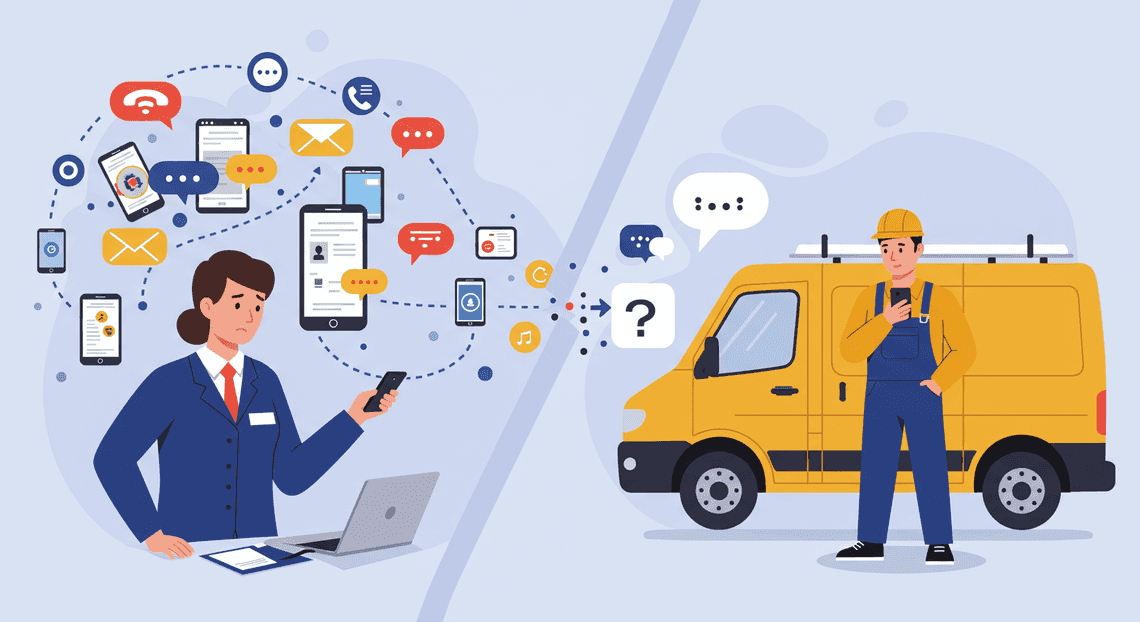
The core of the issue lies in a fundamental communication disconnect. Information flows not in a clean, structured stream, but in a chaotic torrent of phone calls, fragmented email chains, scattered text messages, and notifications from half a dozen different apps. A field technician sends a photo of a part via text, a customer emails an urgent update, and a dispatcher juggles both while trying to update a separate scheduling system.
This creates a dangerous “game of telephone” where critical context is lost with every hop.
-
Information Silos: The dispatcher has the schedule, but the technician has the on-the-ground reality. The customer has the most recent update, but it’s buried in an email no one has seen. There is no single source of truth.
-
Delayed Data Sync: A job’s status is often updated hours after completion, leaving the central office blind to real-time availability and progress. This makes dynamic re-routing or responding to new emergencies nearly impossible.
-
High Cognitive Load: Both field and office personnel are forced to constantly switch contexts, piecing together a coherent picture from disparate sources. This mental tax leads to burnout, frustration, and inevitable human error.
The result is a system built on assumptions and delayed information, where every decision is made with an incomplete view of the operational landscape.
The High Cost of Manual Triage and Delayed Responses
This communication gap directly translates into tangible, and often staggering, financial losses. When a dispatcher acts as a human router for unstructured data, every step of the process is laden with friction and delay.
Consider the cascading costs of manual triage:
-
Initial Delay: A service request arrives. A dispatcher must first see it, then read it, interpret its urgency, and mentally cross-reference it with technician availability, skill sets, and location. This process, even for the most efficient human, takes minutes.
-
Resource Inefficiency: Without a real-time, data-driven view, the dispatcher makes a “best guess.” This can mean sending a senior technician for a simple job, dispatching someone from across town when a closer tech was available, or failing to bundle nearby jobs, leading to wasted travel time and fuel.
-
Compounding Delays: The first delay pushes back the entire schedule. A technician arriving 15 minutes late to their first job can cause a domino effect, impacting every subsequent appointment and potentially forcing costly overtime to complete the day’s work.
-
Lost Opportunities & SLA Penalties: While your team is manually untangling a request, your competitor, using an automated system, has already dispatched a technician and won the business. For contract clients, these delays can breach Service Level Agreements (SLAs), resulting in direct financial penalties and reputational damage.
Every minute spent manually deciphering a request is a minute of lost productivity, a minute a customer is left waiting, and a minute your operational costs tick upward.
The Vision: A Centralized Command Center in Your Chat
Imagine a different reality. Instead of a chaotic web of communication channels, envision a single, unified command center. This isn’t another cumbersome software platform that requires endless training and another screen to monitor. It lives where your team already works: your internal chat application, like Google Chat.
This vision transforms a simple communication tool into an intelligent operational hub.
-
Unified Interface: All requests—whether from email, a web form, or an internal user—are funneled into a dedicated chat space. They arrive as structured, actionable items, not as ambiguous text.
-
Intelligent Triage: AI-powered logic instantly parses the request, identifies keywords, assesses urgency, and presents the dispatcher with clear, prioritized options, complete with technician recommendations based on real-time location, skills, and current workload.
-
Seamless Interaction: The dispatcher can assign the job, notify the technician, and update the customer with simple button clicks directly within the chat interface. The technician receives the full job details on their mobile device, can update the status in real-time, and can close out the job—all from the same conversation.
This is more than just streamlining communication; it’s about embedding command-and-control capabilities directly into your team’s natural workflow. It’s about turning chaotic noise into a clear signal, enabling your operation to move with the speed and precision the modern market demands.
Architecting the Solution: The ‘Operations Commander’ Gem
At the heart of any transformative operational tool lies an architecture that is both elegant in its simplicity and powerful in its execution. The “Operations Commander” is no exception. It’s not merely a collection of disparate services duct-taped together; it’s a cohesive system designed from the ground up to be a force multiplier for our operations teams. This architecture is the engine that turns conversational commands into decisive, real-world actions.
Core Principle: Real-Time Orchestration Where You Work
The foundational philosophy is to eradicate context switching. Traditional incident response involves a frantic ballet of jumping between monitoring dashboards, ticketing systems, spreadsheets, and communication channels. Each jump is a potential point of failure, a moment where critical time is lost.
Our core principle is to bring the command center to the conversation. By embedding the entire operational workflow directly within Google Chat, we meet our teams where they already are. This isn’t just about sending notifications to a chat room; it’s about enabling full-cycle orchestration. From the moment an alert is raised, an operator can analyze, delegate, dispatch, and resolve the issue using a consistent, conversational interface. The feedback loop is instantaneous. The Mean Time To Resolution (MTTR) is slashed because the time between decision and action is reduced to the seconds it takes to type a command.
The Technology Stack: Google Chat App, AI-Powered Invoice Processor, and Gemini 3.5
To bring this principle to life, we selected a synergistic stack of Google Cloud technologies, each playing a distinct and vital role.
-
Google Chat App: This is the cockpit. It serves as the interactive front-end for the entire system. Through a combination of slash commands (e.g.,
/dispatch,/status,/escalate) and interactive cards, the Chat App provides a structured yet flexible user interface. It captures user intent, presents data in a digestible format, and acts as the primary conduit for all commands flowing into the Operations Commander. -
**AMA Patient Referral and Anesthesia Management System: This is the business logic and data management engine. AppSheetway Connect Suite acts as the low-code brain, managing the stateful data required for intelligent dispatching—things like on-call engineer rosters, skill-set matrices, asset inventories, and incident ticket statuses. When a command comes from the Chat App, OSD App Clinical Trial Management automations trigger, cross-referencing the request with its data sources to determine the who, what, and where of the response. Its ability to call external webhooks and APIs is the critical handoff point to our integration backbone.
-
Gemini 3.5: This is the AI co-pilot that provides the crucial layer of natural language understanding. While slash commands provide structure, real-world operations are messy. An operator might type,
/dispatch the closest network engineer with Juniper certs to datacenter B for a flapping port issue on switch R4-2B. Gemini 3.5 parses this unstructured command, identifies the key entities (Role: network engineer, Skill: Juniper, Location: datacenter B, Issue: flapping port, Asset: R4-2B), and translates them into a structured JSON payload. This payload is then passed to AppSheet, transforming complex human language into a precise, machine-executable instruction.
How Antigravity 2.0 Serves as the Integration Backbone
While the Google stack provides the user-facing and business logic layers, Antigravity 2.0 is the hardened, enterprise-grade integration fabric that connects our commander to the outside world. It is our custom-built API gateway and orchestration layer, serving as the central nervous system for all operational actions.
When AppSheet determines an action is needed—like creating a Jira ticket, paging an engineer via PagerDuty, or provisioning a cloud resource via Terraform—it doesn’t call those services directly. Instead, it makes a single, secure, and authenticated call to an Antigravity 2.0 endpoint.
This architecture provides three immense benefits:
-
Abstraction: The front-end doesn’t need to know the intricate details of dozens of third-party APIs. It simply tells Antigravity, “create a P1 ticket,” and Antigravity handles the translation to the specific service’s API.
-
Security: All credentials, API keys, and service accounts are centrally managed and secured within Antigravity, completely isolated from the user-facing applications. This dramatically reduces the attack surface.
-
Orchestration: Antigravity can chain multiple actions into a single, atomic transaction. A single
/dispatchcommand can trigger a workflow in Antigravity that simultaneously creates the Jira ticket, pages the on-call engineer, updates a status dashboard, and logs the action for audit purposes. This ensures consistency and reliability for complex operational procedures.
From Alert to Action: A Step-by-Step Workflow
The true power of an AI Operations Commander lies in its ability to translate chaotic, human-centric communication into structured, machine-executable tasks. This isn’t just about understanding language; it’s about orchestrating a series of dependent actions across multiple systems in real time. Let’s dissect the journey of a single field report as it flows through our intelligent dispatch system, transforming from a simple chat message into a fully assigned operational task.
Step 1: Capturing Unstructured Field Alerts via Google Chat
The process begins at the edge, in the hands of your field personnel. There’s no complex form to fill out, no special app to launch. The operator simply opens a designated Google Chat space and types a message in natural language. This low-friction entry point is critical for adoption and speed.
Consider this real-world example of an alert sent by a technician:
“Heads up command, we’ve got a critical pump failure at the Sector 7B substation. The main coolant line is down. We need an electrical engineer certified for high-voltage systems and a replacement P-500 pump assembly ASAP. This is holding up the entire grid transfer.”
This message is rich with information but completely unstructured. It contains jargon, expresses urgency, and mixes observations with requests. For a human dispatcher, this is standard fare. For our system, it’s the raw material that triggers the entire automated workflow, captured instantly by a Google Chat App listening in the space.
Step 2: Gemini 1.5 Parses Intent and Extracts Key Data
Once the message is captured, it’s immediately sent to a Google Cloud Function that invokes the Gemini 1.5 Pro model. This is where the AI’s core natural language understanding (NLU) capabilities come into play. The model performs two crucial tasks in a single pass:
-
Intent Recognition: It analyzes the message to understand the user’s fundamental goal. Is this a request for information, a status update, or a resource dispatch request? In this case, Gemini correctly identifies the intent as
RESOURCE_DISPATCH. -
Entity Extraction: It then meticulously scans the text to extract key pieces of structured data. The model has been prompted to look for specific operational parameters.
The unstructured text is instantly transformed into a structured JSON object, ready for machine processing.
{

"intent": "RESOURCE_DISPATCH",

"urgency": "CRITICAL",

"incident_summary": "Critical pump failure, main coolant line down",

"location": {

"site": "Substation",

"sector": "7B"

},

"required_personnel": [

{

"role": "Electrical Engineer",

"certification": "High-Voltage Systems"

}

],

"required_equipment": [

{

"type": "Pump Assembly",

"model": "P-500"

}

],

"impact_statement": "Holding up entire grid transfer"

}
This clean, structured output is the bridge between human language and automated logic. The ambiguity is gone, replaced by precise data points that can be used to query other systems.
Step 3: The Gem Queries AppSheet for Resource Availability
With a structured request in hand, the orchestrating Cloud Function now needs to find the right assets. Our single source of truth for all operational resources—personnel, equipment, schedules, and certifications—is a robust Google AppSheet application.
Using the extracted entities from the JSON object, the function constructs a parameterized query to the AppSheet API. The query effectively asks:
-
“Find all personnel with
role: Electrical Engineerandcertification: High-Voltage Systemswhosestatusis currentlyAvailable.” -
“Find all equipment with
type: Pump Assemblyandmodel: P-500whosestatusisIn Stock.” -
“Order the results by proximity to
location: Sector 7B.”
AppSheet executes this query against its underlying [Automated Web Scraping with [Multilingual Text-to-Speech Tool with SocialSheet Streamline Your Social Media Posting 123](https://votuduc.com/Multilingual-Text-to-Speech-Tool-with-Google-Workspace-p809282)](https://votuduc.com/Automated-Web-Scraping-with-Google-Sheets-p292968) or Cloud SQL database and returns a list of available resources. For instance, it might find that engineer Sarah Jones is available and based 15 minutes away, and a P-500 assembly is located at the central depot.
Step 4: Auto-Generating and Assigning Actionable Task Cards
The final step closes the loop by pushing the action back into Google Chat, but in a far more powerful format. The system doesn’t just reply with a text message; it constructs and posts an interactive Google Chat Card.
This card is a dynamic, UI-driven message targeted directly at the best-fit resource identified in the previous step. It synthesizes all the relevant information into a clear, actionable dispatch order:
-
Title:
CRITICAL: Pump Failure at Sector 7B -
Assigned To: Sarah Jones (Electrical Engineer)
-
Details: A summary of the incident and the impact statement.
-
Location: A direct link to Google Maps for the Sector 7B substation.
-
Required Equipment: Instructions to pick up Pump Assembly P-500 from the central depot.
-
Interactive Buttons:
Acknowledge Task,Decline,View Full Briefing.
When Sarah Jones taps “Acknowledge Task,” a signal is sent back to the system. This action triggers a final API call to AppSheet, updating her status to “Assigned” and reserving the P-500 pump assembly. Simultaneously, a confirmation message is posted in the main operations chat space, providing full visibility to the entire team that the incident is being handled. The entire cycle, from unstructured alert to acknowledged action, is completed in seconds.
The Tangible Business Impact of Conversational Operations
Shifting operational command and control into a conversational interface like Google Chat is more than a novelty; it’s a strategic move that delivers measurable, bottom-line results. While the technology is sophisticated, the business case is straightforward. By centralizing actions, context, and communication, you transform your chat platform from a simple notification stream into an interactive, AI-powered command center. This fundamental shift unlocks significant efficiencies, reduces risk, and directly impacts the core metrics that define operational success.
Radically Reducing Mean Time to Resolution (MTTR)
Mean Time to Resolution (MTTR) is the critical KPI for any incident response team. It measures the average time from when an alert is first triggered to the moment the affected system is fully restored. A high MTTR translates directly to extended downtime, customer impact, and potential revenue loss.
The traditional incident response workflow is a primary driver of high MTTR. It’s a fragmented and inefficient process plagued by context switching:
-
An alert fires in a monitoring tool.
-
An engineer is paged and must find a laptop.
-
They log into a dashboarding system to visualize the problem.
-
They SSH into a server or open a cloud console to inspect logs.
-
They correlate information across multiple windows and terminals.
-
They decide on a remediation action and execute it in yet another tool.
-
Throughout this, they communicate updates in a separate chat channel.
Each step introduces delay and the potential for human error. The AI Operations Commander in Google Chat collapses this entire sequence. When an alert arrives in a chat room, it comes enriched with an AI-generated summary and key metrics. The responding engineer can immediately begin triage within the chat thread.
Instead of switching tools, they ask the AI Commander directly:
-
“Show me the error logs for
payment-processor-pod-xyzfrom the last 10 minutes.” -
“What were the CPU and memory utilization trends leading up to the alert?”
-
“Has this alert fired on this service in the past week?”
The AI retrieves and presents this information instantly. Once the cause is identified, the AI can propose a remediation action, such as “Pod is in a CrashLoopBackOff state. Suggest restarting the deployment. Please type approve to proceed.”
The entire lifecycle—from alert to investigation, collaboration, and resolution—occurs in a single, unified interface. This radical consolidation of workflow eliminates context switching, minimizes delays, and can reduce MTTR from hours to mere minutes.
Enhancing Asset and Personnel Utilization
Inefficiency in operations isn’t just about time; it’s about the misallocation of valuable resources, both human and technical. Conversational operations directly address this by optimizing how assets and personnel are deployed.
On the personnel side, the AI Commander acts as a force multiplier and a knowledge repository. It democratizes operational expertise. Instead of escalating every non-trivial issue to a senior engineer, junior team members can be guided by the AI. The Commander provides safe, pre-approved, and context-aware commands, empowering less experienced staff to resolve a wider range of issues confidently. This frees your senior engineers from firefighting and allows them to focus on high-impact work like architectural improvements and strategic projects, reducing burnout and increasing job satisfaction.
For physical and cloud assets, the impact is equally profound. Consider a field service organization. Instead of a dispatcher manually cross-referencing technician locations, skill sets, and vehicle inventory, they can simply ask the Commander: “Dispatch the nearest available technician with HVAC certification to 123 Main St.” The AI analyzes all relevant data points and executes the dispatch, confirming it in the chat.
In the cloud, this translates to cost optimization. The Commander can monitor system load and proactively suggest scaling operations. An engineer sees a message like, “API latency has breached the 200ms threshold due to a 400% traffic spike. I recommend scaling the api-gateway deployment from 5 to 15 replicas.” A one-word approval executes the change. This ensures that infrastructure scales precisely with demand, preventing over-provisioning costs during quiet periods and performance degradation during peaks.
Creating a Verifiable Audit Trail for Every Action
In a traditional, multi-tool environment, creating an accurate audit trail for an incident is a forensic nightmare. An auditor or manager has to piece together a timeline from shell histories, disparate application logs, dashboard screenshots, and scattered chat messages. The resulting record is often incomplete and lacks crucial context about why a particular action was taken.
When operations are centralized in Google Chat, this problem vanishes. The chat thread itself becomes a comprehensive, immutable, and self-documenting audit log. Every event is captured chronologically and attributed to a specific user or the AI itself:
-
The initial alert: Timestamped.
-
Every query for data: Who asked for what, and when.
-
The data returned by the AI: The exact information the team was working with.
-
The AI’s suggested actions: The precise commands that were proposed.
-
The human approval: A clear, unambiguous record of who authorized the change.
-
Confirmation of execution: The system’s feedback that the action was completed.
This creates an unimpeachable record that is invaluable for post-mortems, compliance reviews (like SOC 2 or ISO 27001), and internal training. When conducting a root cause analysis, the team can simply review the chat transcript. The entire decision-making process is laid bare, making it easy to identify points of failure or opportunities for improvement. This verifiable trail fosters a culture of accountability and provides the data-driven foundation for building more resilient systems.
Blueprint for Implementation: Your Path to Operational Supremacy
Theory is the map; implementation is the territory. This section provides the detailed, phased blueprint to translate the concept of an AI Operations Commander into a tangible, high-impact reality within your organization. We move from data structure to AI logic and finally to a scalable, production-ready architecture.
Phase 1: Defining Operational Triggers and AppSheet Database Schema
Before a single line of code is written, you must define the operational nervous system. What events demand a response, and how will you track them? This foundation is critical for the AI to make informed, context-aware decisions.
Operational Triggers:
Your first task is to codify the events that initiate a dispatch request. These are the signals that activate the AI Commander. They can be programmatic or manual, but they must be well-defined. Examples include:
-
Monitoring Alerts: A high-severity alert from Google Cloud Monitoring (e.g., CPU saturation
>95% for 10 minutes on a critical VM cluster). -
Service Desk Integration: The creation of a P1 or P0 incident ticket in a system like Jira or ServiceNow.
-
Manual Escalation: A direct command from a human operator in a dedicated Google Chat space (e.g.,
!dispatch-db-expert - High latency on checkout service).
AppSheet Database Schema:
We will leverage AppSheet as our rapid-development front-end and backend database. Its tight integration with Automatically create new folders in Google Drive, generate templates in new folders, fill out text automatically in new files, and save info in Google Sheets makes it the perfect state machine for this system. The schema below is the minimum viable structure; expand it with any metadata specific to your operations.
Create three primary tables in your AppSheet application:
IncidentsTable: The central record for every operational event.
- IncidentID (Key, Text): Unique identifier, set with UNIQUEID().

- Timestamp (DateTime): When the incident was created, set with NOW().

- Source (Text): Origin of the trigger ("Cloud Monitoring", "Jira", "Manual").

- Severity (Enum): P1, P2, P3, P4.

- Description (LongText): The full context of the alert or request.

- RequiredSkills (EnumList): A list of technical skills needed ("Kubernetes", "PostgreSQL", "Network Security", "Go").

- AssignedEngineerID (Ref): A reference to the `Engineers` table.

- Status (Enum): "Open", "Assigned", "In-Progress", "Resolved", "Closed".

- GoogleChatThreadID (Text): The ID of the Google Chat thread where this incident is being managed.
EngineersTable: A roster of your response team. This is the AI’s knowledge base of available talent.
- EngineerID (Key, Text): Unique identifier.

- Name (Text): Full name of the engineer.

- Email (Email): Used for notifications and mentions.

- Skills (EnumList): A list matching the `RequiredSkills` enum in `Incidents`.

- OnCallStatus (Enum): "On-Call", "Off-Duty", "On-Break". The AI will only consider "On-Call" engineers.

- CurrentLoad (Number): A simple metric, like the count of currently assigned P1/P2 incidents.
DispatchLogTable: An immutable audit trail of all actions related to an incident.
- LogID (Key, Text): Unique identifier.

- IncidentID (Ref): The associated incident.

- Timestamp (DateTime): When the log entry was created.

- Action (Text): A short description of the event ("AI Suggestion", "Dispatch Confirmed", "Engineer Acknowledged").

- Details (LongText): Rich context, such as the AI's full reasoning for its recommendation.
Phase 2: Developing the Conversational AI Logic
This is where intelligence is forged. We will use a serverless Google Cloud Function, powered by [Building Self Correcting Agentic Workflows with Building Self-Correcting Agentic Workflows with Vertex AI](https://votuduc.com/building-self-correcting-agentic-workflows-with-vertex-ai-p-20260321542526)‘s Gemini models, to act as the brain. The logic follows a precise, event-driven workflow.
The AI Decision Workflow:
-
Trigger Ingestion: An AppSheet [Automated Job Creation in Real Time Jobber and Google Sheets Integration from Gmail](https://votuduc.com/Automated-Job-Creation-in-Jobber-from-Gmail-p115606) is configured to fire a webhook whenever a new row is added to the
Incidentstable withStatus= “Open”. This webhook targets the HTTP trigger of our Google Cloud Function. -
Context Assembly: The Cloud Function receives the new incident’s data in the webhook payload. It immediately makes an API call back to AppSheet to retrieve a list of all engineers where
OnCallStatus= “On-Call”. This creates a real-time snapshot of the incident context and available resources. -
Dynamic [Prompt Engineering for Reliable Autonomous Workspace Agents for Reliable Autonomous Workspace Agents](https://votuduc.com/prompt-engineering-for-reliable-autonomous-workspace-agents-p-20260319404106): The function now constructs a highly specific prompt for the Gemini API. This is not a generic question; it’s a structured request for a decision.
# System Prompt Example for Gemini

You are an expert AI Operations Dispatcher. Your task is to analyze an incoming technical incident and recommend the most suitable on-call engineer for the job based on skills, current workload, and the incident's severity. Your response MUST be in a valid JSON format.

## Incident Context:

- Severity: {incident.severity}

- Description: "{incident.description}"

- Required Skills: {incident.requiredSkills}

## Available On-Call Engineers:

{

"engineers": [

{"name": "Ana", "skills": ["Kubernetes", "Go"], "currentLoad": 0},

{"name": "Ben", "skills": ["PostgreSQL", "Network Security"], "currentLoad": 1},

{"name": "Chen", "skills": ["Kubernetes", "PostgreSQL"], "currentLoad": 1}

]

}

## Your Task:

1.  Analyze the incident's required skills against each engineer's skill set.

2.  Prioritize engineers with the best skill match.

3.  Among those with a good match, prioritize the one with the lowest current workload.

4.  Provide a concise, logical reason for your choice.

5.  Return ONLY a JSON object with the keys "recommendedEngineerEmail" and "reasoning".
-
AI Invocation and Response Parsing: The function sends this prompt to the Vertex AI API and awaits the structured JSON response. It then parses this response to extract the recommended engineer and the justification.
-
Proposing Action in Google Chat: Using the Google Chat API, the function posts an interactive card message to the designated operations channel. This card is the primary user interface and includes:
-
Incident Summary: Severity, source, and description.
-
AI Recommendation: “AI Recommends: Ben“.
-
AI Reasoning: “Ben possesses the required ‘PostgreSQL’ and ‘Network Security’ skills and has a lower workload than Chen, who also has a partial skill match.”
-
Action Buttons:
-
Confirm Dispatch: Triggers an action to update the AppSheetIncidentstable, assign the engineer, and notify them. -
Manual Override: Presents a dropdown of other on-call engineers for the human operator to choose from. -
Acknowledge: Closes the loop without dispatching anyone.
This human-in-the-loop design is paramount. The AI suggests, but the human commander confirms, ensuring oversight and control.
Phase 3: Deployment and Scaling Your Architecture
A robust architecture ensures your AI Commander is reliable, secure, and ready to grow.
Core Deployment Steps:
-
Google Chat API Configuration: In the Google Cloud Console, enable the Google Chat API. Configure a new Chat app, setting its “App URL” to the trigger URL of your yet-to-be-deployed Cloud Function. This tells Google Chat where to send interactive events (like button clicks).
-
Cloud Function Deployment: Deploy your function code (JSON-to-Video Automated Rendering Engine or Node.js are excellent choices).
-
Trigger: Set to HTTP.
-
IAM & Security: Create a dedicated service account for the function. Grant it the
Vertex AI Userrole to call the AI models and theSecret Manager Secret Accessorrole to securely retrieve API keys (like your AppSheet API key). Do not hardcode secrets! -
Ingress Control: Set ingress to “Allow all traffic” but secure the function’s URL using Identity-Aware Proxy (IAP) or by validating the Google Chat bearer token in your function’s code to ensure only legitimate requests are processed.
- AppSheet Deployment: Publish your AppSheet app. Finalize the webhook Automated Quote Generation and Delivery System for Jobber rule, pasting in the deployed Cloud Function’s trigger URL.
Scaling and Evolution:
-
Stateless Scalability: The architecture is inherently scalable. Cloud Functions automatically scale with request volume, and AppSheet manages the application state. You are not managing any servers.
-
Performance Optimization: For environments with hundreds of engineers, repeatedly querying the AppSheet API for the on-call roster can introduce latency. Consider caching this roster for a few minutes in a low-latency store like Memorystore for Redis to accelerate the context assembly phase.
-
Future Enhancements:
-
Deeper Integration: Evolve from simple webhooks to deeper API integrations with your monitoring and ticketing systems for bidirectional data flow.
-
Advanced AI Tasks: Empower the AI to suggest initial diagnostic commands or link to relevant runbooks directly within the Google Chat card.
-
Metrics and Reporting: Use the
DispatchLogtable to build AppSheet or Looker dashboards that analyze mean time to resolution (MTTR), AI recommendation accuracy (accepted vs. overridden), and engineer workload distribution. This turns your operational data into strategic insight.
Conclusion: Transform Your Operations from Reactive to Predictive
We’ve journeyed far beyond the simple, command-and-response chatbots of yesterday. The framework we’ve explored isn’t just about piping alerts into a chat room; it’s about building an intelligent, context-aware operational co-pilot right within Google Chat. By integrating the reasoning power of modern AI with the real-time, collaborative nature of chat, we fundamentally change the operational paradigm. The days of frantically searching through dashboards and wikis while an incident rages are numbered. We’ve laid the groundwork for a system that doesn’t just report problems—it understands them, proposes solutions, and executes complex workflows on your command. This is the critical leap from a reactive posture, where teams are constantly fighting fires, to a proactive and even predictive state, where potential issues are identified and mitigated before they can impact users.
The Future is AI-Driven Orchestration
The true power of this model lies not in automating a single task, but in intelligent orchestration. Your AI Operations Commander acts as the central nervous system for your entire tech stack. It’s the conversational layer that unifies disparate systems: your observability platforms like Prometheus or Datadog, your cloud infrastructure on GCP or AWS, your CI/CD pipelines, and your incident management tools like PagerDuty.
Imagine a future where, instead of a cryptic alert, your on-call engineer receives a message in Google Chat from the AI Commander: “I’ve detected a 30% increase in latency on the checkout-service, correlating with a recent deployment. Root cause appears to be a memory leak in the auth-proxy sidecar. I recommend an immediate rollback. Shall I proceed?” This isn’t science fiction; it’s the logical endpoint of combining powerful LLMs with well-defined operational APIs. The AI isn’t just a tool; it’s a team member that can reason, correlate data, and orchestrate a multi-step response, all while keeping the human operator firmly in the loop for critical decisions. This is the future of operations: less about manual intervention and more about strategic oversight.
Take Command of Your Operational Efficiency
Implementing an AI Operations Commander is more than a novel technical project; it’s a strategic investment in your team’s efficiency and resilience. By bringing powerful operational capabilities directly into the conversational flow of Google Chat, you democratize access to complex tasks. Junior engineers can safely query production status or trigger pre-approved diagnostic scripts without needing deep system-specific knowledge. Senior engineers are freed from repetitive toil, allowing them to focus on high-impact architectural improvements.
The benefits are tangible and immediate:
-
Drastically Reduced MTTR: By automating diagnostics and remediation, you shrink the time from detection to resolution from hours to minutes.
-
Minimized Cognitive Load: The AI handles the data correlation and initial triage, presenting engineers with concise, actionable intelligence instead of a flood of raw metrics.
-
Enhanced Collaboration: The entire incident response lifecycle is documented and visible within a single chat thread, providing unparalleled transparency and facilitating seamless handoffs.
You don’t need to build a fully autonomous system overnight. Start small. Begin by teaching your commander a single, high-value task: “Fetch the logs for pod X,” or “What was the last successful deployment to production?” Each new capability you add is a building block towards a more intelligent, efficient, and predictive operational model. The fusion of conversational AI with robust DevOps practices is the next evolution in building and maintaining resilient systems. The command prompt is no longer in a terminal; it’s in your chat window, and it’s time to take command.


Stop Doing Manual Work. Scale with AI.
Want to turn these blog concepts into production-ready reality for your team?
Table Of Contents
Portfolios
Related Posts
Quick Links
Legal Stuff